Here is a thing that happens to almost every technical founder at some point in the first year: you read a security post maybe one from a reputable source, maybe from a VC firm's blog and it tells you that you need a penetration test, a WAF, a SIEM, a data classification policy, an incident response runbook, SOC 2 readiness, a bug bounty program, and a dedicated security engineer.
You close the tab and go back to shipping. You have twelve users and a feature that is half-built and a customer call in the morning. The advice is not wrong exactly. It is just not advice that exists on the same planet as your current situation.
The problem is that without some frame of reference for what actually matters at MVP stage, the whole category of security feels like something to deal with later. And later, when there are real users and real data and a real breach scenario, is the wrong time to be building the foundation.
The five things in this post are not the five things you will need in three years. They are the five things that prevent the specific failure modes that actually happen to early-stage products the credential leaks, the account takeovers, the data exposures, the infrastructure hijacks while demanding nothing that a two-person team shipping a real product cannot do in a single focused sprint.
Five things. No more than five. Everything else can wait.
Why Five and Not Fifty
The instinct to over-specify early-stage security requirements comes from a reasonable place: security failures are expensive, and if you can prevent them entirely by building comprehensively from the start, why not?
The answer is the same answer that applies to every premature optimization in software: you are spending resources you do not have, on problems you may not encounter, at a stage where the right answer changes significantly as the product and the threat model evolve.
A startup handling twenty users' email addresses has a meaningfully different threat model than one handling twenty thousand. The data classification policy, the vendor risk assessment program, and the penetration testing cadence that are appropriate for the second company are not appropriate are actively counterproductive for the first, because implementing them requires time and complexity that slows the iteration that is the first company's primary competitive advantage.
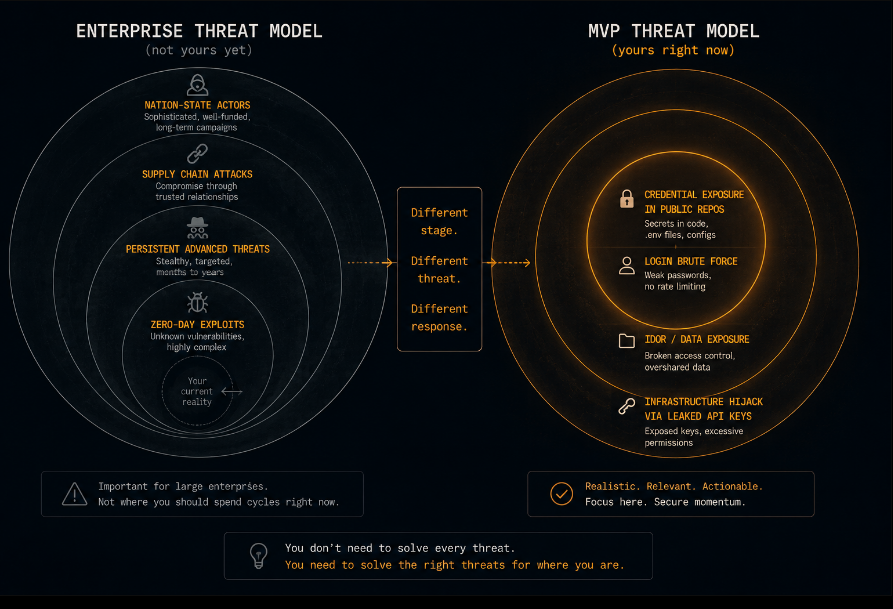
The five things in this post are calibrated to the threat model that actually applies to an MVP with real users and real data: an attacker who finds your application through normal discovery channels, has no special knowledge of your architecture, and is looking for the easiest path to the most valuable data. That attacker is not running a sophisticated multi-stage attack. They are looking for hardcoded credentials in a public GitHub repo, a login endpoint with no rate limiting, or an API endpoint that returns another user's data.
Those are the attacks that happen to early-stage products. These five things stop them.
Thing One: No Credentials in the Code
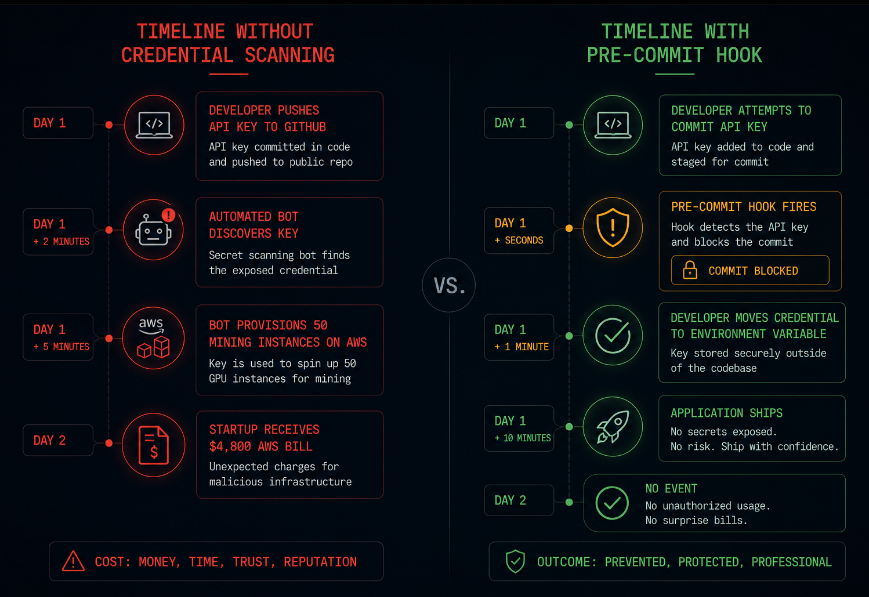
This is first because it is the failure mode with the fastest time-to-consequence. A hardcoded API key pushed to a public GitHub repository has a median time to exploitation of approximately two minutes. Automated bots scan public repositories continuously, looking for credential patterns. They are not targeting your startup specifically. They do not need to. They find the credential and exploit it before you have finished closing the PR.
The consequence is not always obvious immediately. A compromised AWS key might start provisioning cryptocurrency mining infrastructure within minutes, generating a bill that accumulates while you are asleep and surfaces as a cost spike that is inexplicable until it is explained by the CloudTrail log showing API calls from a location you have never been.
The fix is a habit, not a tool: credentials live in environment variables, never in files that are committed. Specifically:
Database connection strings, third-party API keys, webhook signing secrets, OAuth client secrets, JWT signing keys none of these touch a file that git tracks. They live in the deployment environment's secret store (AWS Systems Manager Parameter Store, Heroku config vars, Railway environment variables, whatever your deployment platform provides) and are injected at runtime.
Add a git pre-commit hook that scans for common credential patterns before any commit is pushed. The tool that does this git-secrets, detect-secrets, or gitleaks takes twenty minutes to configure and runs automatically on every commit thereafter. It will not catch everything, but it catches the obvious patterns that represent the vast majority of credential leaks at this stage.
If you have an existing codebase and you are not certain whether credentials have ever been committed: scan the full git history now, before you add users. Not just the current state of the files the history, because removing a credential from a file does not remove it from the commits that contained it. GitHub's secret scanning, when enabled on a repository, will alert on historical commits as well as new ones.
Thing Two: Authentication That Resists the Obvious Attacks
The authentication endpoint of your application is the most attacked surface on any web application, because it is the path to everything else. An attacker who can authenticate as a real user can access everything that user can access and depending on how your authorization model is built, potentially more.
The authentication that most MVPs ship handles one case: a user provides correct credentials and receives a session. That is necessary but not the whole job. Three specific additions turn a functional authentication implementation into one that resists the attacks that actually target early-stage products:
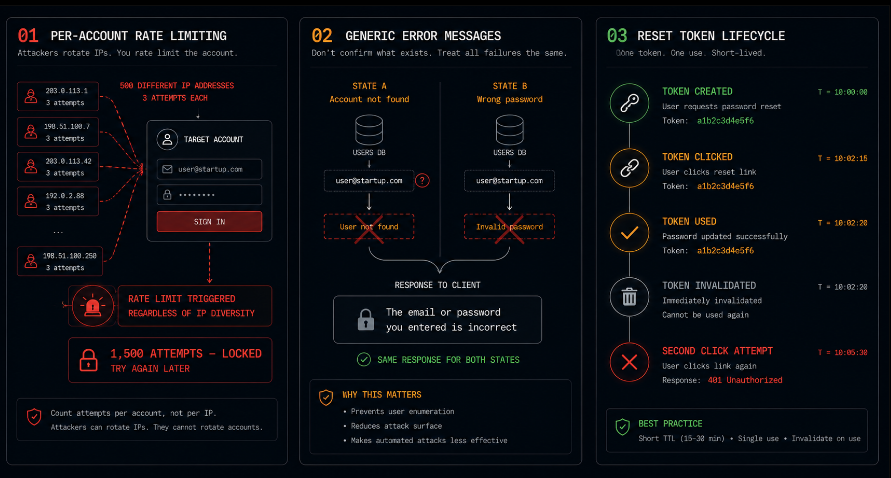
Per-account login attempt counting. Not per-IP per account. A rate limiter that fires after ten failed attempts from the same IP is bypassed by a distributed attack using different IP addresses. A rate limiter that counts failed attempts against the same account regardless of where those attempts come from catches credential stuffing attacks that distribute their traffic deliberately to avoid IP-based rate limiting. The implementation is a counter in Redis or any fast store, keyed to the account identifier, incremented on each failed attempt, and checked before processing any attempt against that account. After a configurable threshold, require a CAPTCHA or introduce a time delay. The threshold should be low enough to stop automation five to ten attempts and the delay or challenge should be significant enough to make brute force impractical.
Generic error messages. Your login endpoint should return the same error message whether the email address does not exist or the password is wrong: "The email or password you entered is incorrect." The distinction between these two cases is useful to an attacker constructing a list of valid accounts on your platform and useless to the legitimate user who simply knows they entered something wrong. Returning different errors for the two cases is an enumeration gift that takes one minute to prevent.
Password reset tokens that expire and invalidate. A reset token should be single-use and should expire one hour is a reasonable default. The moment a user clicks the reset link and sets a new password, that token should be invalidated in your data store. A reset token that can be used multiple times, or that stays valid for twenty-four hours after being clicked, is a window that a patient attacker can exploit.
Thing Three: Authorization at the Data Layer
This is the control that the largest number of early-stage products get wrong, and the failure is invisible during development because developers test their own applications as themselves, accessing their own data.
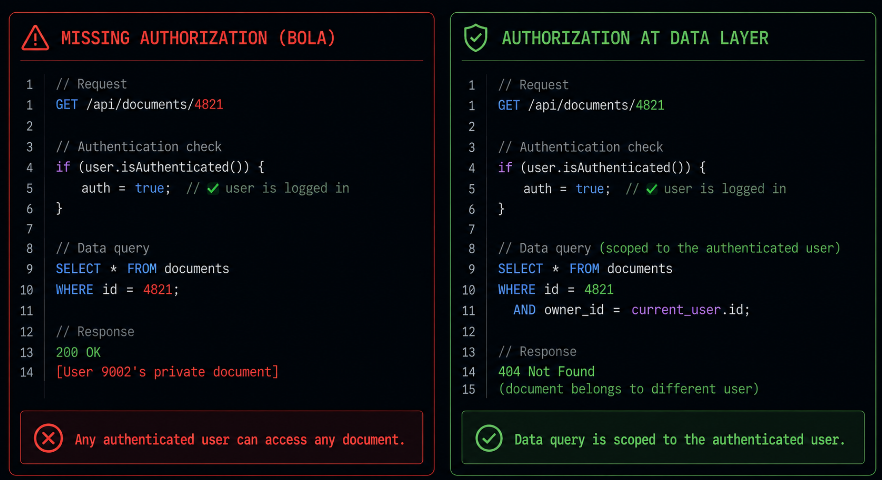
The failure looks like this: you build an endpoint that retrieves a document, /api/documents/1847. You verify the user is authenticated. You fetch the document with ID 1847. You return it. What you did not do: verify that the authenticated user is the one who owns document 1847.
Any authenticated user on your platform can now substitute any document ID in the URL and retrieve any document. The authentication check passed they are a real user. The authorization check that would verify they own this specific document never happened.
This is Broken Object Level Authorization BOLA and it is the most consistently present vulnerability in early-stage API applications. It is not found during normal development because the developer always happens to request their own documents. It is found instantly by anyone who opens developer tools and changes the ID in the request URL.
The fix is not architecturally complex. It is a discipline of always querying by both the resource ID and the authenticated user's ID simultaneously:
Instead of:
SELECT * FROM documents WHERE id = ?
Use:
SELECT * FROM documents WHERE id = ? AND owner_id = ?
Where owner_id comes from the verified session token not from the request body, not from a URL parameter, not from anywhere the user controls. From the server-side session state that was set when the user authenticated.
Write this check once as a utility function, use it everywhere, and make its absence the thing that stands out in code review rather than its presence. The discipline of always querying with ownership scope is the difference between an application that leaks every user's data to every other user and one that does not.
Thing Four: HTTPS Everywhere With No Exceptions
This one sounds so basic that it belongs in 2015, not 2026. It belongs in 2026 because a non-trivial fraction of early-stage applications still have at least one path where data travels over HTTP a webhook endpoint, an internal service call, a legacy route that was not updated when the main application moved to HTTPS, a redirect that takes one HTTP hop before landing on HTTPS.
Every one of those paths is a path where data can be intercepted by any party positioned between the client and the server. The customer on a shared WiFi network. The mobile carrier doing traffic inspection. The corporate proxy at the customer's company.
The specific things to verify, not just assume:
TLS is enforced at the load balancer or ingress, not just configured. HTTP requests should be redirected to HTTPS automatically, not served alongside HTTPS. Verify that a direct HTTP request to your application returns a 301 to the HTTPS equivalent rather than serving a response.
Every endpoint enforces HTTPS, including webhooks and internal API calls. Scan every route in your application and confirm that none of them are reachable over HTTP. This is a ten-minute audit that can be done with curl against your staging environment.
Your TLS configuration is not using deprecated protocols. TLS 1.0 and 1.1 have known vulnerabilities and are deprecated. Your application should enforce TLS 1.2 as a minimum and prefer TLS 1.3. Most modern load balancers and cloud platforms handle this correctly by default, but the default should be verified rather than assumed.
Cookies carrying session tokens have the Secure and HttpOnly flags set. The Secure flag ensures the cookie is never transmitted over HTTP. The HttpOnly flag prevents JavaScript from reading the cookie value, limiting the damage from XSS attacks. These two flags should be set on every cookie that carries session state or authentication information.
Thing Five: A Minimal, Accurate Data Inventory
The last thing is not a technical control. It is the prerequisite for every security decision you make going forward, and it is the thing that transforms you from an organization that is guessing about its security posture to one that is making informed decisions about it.
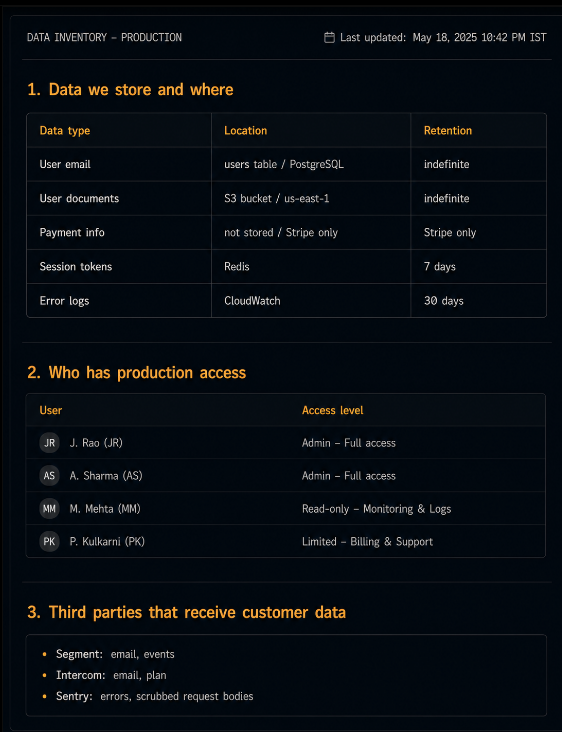
Write down what data your application stores, where it lives, and who can access it. Not a formal data classification policy a single document, maintained in your team wiki, that answers these questions accurately and is updated when they change.
What to include:
Data categories and their location. User email addresses in the users table. User-uploaded documents in S3 bucket [name] in region [region]. Payment information passed through to Stripe, not stored in our database. Session tokens in Redis. Log data in CloudWatch, retained for thirty days.
Who has access. Production database: [name] and [name]. AWS console: [name] (admin), [name] (read-only CloudWatch). GitHub: all three engineers. Stripe dashboard: [name] and [name].
Third-party services that receive customer data. Segment receives user events including email. Intercom receives user email and plan information for support. PostHog receives anonymized usage events. Sentry receives error events we configured it to scrub request bodies before sending.
This document takes three hours to create for a simple application and fifteen minutes to update when something changes. It is the answer to the data room question "can you describe your data handling practices?" when the investor sends it. It is the starting point for your first formal security review. It is the thing that tells you, when you are evaluating a new third-party integration, whether the data that integration would receive is something you are comfortable sharing under their terms.
Most importantly, it surfaces the data you did not realize you were collecting or sharing. Early-stage applications accumulate third-party integrations quickly, and each integration receives some category of customer data. The inventory exercise routinely reveals that error tracking tools are receiving full request payloads including user-generated content, that analytics platforms are receiving more PII than their terms of service are intended to cover, or that logging configurations are capturing credential values in request logs.
Knowing this before a customer asks is the difference between a conversation you can have confidently and one you have to fumble through while discovering the answer in real time.
The Order Matters
These five things are listed in a specific sequence that reflects both urgency and compounding value.
Credential hygiene is first because the time-to-consequence of a credential leak is minutes, and because every other security control is undermined if an attacker can harvest your infrastructure credentials from your public repository.
Authentication hardening is second because it protects the accounts of every user who has trusted you with access to your application, and because the cost of retrofitting rate limiting and token validation into an existing auth implementation grows with every user who is added.
Authorization at the data layer is third because it is the control that most directly determines what an attacker who gets past your authentication can do and because the discipline of always querying with ownership scope is easiest to establish as a habit when the codebase is small.
HTTPS enforcement is fourth because it protects the transport layer for everything the first three controls secured at the application layer. There is limited value in secure authentication and authorization if the tokens and credentials can be intercepted in transit.
The data inventory is fifth because it is the only item on this list that is not a technical control it is the foundation of informed decision-making about every security decision that follows these five. It is last because it is most valuable when the other four are in place and you are thinking about what comes next.
What This Does Not Cover (and Why That Is Okay)
These five things do not include a WAF, a SIEM, a penetration test, dependency scanning, SOC 2 readiness, a formal incident response plan, or most of the other things that appear in enterprise security frameworks.
They do not include those things because those things are not what an MVP with ten to one hundred users needs. They are what a company with thousands of users, enterprise customers with formal security requirements, and the organizational capacity to maintain complex security infrastructure needs. The sequencing of when each additional control makes sense is a function of your user count, your data sensitivity, your customer profile, and your team size not of a universal checklist that treats every company as the same.
The five things in this post are the difference between a product that has catastrophic, foundational security failures and one that does not. They do not make your product impenetrable. They make your product defensible something that resists the opportunistic attacks that target early-stage applications and that provides a sound foundation for the controls that will matter later.
When you have a hundred users, add dependency scanning. When you have your first enterprise prospect, commission a penetration test. When you close your Series A, start the SOC 2 process. Each of these additions builds on the foundation that these five things establish. Without the foundation, the additions are decoration.
The Sprint That Ships Secure
One engineer. One focused sprint. These five things, implemented in this sequence, in this approximate time allocation:
Day one, morning: Credential audit and migration. Scan git history for credential patterns. Move all credentials to environment variables. Configure pre-commit hooks for credential detection. Four hours.
Day one, afternoon: Authentication hardening. Implement per-account login attempt counting. Normalize error messages. Verify password reset token single-use and expiration. Four hours.
Day two, full day: Authorization audit. Review every endpoint that takes a resource identifier as a parameter. Implement the ownership scope query pattern for each one. Build a reusable ownership verification utility. Eight hours.
Day three, morning: HTTPS verification. Audit every route for HTTP accessibility. Verify redirect behavior. Confirm TLS version configuration. Confirm cookie flags. Three hours.
Day three, afternoon: Data inventory. Document all data categories, storage locations, access grants, and third-party data flows. Five hours.
Total: approximately twenty to twenty-five hours of focused engineering work. Not a sprint a sprint and a half, if you are generous with your estimates.
What you have at the end: a product that does not have the foundational failures that end early-stage companies. Not a perfect security program. Not an enterprise posture. Something much more valuable for where you are: a foundation you can build on honestly, describe accurately, and be confident about when the first real question about your security arrives.
When you are ready to test what you have built not review the code, but exercise the running application the way an attacker would Axeploit is built for exactly that moment. It tests authentication, authorization, session management, and input handling on the deployed product, surfacing the gaps that are invisible during normal development and that matter when real users and real data are in the system. Not a replacement for the five things in this post. The verification step that confirms they are actually working.