The attack does not start with the email. The email is step four.
By the time an attacker sends the message that eventually compromises a founder's credentials, they have already spent time building a target profile. They have read the LinkedIn posts, the press releases, the podcast appearances, the Twitter/X thread where the founder talked about their lead investor by name. They have checked the company's domain registration, looked at who the engineering team follows on GitHub, identified the email format from a public-facing address on the contact page, and found the names of the lawyers, the accountants, and the advisors who appear in the company's public communications.
The email, when it arrives, does not look like an attack. It looks like a message the founder was probably expecting, from someone they recognize, about something that is actually happening in their business. That is the design. That is what makes it work.
This is a walkthrough of how that attack unfolds, from the first search to the credential harvest to what comes next. The scenario is composite and realistic drawn from documented attack patterns against real founders, adapted slightly to avoid specificity about any real organization. The techniques are real. The progression is real. The consequences are real.
Stage One: Building the Target Profile
A founder who has raised a seed round, shipped a product with paying customers, and is visible in their ecosystem is a well-profiled target before the attacker makes a single move.
The information that funds a targeted attack is not private. Most of it is public and deliberately published: the announcement post when the round closed, naming the lead investor and the round size. The LinkedIn connections that show the founder knows a specific partner at the lead firm by first name. The podcast episode where the founder mentioned they were "starting to have serious Series A conversations." The tweet where they celebrated shipping a feature after a long weekend. The GitHub profile that shows which repositories they are active on and what their commit schedule looks like.
The attacker is not looking for secrets. They are looking for context the raw material for a message that is specific enough to be credible. They are building a map of the founder's relationships, the organizations they interact with, the timing rhythms of their business, and the specific language patterns that populate their professional communications.
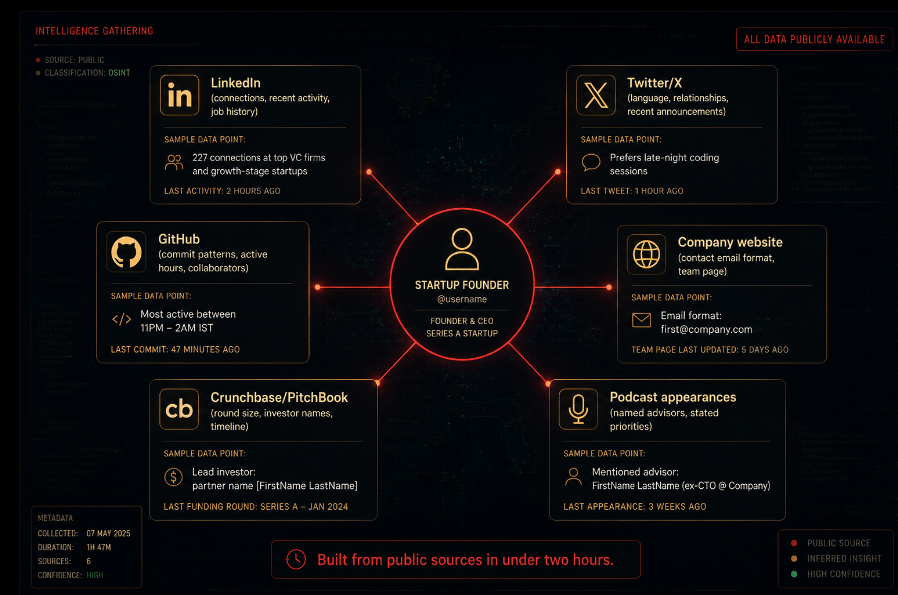
This stage takes one to two hours for a motivated attacker targeting a specific company. The output is a credibility profile: a set of names, relationships, timing signals, and context that makes a subsequent message feel like it is coming from inside the founder's world rather than outside it.
Stage Two: The Pretext Construction
With the profile built, the attacker selects a pretext the fictional scenario the attack will use as its cover story. The best pretexts share three characteristics: they are time-sensitive, they involve someone the target knows and trusts, and they fit the timing of something that is actually happening in the target's business.
For a founder who mentioned Series A conversations on a podcast three weeks ago, the pretext constructs itself: something urgent related to a funding process, involving a name the founder recognizes, that requires action before the end of business.
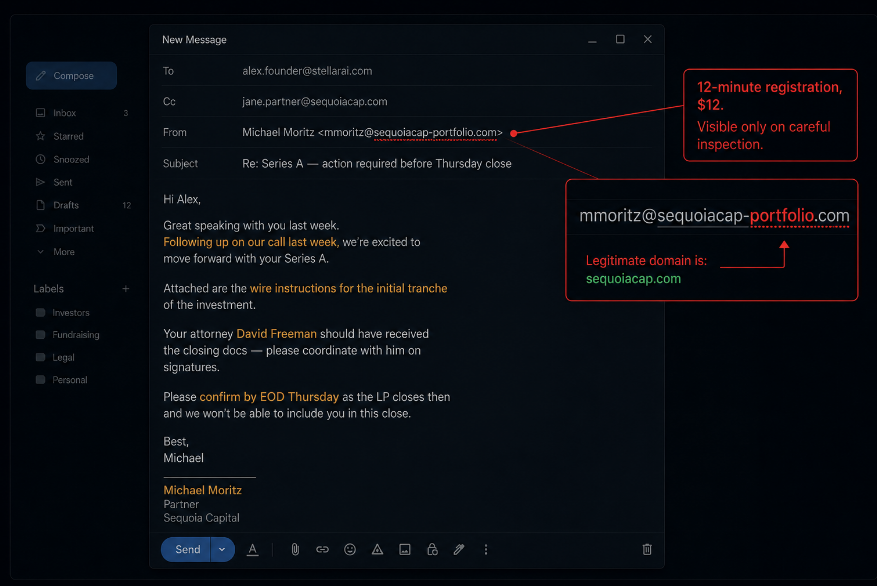
The attacker registers a domain. Not a random string a domain that looks plausible as an investor firm's communication address at a quick glance. sequoia-capital-investor.com is obvious. sequoiacap-updates.com is harder to catch on a phone screen at 6 PM between meetings. The domain registration takes ten minutes and costs twelve dollars.
An email account is created on that domain. The display name is set to the name of the known partner at the lead firm the one whose first name the founder used on the podcast. The attacker has seen enough of that partner's public writing to approximate their tone: direct, specific, warm but professional.
The email is drafted. It references: The correct round size and stage, from the public announcement A specific timeline detail that matches something the founder mentioned publicly The name of the founder's lawyer, who the attacker found in a public court filing or LinkedIn connection A specific, urgent action required: verifying wire transfer instructions, confirming a signature, reviewing a term sheet version
The email does not contain a suspicious link. Not yet. It is a message that requires a reply. The goal of this first contact is to establish that the channel is real to get the founder to reply to a message that feels like it is from someone they know.
Stage Three: The Reply That Opens the Window
The founder receives the email on their phone, between two other things that are actually urgent. The display name is familiar. The content references things that are real. The request is the kind of request that actually happens in funding processes.
The founder replies. Maybe to confirm they received it. Maybe to say they will look at the document. Maybe to provide their attorney's direct line to coordinate.
That reply does the two things the attacker needs:
It confirms the email address is active and monitored by a person who has the authority the attacker assumed they had. And it opens a channel the founder has now responded to the fake address, establishing a communication thread that feels real because it has the founder's own words in it.
The follow-up arrives quickly. A document needs to be reviewed and signed before Thursday. A link is provided to "DocuSign" a URL that begins with docusign but resolves to a phishing page that captures credentials. Or: a PDF is attached that contains a macro or a link to a credential harvesting page. Or: a request for the founder to add a specific email address to a shared document in their Google Workspace, which the attacker then uses to request access to the shared drive.
Each of these vectors has a different technical mechanism but the same operational goal: get the founder to authenticate somewhere the attacker controls, or grant the attacker access to something the attacker can then use.
Stage Four: Credential Harvest and the First Fifteen Minutes
The founder clicks the link. The phishing page renders as DocuSign, or as Google Sign-In, or as whatever authentication screen the attacker designed. The founder enters their credentials. The page redirects to a real document, or displays a "link expired" message, or shows a generic error.
The credentials are now in the attacker's possession. The founder has no idea anything happened.
The first fifteen minutes after credential harvest are the most valuable the attacker will have. In that window:
The attacker logs into the founder's email. Email is the master key to everything else. Password reset links for every service go to email. Recovery codes for multi-factor authentication often go to email. The backup codes the founder set up when they configured MFA and then saved in their drafts folder those are in email.
The attacker enumerates connected services. Inbox search for "welcome to," "account created," "your subscription," "invoice from," "confirm your account" reveals the full inventory of services the founder uses their cloud provider, their payment processor, their domain registrar, their code repository, their customer relationship tools. Each represents a lateral movement opportunity.
The attacker creates persistence. A forwarding rule is configured to send copies of all incoming email to an external address. An app password or OAuth token is created for the email account a credential that will survive a password change because it is not a password. If MFA is on the email account, the attacker looks for backup codes in the founder's draft folder, notes, or documents. If they find them, MFA is no longer a barrier.
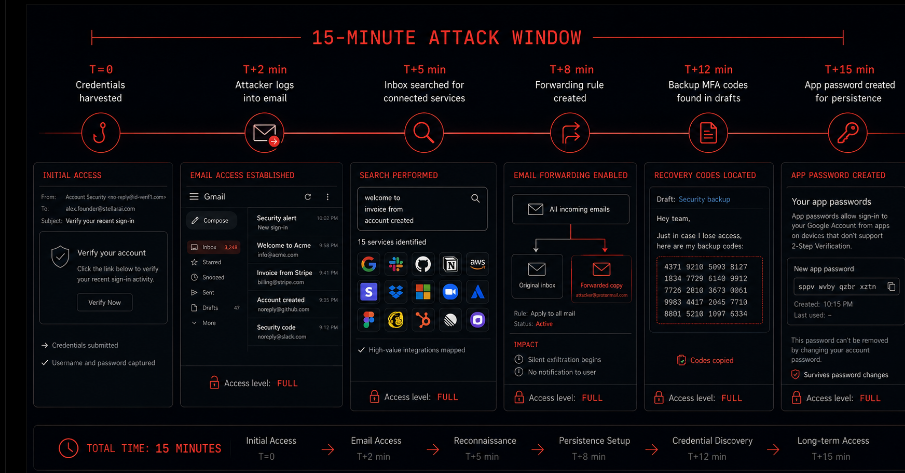
By the time fifteen minutes have passed, the attacker has persistence that a password change will not break, visibility into all incoming email that will continue regardless of what the founder does next, and a map of every service connected to that email address.
Stage Five: Lateral Movement Into the Business
The founder's personal email access is not the end goal. It is the staging ground.
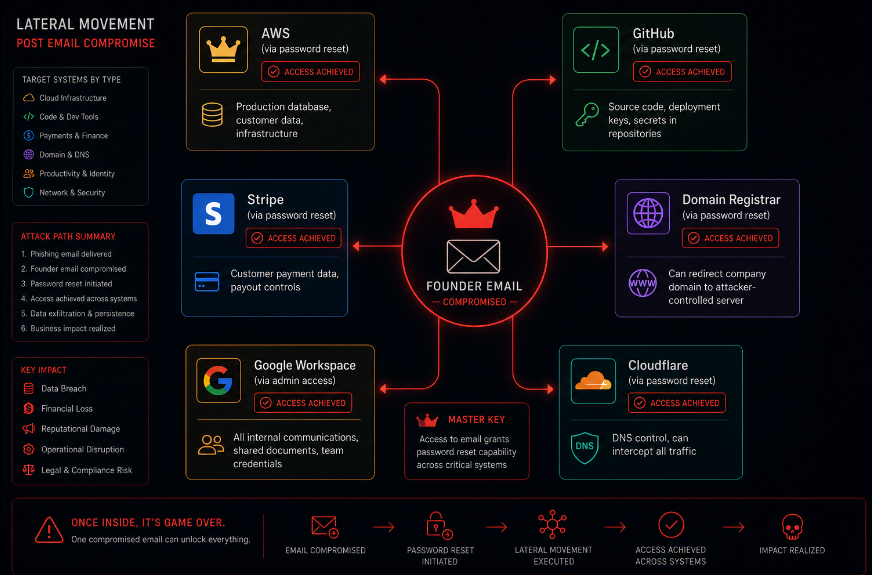
The company runs on infrastructure that the founder built or controls. The AWS account that the founder created with their personal email. The GitHub organization where the company's code lives. The Stripe account where customer payments are processed. The domain registrar where the company's domain is registered. The Cloudflare account where DNS is managed. The Google Workspace that the team uses for internal communication.
Each of these services was set up by the founder, often linked to the founder's email as the primary or recovery address, often without a secondary verified owner who could independently revoke access if the founder's account was compromised.
The attacker uses the compromised email to request password resets on each of these services in sequence. The reset links arrive in the email the attacker controls. The accounts change hands in the order the attacker chooses.
The AWS account is the crown jewel. Inside it: the production database, the compute instances running the application, the S3 buckets containing user data, the IAM configuration that controls access to all of the above. A bad actor with AWS root access can exfiltrate the entire customer database, delete production infrastructure, lock out the legitimate team, ransom the data, or silently maintain access indefinitely while using the infrastructure for their own purposes.
None of this requires the attacker to find and exploit a code vulnerability. It required twelve dollars, a convincing email, and the founder clicking a link at the wrong moment.
Stage Six: The Founder Realizes Something Is Wrong
The signal that something is wrong rarely comes from the attacker doing something obvious. It comes from a side effect that the attacker did not fully control.
A customer sends a confused message about a billing email they did not expect. A team member mentions that they received a weird access request from the founder's email. An AWS billing alert fires because infrastructure that was not running is now running. A Stripe notification shows a payout address was updated. The domain starts behaving strangely.
By the time any of these signals appears, the attacker may have had access for hours or days. The fifteen-minute window of initial access has long since expanded into a persistent foothold. The forwarding rule is still active. The app password still works. The backup MFA codes have been used to enroll a new authenticator device.
The response process is the crisis that never gets practiced until it is needed: identifying the scope of compromise, revoking access across every service simultaneously, notifying customers if their data was accessed, managing the regulatory implications if the breach affected personal data, and communicating with investors and the board about what happened and how.
For a two-person team without an incident response plan, without a single source of truth for all the services that need to be revoked, without a recovery path for the AWS account if the root credentials have been changed, this process can take days days during which the attacker retains access to the production environment.
What the Attack Required vs. What Would Have Stopped It
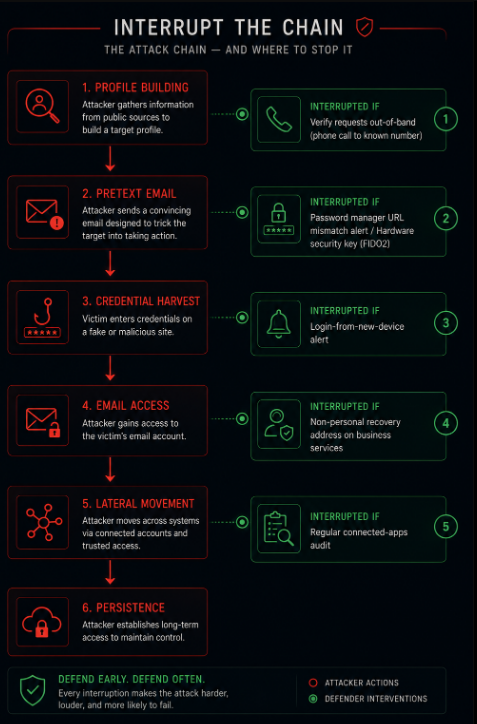
It is worth being precise about what the attacker needed to succeed and what would have interrupted them at each stage.
What the attacker required: Two hours of open-source research to build the profile. Twelve dollars for a domain registration. An email that looked like it came from a trusted source and referenced real context. One click from a founder who was busy and trusting.
What would have interrupted it at each stage:
At the pretext stage: a habit of verifying unexpected financial or access requests through a channel other than the one the request arrived on. Not replying to the email asking for confirmation calling the investor partner directly using a number from the actual firm's website.
At the credential harvest stage: a password manager that flags when a login page's URL does not match the saved credential's domain. The founder's browser would not autofill credentials for sequoiacap-portfolio.com because the saved credential is for sequoiacap.com. Hardware security keys (FIDO2), which cannot be phished because authentication requires physical presence, would have made the credential harvest useless even if the founder entered their password on the phishing page.
At the email access stage: an email provider configured to alert on new login from unrecognized devices or geographies. An immediate notification that a new device authenticated to the account would have given the founder a signal that something was wrong.
At the lateral movement stage: services configured with a non-personal email address as the recovery address a company-controlled address where multiple people can independently respond to recovery requests. Infrastructure access not linked to the founder's personal email as the sole recovery path.
At the persistence stage: regular review of connected apps, OAuth authorizations, forwarding rules, and app passwords a fifteen-minute audit of the email account's connected applications would reveal the attacker's persistence mechanisms.
The Specific Practices That Provide the Most Protection Per Hour Invested
This walkthrough is not an argument for building an enterprise security program before you have a product. It is an argument for the specific practices that interrupt the specific attack described above.
Use a hardware security key for email and your cloud provider. FIDO2 hardware keys (YubiKey is the most common) cannot be phished. When authentication requires the physical key, a credential harvested on a fake login page is useless the attacker has the password but not the key. The key costs approximately fifty dollars. Configure it on email, AWS root, GitHub, and your domain registrar as the minimum set.
Configure a company-managed email address as the recovery address for every business-critical service. Not your personal Gmail. A company address that multiple trusted people can access independently. If your personal email is compromised, this is the address that can initiate recovery of the services that matter.
Verify unexpected financial or access requests out-of-band. If an email from an investor, lawyer, or bank asks you to click something, do something, or approve something, do not respond to the email. Call the person at a number you already have for them. The call takes two minutes and collapses the attack entirely.
Audit your email account's connected applications and forwarding rules monthly. Settings → connected apps → revoke anything you do not recognize. Settings → forwarding and filters → delete any rule you did not create. This audit takes five minutes and removes persistence mechanisms before they can be used.
Set up login alerts on your primary email and cloud accounts. Every major email provider and cloud platform supports alerting when a new device authenticates to the account. Enable it. The alert that fires when an attacker logs in is the signal that you have a window to act before the damage compounds.
Closing: The Attack Does Not Respect Your Stage
The founder with forty customers is a less valuable target than the founder with four thousand. But they are not a worthless target. The AWS account contains real infrastructure. The customer database contains real email addresses. The domain registrar controls a real domain. The GitHub repository contains real code.
And the founder with forty customers is typically a more accessible target than the one with four thousand, because they have not yet built the organizational practices shared service ownership, incident response plans, security-reviewed access controls that make the attack harder to execute and easier to contain.
The attack described in this post requires no technical sophistication. It requires research, a convincing email, and a moment of inattention. The defenses against it require no significant budget. They require a hardware key, a company recovery address, a habit of out-of-band verification, and a monthly five-minute audit.
The email arrives when you are between things, when something else is more urgent, when the name at the top looks right and the context looks right and there is no reason not to click. That moment is the entire opportunity the attacker needs.
The practices that prevent it do not require a security team. They require knowing how the attack works. Now you do.
Axeploit does not defend against phishing no application security tool does. What it tests is what happens after a credential is compromised: whether the access controls inside the application limit the damage when an attacker has a valid session, whether the authorization boundaries hold when credentials are misused, and whether the application exposes data or capabilities it should not when accessed by someone who should not be there. Social engineering gets an attacker in the door. Application security determines what they find when they arrive.