Forty customers is the number that matters more than most founders realize at the time they reach it.
It is not a large number. It does not feel like the moment when security becomes a real consideration. The product is still being built. The team is small. The infrastructure is simple relative to what it will become. The product is working and customers are using it and there are a hundred things more urgent than running a security audit on a product that is barely six months old.
But forty customers means forty people and probably forty companies who gave you their email addresses, who may have connected an integration with their data, who may be storing work product in your application, who trusted you with something that is not yours. That trust is the liability. It does not scale with funding rounds. It starts the moment the first customer signs up.
The security that protects forty customers is not a different category of concern than the security that protects four thousand. It is the same concern at an earlier stage. And the decisions made at forty customers about how authentication works, how credentials are stored, how access is logged, how data is structured are the decisions that compound for years. Getting them wrong at forty customers means carrying the technical and cultural debt of wrong decisions into every subsequent phase of growth.
This is not a post about building an enterprise security program. It is about the specific, concrete, achievable steps that protect the forty customers you have right now, made in the sequence that produces the most security per hour of engineering time invested.
First: Understand What You Actually Have
Before any specific security control, there is an inventory step that founders consistently skip because it feels like housekeeping rather than building. It is the most important step in the starter kit.
Sit down and answer four questions honestly:
What data do you store, and where does it live? Not at the schema level at the sensitivity level. Email addresses are one category. Names are another. Payment information is another. Any data that a customer created or provided that belongs to them documents, configurations, integrations, content is another. Map what you have, what sensitivity level it represents, and which database tables or storage buckets hold it.
Who can access it? Not in theory in practice. Which team members have database credentials? Which have access to production infrastructure? Which third-party services have API access to your data? Which customers can access other customers' data through any path in the application even theoretically?
Where does data move? Does data leave your database and go somewhere else? Into a third-party analytics platform? Into a logging service? Into an email provider that stores message content? Into an error tracking tool that captures request payloads? Third-party services that receive customer data are part of your security surface whether or not you think of them that way.
What would actually hurt if it was exposed? Be honest about this one. If your customer email list was published, what would the consequence be? If your customer's stored data was accessed by another customer, what would the consequence be? If your database was dumped and sold, what would be in it?
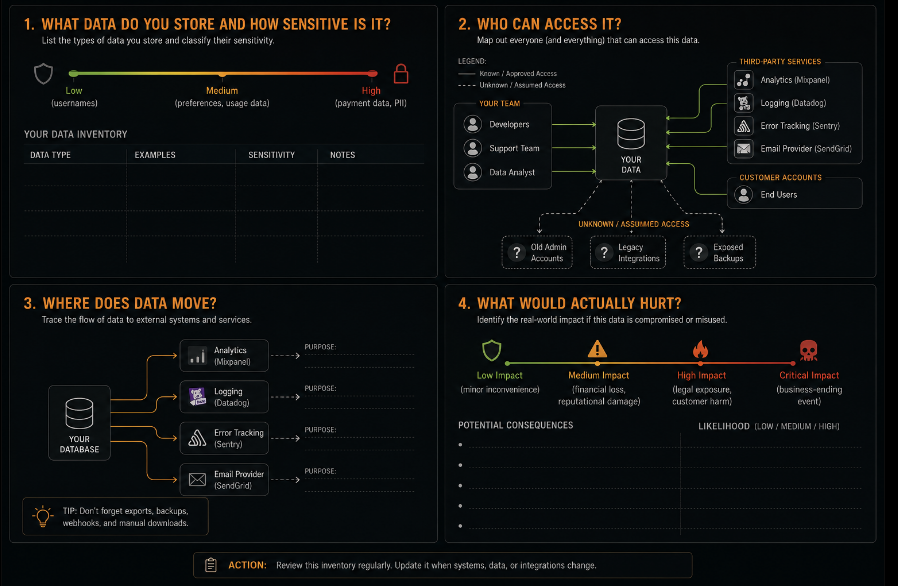
This inventory exercise takes two to three hours for a simple application. It produces something more valuable than any security tool: a clear picture of what you are actually protecting, where it actually lives, and who actually has access to it. Everything that follows in this starter kit is more useful when it is specific to this map rather than generic.
Credentials: The Category Where Everything Else Falls Apart
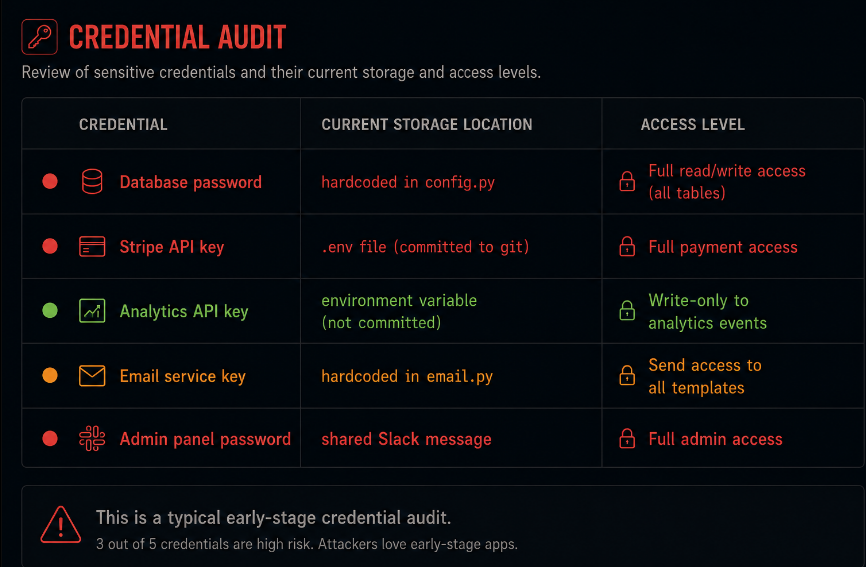
The most common security failure in early-stage applications is not a sophisticated vulnerability. It is a credential an API key, a database password, a service account secret that is stored in the wrong place and accessed by someone or something that should not have it.
This category deserves specific, actionable attention because the failure modes are predictable and the preventions are not expensive.
Database credentials should never live in application code or configuration files that are committed to version control. This sounds obvious. It is violated constantly. The pattern: a developer sets up a database connection, pastes the credentials into the config file to make it work, commits the file, and moves on. The credentials are now in the git history forever, regardless of whether the file is subsequently modified. Even private repositories are not reliably safe they become public, they get forked, they get cloned to developer machines that are less secure than the repository.
The fix is environment variables loaded from a secrets manager or from environment-level configuration that is never committed. For a two-person team on AWS, that is Systems Manager Parameter Store or Secrets Manager. For a team on Heroku or Render or Railway, that is the platform's environment variable configuration. For a team with a more complex setup, that is HashiCorp Vault or an equivalent. The specific tool matters less than the principle: credentials live in the environment, not in the code.
Each service should have its own credentials with only the access it needs. Your analytics pipeline does not need write access to the customer database. Your email delivery service does not need access to the orders table. Your error tracking tool should not be receiving database connection strings in error payloads. Audit the credentials that exist and ask, for each one, whether the access level matches what the service actually needs to function. Narrow access means a compromised credential does limited damage.
Rotate anything that has not been rotated since it was created. If a credential has existed since the application was first built, it has probably been seen by every developer who has worked on the application, every machine those developers used, every place the code has been deployed, and every backup that captured the configuration. Rotating it now does not fix the history. It starts a new history.
Authentication: What You Shipped and What You Should Have Shipped
Most early-stage applications implement authentication correctly for the happy path. The user provides valid credentials, receives a session, uses the application. The authentication works.
The gaps are in everything that surrounds the happy path: what happens with invalid credentials, what happens with many invalid credentials, what happens when the user says they forgot their password, what happens with the session when the user logs out.
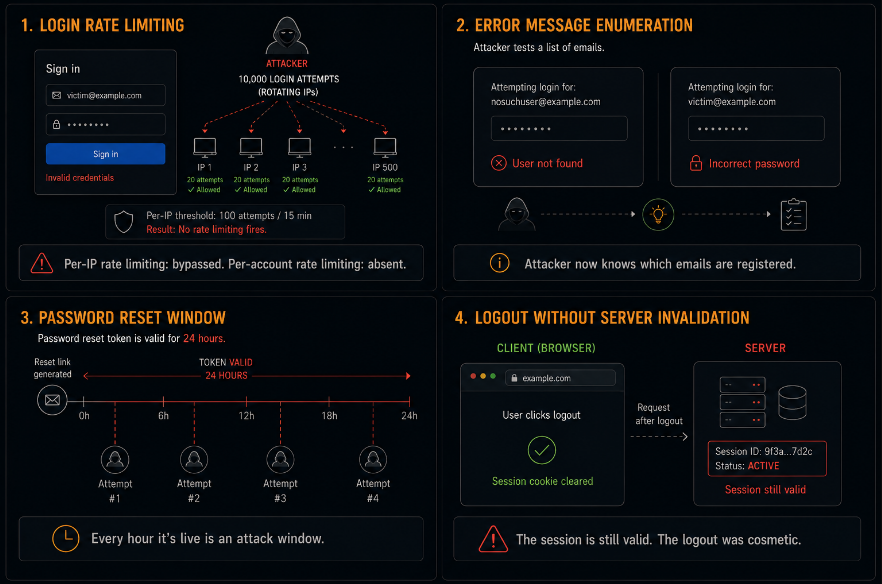
Rate limit authentication attempts per account, not just per IP. If your login endpoint allows unlimited attempts against the same email address from different IP addresses, your accounts can be brute-forced by anyone with a credential list and a residential proxy network. The fix is a counter keyed to the target email address not the requesting IP that progressively delays responses or requires a CAPTCHA after a threshold of failures. The implementation takes a few hours. The protection it provides is meaningful immediately.
Generic error messages for authentication failures. Your login endpoint should return the same error message "The email or password you entered is incorrect" regardless of whether the email address exists in the system or the email exists but the password is wrong. Returning different messages reveals whether an email address is registered, which is useful information for an attacker constructing a targeted list. The distinction between "user not found" and "wrong password" is a gift to the attacker and irrelevant to the legitimate user.
Password reset tokens should be single-use and short-lived. A password reset link that works for twenty-four hours is a window. A password reset link that can be used multiple times is a persistent attack surface. The token should be invalidated the moment it is used and should expire on a short window regardless of use one hour is a reasonable default for most applications. The token should also bind to the account it was issued for and refuse to reset a different account.
Logout should actually invalidate the session. Clearing the session cookie on the client is not the same as invalidating the session on the server. A server-side session store should mark the session as invalid on logout. Any subsequent use of that session token whether from a cached request, a stolen cookie, or a browser extension should return a 401 and require re-authentication.
Authorization: The Gap That Grows With Every Feature
Authorization is the control that determines whether a logged-in user can access a specific piece of data or perform a specific action. It is distinct from authentication which answers whether the user is who they claim to be and it is the control that most early-stage applications implement incompletely as the feature set grows.
The failure mode is specific and consistent: the first feature you build has correct authorization because it is the only feature and the only data and you are thinking carefully about who can see what. The fifth feature is built quickly because you are in a sprint and the authorization logic is added as an afterthought. The fifteenth feature references data from multiple other features and the authorization is more complex than a single check, and in the rush to ship, the check is simplified or partially implemented.
The concrete risk: any endpoint in your application that returns data based on an identifier in the URL or request body needs to verify that the authenticated user is permitted to access the data associated with that identifier. /api/invoices/4821 should check that invoice 4821 belongs to the authenticated user. /api/documents/7734 should check that document 7734 belongs to the authenticated user's account. Without these checks, any authenticated user can access any other user's data by substituting the identifier.
Audit this specifically: for every endpoint that takes an identifier as a parameter, add the authorization check that verifies ownership before returning data. The check belongs in the query SELECT * FROM invoices WHERE id = ? AND user_id = ? not in a conditional after the data has been fetched.
Write this check once and make it reusable. The authorization check that verifies a user owns a resource should be a function in your codebase, not a pattern duplicated across every endpoint. A reusable ownership check that is called consistently is easy to audit, easy to update, and impossible to forget to add because the code pattern makes its absence visible.
Logging: What You Will Need That You Are Not Capturing
Most early-stage applications have some logging. Most of what gets logged is useful for debugging: errors, exceptions, request paths, query execution times. Most of what matters for security is not being logged.
Security logging serves a different purpose than debugging logging. Debugging logs help you understand why the application is behaving unexpectedly. Security logs help you understand whether the application was accessed in ways that were not intended and they need to exist before the incident, not be created in response to one.
The specific events worth logging at early stage:
Authentication events. Every login success and login failure, with the email address attempted (hashed, not plaintext), the IP address, the timestamp, and the user agent. This log is what you examine when a customer reports that their account may have been accessed without their knowledge. Without it, you have no answer.
Authorization failures. Every time a request is rejected because the user does not have permission to access the resource they requested. A pattern of authorization failures from a single account is a signal that the account is being used to probe the application for access control gaps.
Administrative actions. Every action that changes account state, modifies permissions, deletes data, or changes configuration. These actions are low-volume and high-significance. Logging them with the acting user's identity and the specific change made creates an audit trail that matters if something goes wrong.
Data access for sensitive records. For the most sensitive data in your application customer payment information, PII, confidential content logging access events creates visibility into whether that data is being accessed in expected patterns or in ways that warrant investigation.
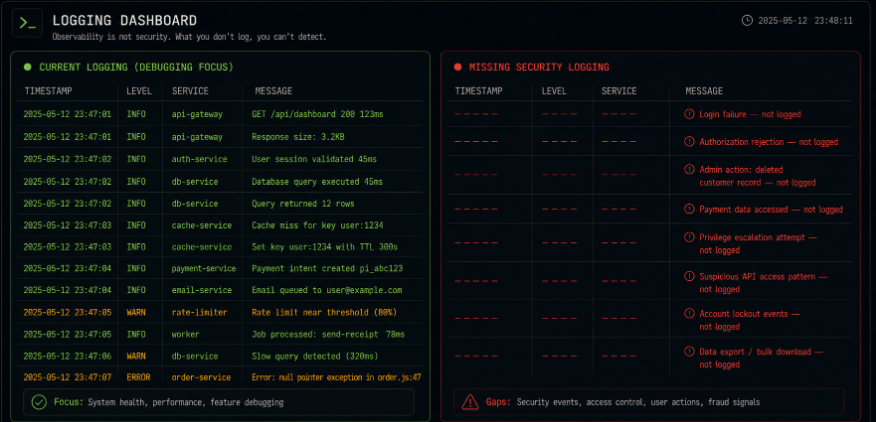
What matters is not the sophistication of the logging system. It is the specificity of what gets captured. A simple log file or a basic log aggregation service that captures authentication events, authorization failures, and administrative actions provides meaningful visibility. A sophisticated logging platform that captures requests but not these specific event types provides the appearance of visibility without the substance.
Third-Party Services: The Security Surface You Do Not Think Of as Yours
Every third-party service integrated into your application is an extension of your security surface. The email provider that receives your customer email addresses. The error tracking tool that receives exception data, which may include request bodies containing customer information. The analytics platform that receives user behavior data. The payment processor that handles customer payment information. The customer support tool that stores conversation history.
These services are not security risks in themselves they are reputable companies with their own security programs. They are risks as integration points, where the security of the integration determines what data reaches them and what they can do with it.
Three specific integration security practices for early stage:
Do not send sensitive data to services that do not need it. Error tracking tools do not need to receive the full request body of every API call. Sanitize the data before it reaches the logging or error tracking service strip passwords, tokens, payment card data, and full PII before the payload is transmitted. This requires a few hours of instrumentation work and prevents the scenario where a data request to your error tracking vendor reveals that you have been sending customer PII to a third party.
Use the minimum scope of API access for each integration. If your analytics integration only needs to write events, do not configure it with a token that has read access. If your email delivery service only needs to send transactional messages, do not configure it with access to your full subscriber list. Minimum scope access limits the damage from a compromised integration credential.
Keep an inventory of which services have access to what data. When you need to respond to a customer asking "where is my data?", or when a service you use announces a security incident, or when a prospect's enterprise security questionnaire asks about your sub-processors, you need a current and accurate answer. That answer requires knowing what you have connected.
The Security Review You Can Do This Week
The starter kit is not a project. It is a series of specific checks, each of which can be done by one engineer in an afternoon.
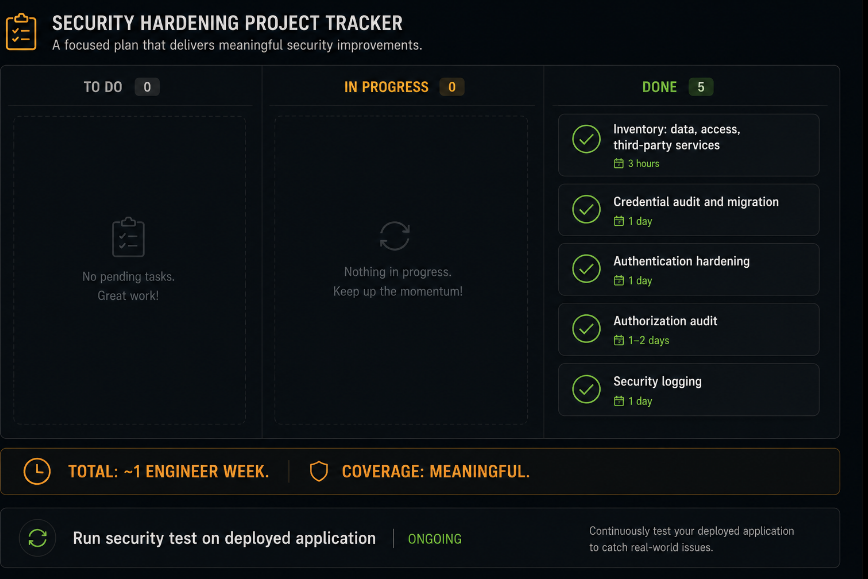
Day one: Run the inventory. Map data, access, and third-party integrations. This is a document, not code. Two to three hours.
Day two: Audit credentials. Find everything hardcoded or committed. Move it to environment variables or secrets manager. One engineer, one day.
Day three: Add per-account rate limiting to authentication endpoints. Add generic error messages. Verify password reset tokens are single-use and short-lived. Verify logout invalidates server-side sessions. One engineer, one day.
Day four: Audit authorization. For each endpoint that takes an object identifier, verify the ownership check is present and in the query. One engineer, one to two days depending on endpoint count.
Day five: Add security logging. Authentication events, authorization failures, administrative actions. One engineer, one day.
The total is roughly one engineer-week of focused work. It does not require a security team, a compliance framework, or a tool purchase. It requires knowing what you have and addressing the specific gaps that matter most at forty customers.
What Comes After the Starter Kit
The starter kit gets you to a defensible starting position. It is not a complete security program. It is the floor, not the ceiling the set of controls that any application handling real customer data should have in place before adding more complexity.
What comes next, in rough sequence as the application grows:
When you have one hundred customers, add a vulnerability scanner to your deployment pipeline. When you start closing enterprise accounts, get a penetration test. When you pass a hundred and fifty thousand dollars in ARR and are managing meaningful customer data, consider a continuous security testing program that exercises your application the way a penetration test would but at the cadence your deployment schedule demands.
The decisions made at forty customers compound. Authentication that was implemented correctly at forty customers does not need to be rebuilt at four thousand. Authorization checks that were added early scale with the feature set instead of becoming technical debt that requires a refactoring sprint. Security logs that existed before an incident mean you can answer questions after one rather than building the logging capability during the crisis.
The customers you have now are the customers whose trust you are building or not building right now. The forty emails in your database are the beginning of a relationship with real people and real companies that extends, if you build well, to hundreds and then thousands of customers. Security is how you hold up your end of that relationship before anyone gives you a reason to.
Axeploit was built for teams that want to know whether their application is actually secure not whether a scanner flagged a known CVE, but whether the authorization controls work, the authentication is solid, and the endpoints are behaving correctly under adversarial conditions. For founders past the starter kit phase and ready to validate what they have built, Axeploit tests the running application with the same intent that a skilled attacker would bring to it.