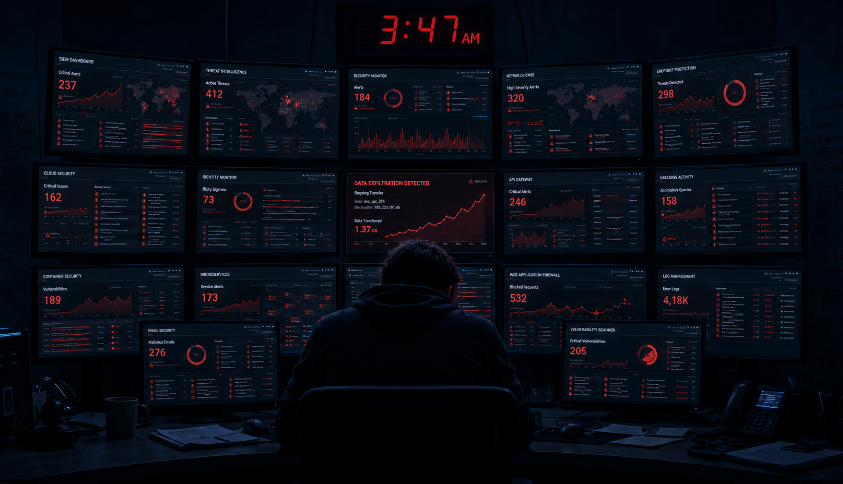
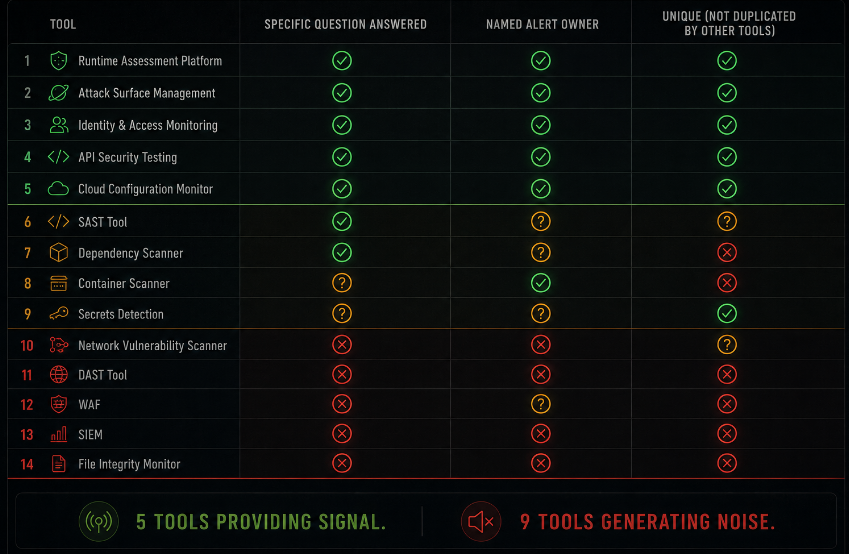
Somewhere around tool number eight, a subtle shift happens in how a security team relates to its tooling. Before that point, adding a tool extends coverage a SAST scanner catches what manual review misses, a dependency scanner surfaces what the SAST misses, a runtime monitor catches what the scanner misses. Each tool adds to the picture.
After tool number eight, something different starts happening. The tools start adding to the noise.
This is not a theory. It is the operational experience of most security teams that have been accumulating tools over a multi-year period, responding to each new threat category with a specialized scanner, each compliance requirement with a dedicated platform, each vendor sales cycle with a proof-of-concept deployment that never got rationalized out of the stack after the evaluation ended.
The result is a security infrastructure that generates more alerts than any team can meaningfully review, spreads security signal across disconnected platforms that do not speak to each other, and produces a collective organizational confidence that security is being handled because the dashboards are full while the actual coverage question remains unexamined.
Fourteen dashboards. Zero answers to the question that matters: is this specific application, running right now, exploitable by an attacker who has found their way in?
How the Stack Got This Way
Security tool sprawl does not happen because of bad decisions. It happens because each individual decision was reasonable at the time it was made, and nobody had a clear view of the cumulative effect.
The accumulation follows a recognizable pattern across almost every organization that has experienced it.
A compliance requirement arrives SOC 2, PCI, ISO 27001 and with it a checklist of controls that need to be in place. Some of those controls correspond to tools: vulnerability scanning, log aggregation, endpoint detection, dependency tracking. The tools get purchased and deployed to satisfy the compliance evidence requirement. They are configured minimally enough to produce the evidence the auditor needs, not necessarily enough to produce operational security value. They stay in the stack because removing them would create a compliance gap.
A security incident happens, or a near-miss, or a prominent breach at a company in the same industry. The post-mortem identifies a category of detection or prevention that was absent. A tool is purchased to fill that specific gap. It gets configured around the specific scenario that prompted the purchase, which means it is well-tuned for one threat pattern and not tuned at all for adjacent ones. It generates alerts that nobody knew how to triage when the tool was new, and those alert queues are never fully addressed.
A vendor relationship produces a proof-of-concept deployment. The tool gets a ninety-day trial. The security team evaluates it, concludes it has some value, and the license gets renewed because removing it requires a decision and a process and nobody has the bandwidth. The tool stays in the stack producing alerts that go into a queue that is nominally someone's responsibility and practically nobody's priority.
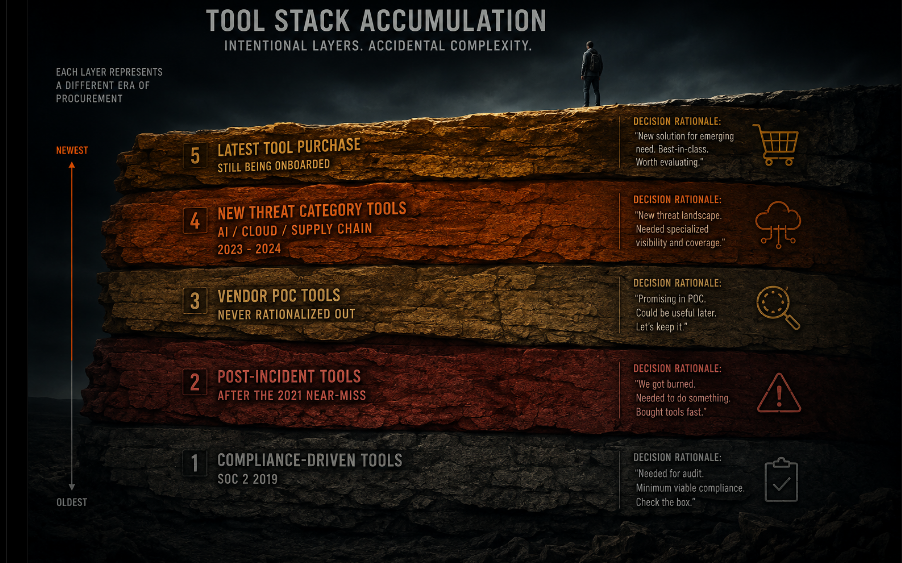
Repeat this across five years of security program growth, through multiple head-of-security transitions, and the result is a stack that reflects every security concern that was prominent at the moment of each purchase not a coherent architecture designed to answer the questions that matter now.
The Three Categories of Noise That Fourteen Dashboards Generate
Not all security tool noise is the same. Understanding the specific ways that tool sprawl produces noise rather than signal helps diagnose which parts of the stack are contributing to the problem.
Volume noise: too many alerts to process. A vulnerability scanner that runs weekly against a large application surface produces hundreds of findings per scan. A dependency scanner running against a modern application with hundreds of transitive dependencies produces findings on every run. A SAST tool scanning a large codebase produces findings that range from critical SQL injection risks to minor style violations flagged as potential security issues. The cumulative volume of alerts across all tools in a mature stack can exceed any realistic capacity for human review.
The consequence of volume noise is not that alerts go uninvestigated they do, but that is a symptom. The consequence is alert fatigue: the gradual calibration of the security team's attention away from the alert stream because the signal-to-noise ratio makes the stream unreliable as an attention signal. A team that has learned that most alerts are noise will treat new alerts as probably noise until proven otherwise. The real finding gets the same initial response as the false positive.
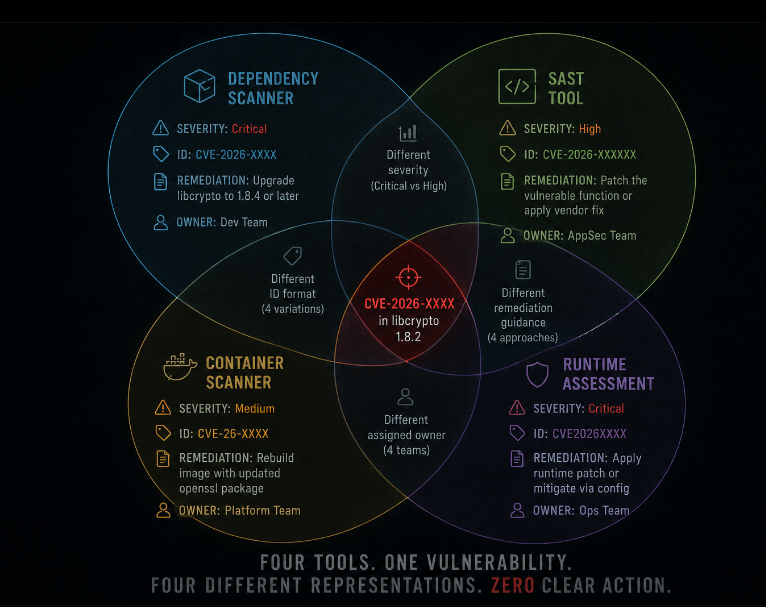
Duplication noise: multiple tools flagging the same thing differently. A vulnerability present in a dependency may be flagged by the dependency scanner, the SAST tool, the container scanning tool, and the runtime vulnerability assessment each using different CVE identifiers, different severity classifications, different remediation guidance, and different ownership assignments. The security engineer reviewing the finding has to reconcile four different representations of the same issue before they can determine what needs to be done and who needs to do it.
Duplication noise is more corrosive than volume noise because it creates the false impression of corroboration. Four tools flagging the same issue looks like four independent findings. The team spends more time on it than a single finding would justify, and when the team discovers it is the same issue reported four times, the credibility of the alert stream degrades further.
Context noise: alerts without the information needed to act on them. A runtime alert fires indicating anomalous traffic to an internal endpoint. The alert contains the endpoint path, the timestamp, the source IP, and a severity level. It does not contain the authenticated user identity associated with the request, the business context of the endpoint, whether the traffic volume is anomalous relative to this specific endpoint's normal patterns, or what a reasonable response to this specific finding would look like.
An alert without context is not a finding. It is a starting point for an investigation, and the investigation requires context that lives in a different tool the application logs in the logging platform, the user identity in the identity management system, the endpoint's traffic baseline in the monitoring platform. Answering the question the alert raises requires logging into three other dashboards and correlating data manually. This is the operational reality of a tool stack that was assembled rather than designed.
What Good Coverage Actually Requires
The instinct, when a security team identifies tool sprawl as a problem, is to consolidate buy fewer tools, buy platforms that do more. This instinct is partially correct and partially misleading.
Consolidation addresses the symptom of too many dashboards. It does not address the underlying question: are we getting answers to the questions that matter? A consolidated platform with ten integrated modules can produce exactly the same noise problem as fourteen separate tools if the outputs are not designed to answer specific questions about specific applications.
The question that matters for application security is specific: for this application, running in this environment, with this authentication model and this data access pattern, what can an authenticated attacker with a valid account do that they should not be able to do?
That question is not answered by a vulnerability scanner, which reports on known CVEs in dependencies. It is not answered by a SAST tool, which analyzes code structure for patterns associated with vulnerability classes. It is not answered by a WAF, which detects known attack signatures in traffic. Each of these tools answers an adjacent question and provides genuine value against its specific threat model. None of them answers the question of what the running application does when exercised by someone with attacker intent following the actual workflows the application was built to support.
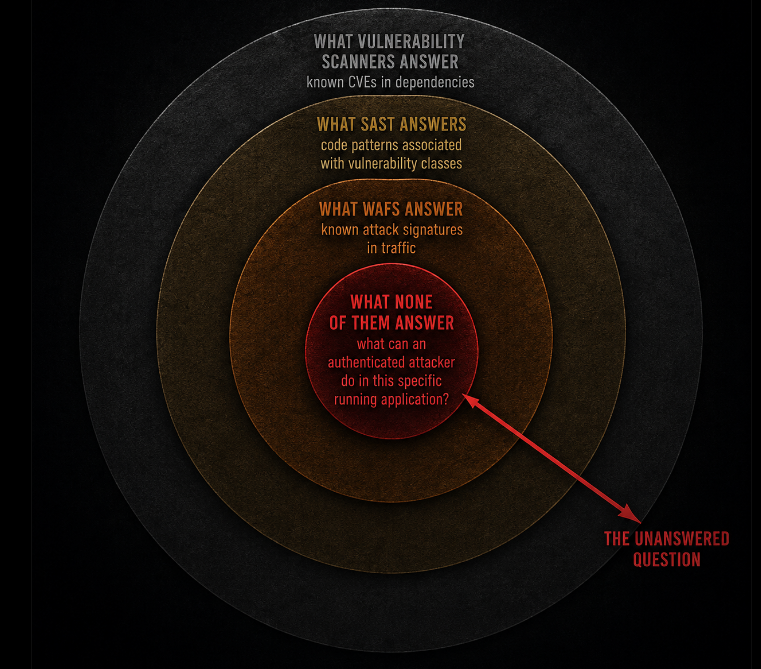
Answering the center question requires a different approach: testing the application as it actually runs, from the outside, as an authenticated user would use it, exercising the workflows that real attackers exercise, and observing whether the security properties that should be present are actually present in practice.
The Stack Rationalization Framework
Before adding a tool, and periodically as a portfolio review, each tool in the security stack deserves evaluation against three questions.
What specific question does this tool answer? Not a category "endpoint security" or "application monitoring" but a specific, answerable question. "Does any process on this endpoint match known malware signatures?" is a specific question a tool can answer. "Is the application secure?" is not a specific question any tool can answer, and a tool purchased against that framing will produce noise rather than signal.
If the team cannot articulate the specific question the tool answers, the tool is likely producing output that nobody is acting on. Output that nobody acts on is noise, regardless of how sophisticated the tool generating it is.
Who owns the output, and what do they do with it? Every alert stream needs an owner a specific person or team whose job description includes reviewing that stream, triaging the findings, and taking action on them. A tool whose alert stream has no clear owner is a tool that is generating noise with nobody responsible for converting it to signal. In a stack audit, the question "who reviews this tool's alerts?" should have a specific answer. "Whoever gets around to it" is not a specific answer.
Is this tool answering a question that another tool in the stack already answers? Duplication in security tooling is not always wasteful corroboration from independent tools can increase confidence in a finding. But duplication that produces four representations of the same finding without adding information is pure noise. When two tools in the stack answer substantially the same question, the evaluation should determine whether one can be retired, not whether both should be retained for coverage.
The Alert Fatigue Spiral and How to Exit It
Alert fatigue is not a personnel problem. It is a system design problem that presents as a personnel problem.
The common organizational response to alert fatigue is to hire more people to review more alerts, to implement triage processes, or to mandate SLAs for alert response times. These interventions address the symptom alerts are not being reviewed fast enough without addressing the cause the alert stream contains too many low-value signals relative to high-value ones for the volume to be manageable at any realistic staffing level.
The correct intervention is to reduce the volume of low-value alerts, not to increase the capacity to process them. The mechanisms for reducing low-value alert volume:
Tune before you add. Every new tool starts with default detection thresholds that are calibrated for a generic environment, not your specific application and infrastructure. Tuning the tool to your environment adjusting thresholds, excluding known-good patterns, configuring context that the tool does not have by default dramatically reduces the false-positive rate. Most tools are never tuned after initial deployment. Default thresholds produce default noise volumes.
Route alerts to context, not to inboxes. An alert that arrives in a general security inbox has lost context by the time it reaches a reviewer. An alert that arrives in the engineering team's issue tracker, tagged to the specific service and codebase it relates to, with the relevant code context and ownership information already attached, is an alert that an engineer can act on. The routing of alerts determines whether they become actionable findings or noise.
Measure suppression rate, not alert volume. The metric most security teams track is alerts generated. The metric that would be more useful is the ratio of alerts that produced an action to alerts that were suppressed as false positives. A tool with a ninety percent suppression rate is a tool that is generating ten times as much noise as signal. That ratio should be a tool performance metric with consequences for whether the tool stays in the stack.
Consolidate to common data model before consolidating platforms. The most practical near-term improvement in most overstacked environments is not retiring tools but establishing a common data model for alert output a shared schema that every tool's output gets normalized to before reaching the queue. Normalized output makes deduplication possible, makes correlation possible, and makes the question "have we seen this before?" answerable without logging into multiple platforms.
What a Rationalized Stack Looks Like in Practice
A rationalized security stack is not a minimal stack. It is a stack where every tool answers a specific question, where every alert stream has an owner, where duplication is deliberate rather than accidental, and where the gap between what the stack covers and what it does not cover is explicitly acknowledged rather than obscured by dashboard count.
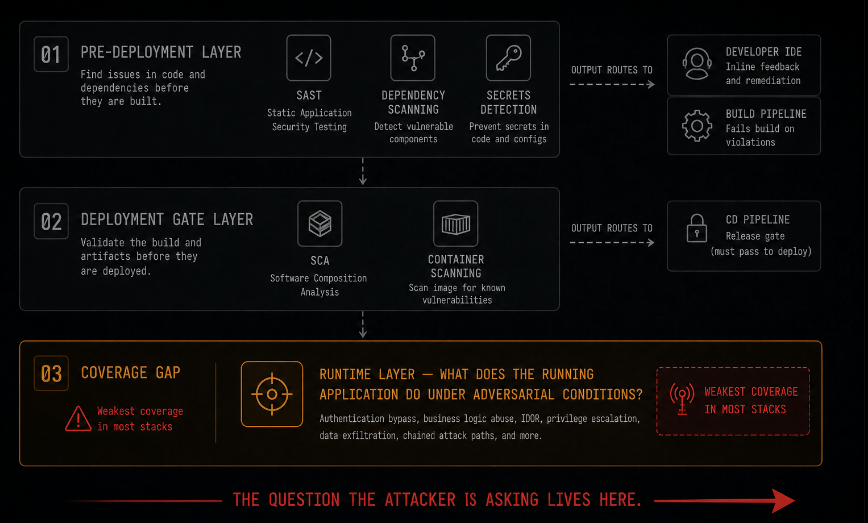
For application security specifically, the rationalized stack has a clear division of responsibility across three layers that address fundamentally different questions.
The pre-deployment layer answers: does this code introduce known vulnerability patterns before it ships? SAST, dependency scanning, and secrets detection operate here. Their output goes to developers in the build pipeline, as close to the point of introduction as possible, where the cost of remediation is lowest. This layer is high-volume by nature it runs on every commit and its outputs need to be tuned to the severity threshold where developers will actually act on them rather than suppress them.
The deployment gate layer answers: does this dependency inventory or configuration have known issues that should block the release? Software composition analysis and container scanning operate here, integrated into the CD pipeline as a gate rather than a reporting tool.
The runtime layer answers: what does this running application actually do when exercised by someone with attacker intent? This is the layer that most stacks have the weakest coverage on, precisely because it requires exercising the application rather than analyzing its artifacts. This is also the layer that answers the question closest to the one an attacker is asking.
The coverage gap between the pre-deployment and runtime layers is where most application security vulnerabilities that reach production live not because the pre-deployment tools failed, but because they answer questions about code patterns and known CVEs rather than about the behavior of the running application under adversarial conditions.
The Honest Conversation About Security Tool ROI
At some point, a CFO or a board member asks the question that the security team has been avoiding: what are we getting for the seven-figure annual spend on security tooling?
The honest answer, in most organizations with fourteen dashboards, is: we are getting coverage across several specific threat categories, we are producing compliance evidence for our auditors, and we are not currently able to tell you whether the applications handling customer data are actually exploitable by an authenticated attacker with a valid account.
That last part is the one worth being honest about. Not because the tools are failing they are doing what they were purchased to do but because what they were purchased to do does not include the specific question that an attacker, and a diligent security program, needs answered about the running application.
The gap is not a reason to spend more on tools. It is a reason to spend differently to evaluate what the stack is actually answering and to identify what it is not answering, and to fill the gap with the specific capability that addresses the unanswered question rather than adding a fifteenth dashboard to the noise.
Closing: The Dashboard Is Not the Answer
Fourteen dashboards do not produce security. They produce the appearance of security monitoring, which is a different and sometimes more dangerous thing. An organization with zero dashboards knows it does not have visibility. An organization with fourteen dashboards believes it does even when those dashboards are generating noise that obscures the signal, duplicating findings in ways that waste triage time, and collectively failing to answer the question that matters most.
The answer to the application security question does not live in a dashboard. It lives in the behavior of the running application when exercised with attacker intent whether the endpoint returns data it should not, whether the workflow can be bypassed, whether the session survives conditions it should not survive.
That answer requires testing the application, not instrumenting it. Instruments measure. Tests reveal. The distinction between knowing that something is being monitored and knowing whether it is actually secure is the distance between fourteen dashboards and one answer.
Axeploit provides the answer that fourteen dashboards do not: what does this specific running application actually do when an authenticated user with attacker intent exercises its real workflows? It does not add a fifteenth dashboard. It tests the application the way an attacker tests it creating accounts, navigating authenticated workflows, exercising API endpoints with modified parameters and surfaces the findings that instrumentation and code analysis cannot produce. One answer, clearly stated. No dashboard required.