If you’ve spent any time in developer communities recently, you’ve likely noticed a massive shift. Developers are rapidly migrating from traditional sandboxes and early cloud IDEs like the recent wave of folks moving from Replit to Cursor, seeking the unparalleled speed of AI-native environments.
You no longer need to memorize complex syntax or dig through endless Stack Overflow threads. Instead, you prompt, you tweak, you “vibe” with the AI, and an app is born. It feels like magic. But underneath that rapid iteration lies a dangerous oversight that the security community is calling the “Copilot Blindspot”.
While AI code assistants are incredible at generating functional code, they are fundamentally built to be people-pleasers, not security engineers. If you blindly trust these models, you aren't just building faster, you are inadvertently planting ticking time bombs inside your application's architecture.
The Rise of AI Assistants and the Illusion of Safety
The adoption of tools like Cursor and GitHub Copilot has revolutionized software development. They act as pair programmers that never sleep, auto-completing boilerplate and suggesting entire modules.
Why AI Code Looks “Correct” but Isn't
There is a massive difference between code that compiles and code that is secure. When you lean entirely on AI for backend logic, you introduce critical GitHub Copilot security risks. The illusion of safety comes from the AI's confidence; it outputs clean, documented code that looks legitimate.
However, AI models predict the next logical line based on training data that includes billions of lines of insecure public code. The model isn't thinking about your data's safety; it's thinking about what "looks" like a finished function.
What Exactly is the “Copilot Blindspot”?
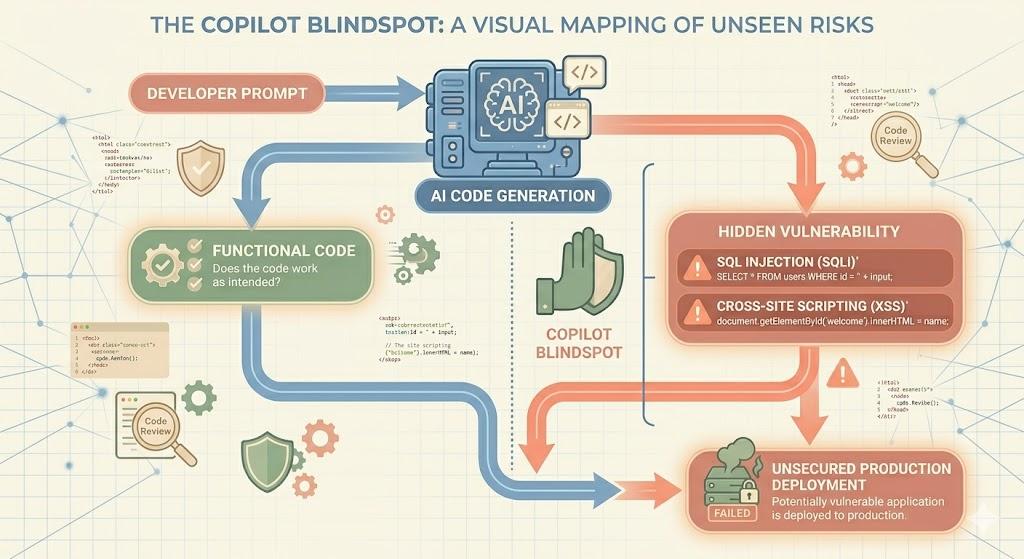
The Copilot Blindspot is the dangerous gap between a developer's intent and an AI's execution regarding application security. Because the AI's goal is to make the app function according to your prompt, it will frequently take the path of least resistance, bypassing essential security guardrails.
Hallucinating Insecure Patterns
AI models are infamous for “hallucinating,” generating information that sounds authoritative but is factually wrong. In a secure coding context, this can mean:
- Outdated Libraries: Suggesting packages with known CVEs (Common Vulnerabilities and Exposures).
- Weak Encryption: Recommending deprecated algorithms like MD5 or SHA-1 for sensitive data.
- Logic Flaws: Missing edge cases that allow unauthorized access.
For example, a prompt to “write a login function” might produce code that connects to your database but fails to sanitize input. This introduces SQL Injection (SQLi).
Simple Terms: SQLi is like handing someone a form; instead of their name, they write a secret command that tricks your database into handing over every user's password.
Similarly, AI-generated front-end code often leads to Cross-Site Scripting (XSS) by displaying user input without cleaning it, allowing hackers to steal session tokens.
The Threat of Context Contamination
Modern tools like Cursor index your entire workspace to provide better context. However, this creates a new vector: Supply-Chain Prompt Injection.
If your project pulls in a malicious open-source package, that package can act as a “prompt injection” against your AI. The AI reads the malicious file for context, gets hijacked by hidden instructions, and starts generating code that leaks API keys or creates silent backdoors, all while you think you’re just writing a standard feature.
Why “Just Winging It” is a Ticking Time Bomb
For the vibe coder, the workflow is often: prompt, test locally, and push to production. This is where the bomb is armed. Without proper DevSecOps integration, these AI-generated vulnerabilities sit quietly in your live codebase.
Hackers use automated bots to scan the internet 24/7 for these flaws. By the time your app gains traction, an attacker may have already found the backdoor your AI accidentally left open.
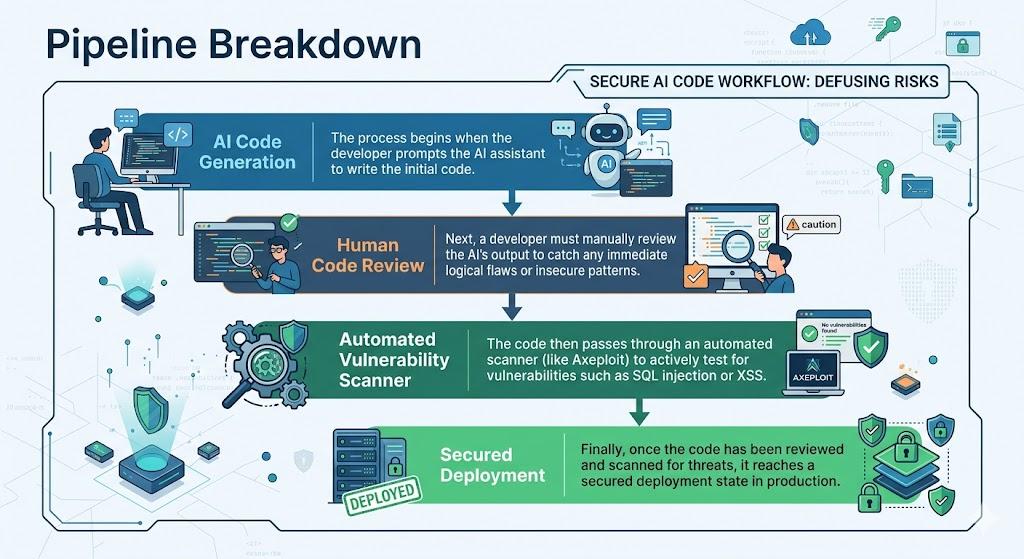
Defusing the Bomb: Secure Coding with Axeploit
You don't have to stop using AI. You just need to evolve your workflow. Here is how to keep your speed while ensuring your app is bulletproof:
1. Human Oversight is Non-Negotiable
Think of your AI as a brilliant but naive junior developer. You wouldn’t let a junior push raw code without a senior's review. You must manually inspect how data enters and exits your application.
2. Implement SAST (Static Application Security Testing)
Use SAST tools to read your code with a hacker’s mindset. These tools analyze your source code before it runs, flagging insecure patterns and hardcoded secrets.
3. Automated Vulnerability Scanning with Axeploit
Static analysis isn't enough; you need to see how your app behaves in the real world. Axeploit’s scanner doesn’t just read text; it actively tests your live application.
Axeploit attacks your app from the outside, exactly like a hacker would. If your AI assistant left a database vulnerable to SQLi, Axeploit’s dynamic scanner will catch it and show you the fix before you go live.
Conclusion: Code with AI, Secure with Axeploit
The future of coding is incredibly exciting. The barrier to entry has never been lower, and the speed at which ideas become fully functional apps is mind-blowing. But as AI code assistants become the standard, the responsibility of securing that code remains entirely human.
The “Copilot Blindspot” is very real, and ignoring it will eventually cost you your app's reputation, your users' data, and your peace of mind. By adopting a DevSecOps mindset and arming yourself with powerful, automated security tools like Axeploit, you can confidently vibe code your way to the top, knowing your application is locked down and bulletproof.