If you are a startup founder, a beginner in the tech space, or a “vibe coder” who loves building apps but doesn't have a background in hardcore cybersecurity, the news can often sound like a foreign language. You might hear terms like “Zero-Day,” “Privilege Escalation,” or “Indicators of Compromise” and wonder what they mean for your business.
Recently, a massive cyberattack made headlines in early April 2026 involving something called FortiGate SSL VPN and a suite of hacking tools known as Nightmare Eclipse. While the names sound like something out of a sci-fi movie, the threat is very real.
In this guide, we are going to break down exactly what happened during this attack, how the hackers managed to compromise the system, and what you need to do to keep your own startup safe.
Understanding the Threat: What Are the Nightmare Eclipse Tools?
To understand the attack, we first need to look at the weapons used. Nightmare Eclipse (also known as Chaotic Eclipse) is the online alias of a security researcher who got frustrated with how slowly Microsoft was fixing security flaws. In retaliation, this researcher publicly released a set of tools designed to bypass Windows Defender (Microsoft's built-in antivirus).
These tools include three main programs:
- BlueHammer: Designed to break into the system's core password database. (Microsoft fixed this in April 2026 under the name CVE-2026-33825).
- RedSun: Created to override essential Windows security services.
- UnDefend: Built to entirely disable Windows Defender without needing administrative permission.
Why Are These Tools Dangerous?
In the cybersecurity world, we talk a lot about “Privilege Escalation.” Imagine your computer network is an office building. A normal user has a keycard that only opens the front door and their specific cubicle. Privilege escalation is like a hacker stealing a normal keycard, but then finding a bug in the security system that magically transforms their standard keycard into a master key. Suddenly, they have “SYSTEM-level” access, meaning they can go anywhere and do anything.
That is exactly what the Nightmare Eclipse tools are designed to do.
How Hackers Broke In: The FortiGate SSL VPN Compromise
You might be wondering: If these tools only work once you are inside the computer, how did the hackers get in to begin with?
The answer is surprisingly simple: They didn't break down the door. They used a key.
The Stolen Credentials
Many businesses use a FortiGate SSL VPN to allow their remote workers to securely connect to the company network from home. In this attack, hackers managed to obtain valid usernames and passwords for a victim's VPN.
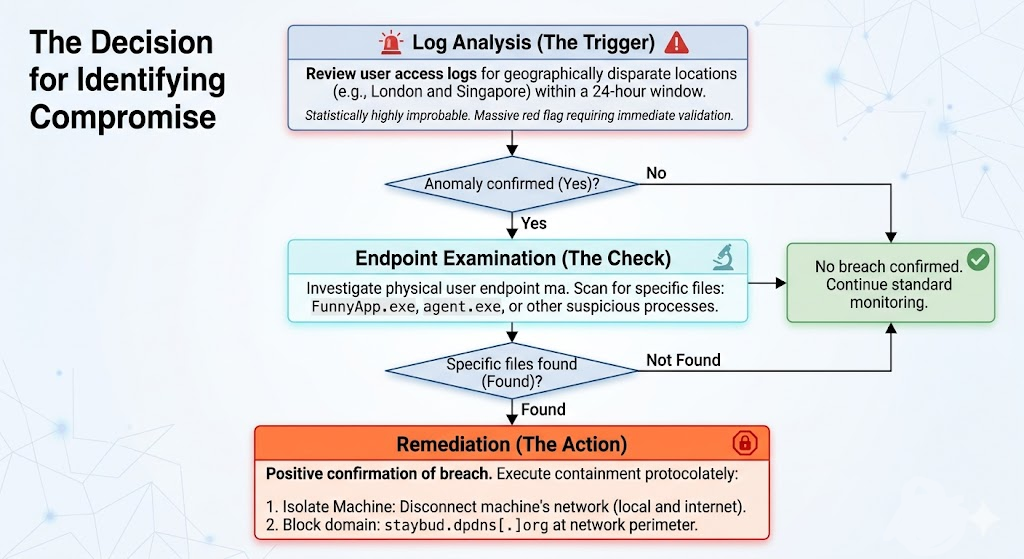
Security investigators noticed that on April 15, 2026, an attacker logged into the FortiGate VPN using valid credentials from an IP address in Russia. Shortly after, the exact same account was used to log in from Singapore and Switzerland. This multi-country hop is a classic sign of “credential abuse,” meaning the hackers either bought the stolen passwords on the dark web or shared them among their team.
The Clumsy Execution
Once inside, the hackers tried to use the Nightmare Eclipse tools to gain that "master key" access. They dropped a file named FunnyApp.exe (which was actually the BlueHammer tool) into the victim's “Pictures” folder. They also tried running UnDefend from hidden folders.
Interestingly, the hackers were not as elite as their tools. They misspelled commands (typing-agressive instead of the correct spelling) and failed to actually escalate their privileges. However, that didn't mean the victim was safe.
The Hidden Danger: Meet BeigeBurrow
While the Nightmare Eclipse tools failed, the hackers successfully deployed a custom piece of malware called BeigeBurrow.
BeigeBurrow is a covert communication tool. It reached out to a server controlled by the hackers over “Port 443.” In simple terms, Port 443 is the exact same channel your web browser uses to visit secure websites (like your bank or Facebook). Because it looks like normal internet traffic, the company's firewalls didn't block it. BeigeBurrow successfully created a hidden backdoor, allowing the hackers to maintain a permanent foothold in the network.
Indicators of Compromise (IoCs): Spotting the Attack
In cybersecurity, an Indicator of Compromise (IoC) is a piece of digital forensic evidence, a breadcrumb that suggests a network has been breached. If your security team sees these specific breadcrumbs on your network, it means you might be under attack.
Here are the specific IoCs associated with the Nightmare Eclipse and FortiGate VPN attack:
Suspicious IP Addresses (VPN Logins)
- 78.29.48.29 (Russia)
- 212.232.23.69 (Singapore)
- 179.43.140.214 (Switzerland)
Malicious Domains
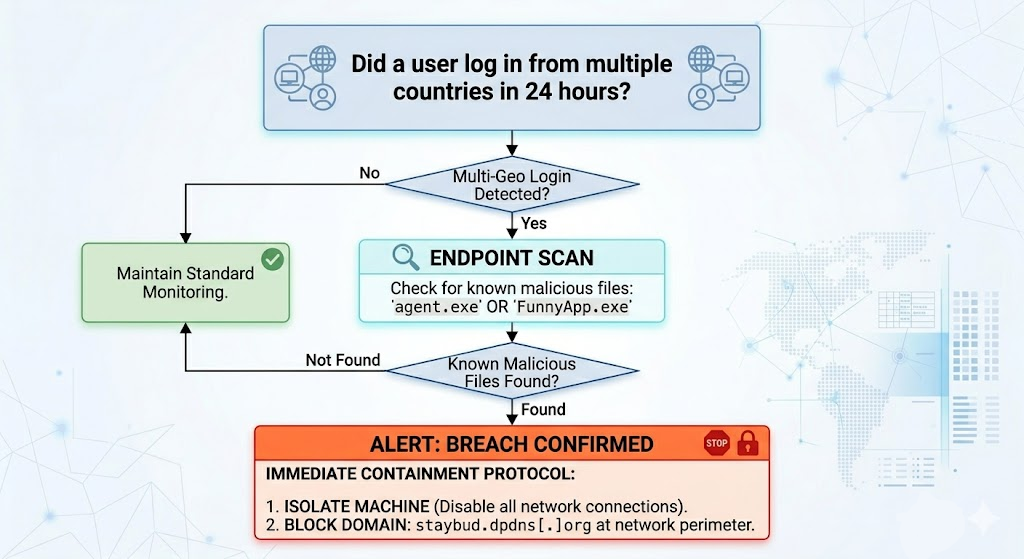
- staybud.dpdns[.]org (The server used by BeigeBurrow to control the backdoor).
File Names and Alerts to Watch For
- FunnyApp.exe, RedSun.exe, undef.exe, z.exe (Often found hiding in the Downloads or Pictures folders).
- Exploit:Win32/DfndrPEBluHmr.BZ (This is the alert Windows Defender will throw if it catches BlueHammer).
- agent.exe (The file name often used for BeigeBurrow).
Step-by-Step Guide: How to Stay Safe and Keep Your System Secure
As a startup founder or a busy developer, your main goal is building a great product, not spending 24/7 monitoring firewall logs. However, the FortiGate attack proves that relying on basic passwords isn't enough. Here is a step-by-step guide to detecting malware and securing your infrastructure.
Step 1: Secure Your “Front Door” (Authentication)
The attackers got in because they had valid VPN credentials.
- Enable Multi-Factor Authentication (MFA): Passwords alone are dead. Ensure every single entry point to your business requires a secondary approval (like a push notification to a mobile device).
- Monitor Geo-Logins: Set up alerts if an employee's account logs in from New York and then Singapore an hour later. It’s physically impossible and a clear sign of a breach.
Step 2: Patch Your Systems Immediately
Hackers rely on old, unpatched software. Make sure you update your operating systems religiously. In this case, applying Microsoft’s April 2026 Patch Tuesday update completely blocks the BlueHammer tool.
Step 3: Automate Your Vulnerability Scanning with AI
Traditional security tools often require extensive manual setup, which vibe coders and fast-moving startups simply don't have time for. Furthermore, traditional tools often miss “authentication flaws,” the exact type of weak spots that allow hackers to abuse login systems.
This is where next-generation tools like Axeploit become essential. Axeploit is a zero-configuration, AI-powered vulnerability scanner that acts like an automated security engineer.
- How it keeps you safe: Instead of just scanning code, Axeploit uses AI agents to independently navigate your app. It can sign up for an account, verify an OTP (One Time Password), and test over 7,500 vulnerabilities, including weak authentication mechanisms and complex business logic flaws.
- Why it matters: Because Axeploit continuously tracks zero-day threats and the latest CVEs (Common Vulnerabilities and Exposures), it can spot the exact weak points a hacker might use to steal credentials before a breach ever happens.
Step 4: Monitor the “Unusual”
Hackers try to blend in. Set up your systems to flag unusual behavior, such as a program named agent.exe running with a -hide command, or an employee running high-level administrative commands (whoami /priv) that they never normally use.
Conclusion
The Nightmare Eclipse attack on FortiGate SSL VPNs is a wake-up call. It proves that even highly sophisticated, automated malware campaigns still begin with simple human errors like compromised passwords and weak network perimeters.
You don't need a massive enterprise budget to protect your startup. By understanding the flow of an attack, monitoring your Indicators of Compromise (IoCs), enforcing strict multi-factor authentication, and leveraging AI-powered scanners like Axeploit to continuously audit your systems, you can build a resilient defense. Stay vigilant, patch your software, and never leave your digital front door unlocked.