When you start a new project in Cursor, the AI is a genius. It’s like having a senior architect who has memorized every line of your code. You ask for a button; it gives you a button that perfectly matches your CSS variables, your API structure, and your weird naming conventions.
But then, the project grows. You add a payment gateway. You add a dashboard. You add a "dark mode" that took way too many hours to debug. Suddenly, the AI starts acting like it’s had one too many martinis. It suggests libraries you uninstalled last week. It "forgets" that your API expects a snake_case response and starts giving you camelCase.
This isn't a bug in the AI; it's a Context Rot problem. Here is how you fight it.
1. The Strategy of "Micro-Isolation"
In the old days of C++, we talked about "Encapsulation." Today, in the era of LLMs, we need to talk about Micro-Isolation.
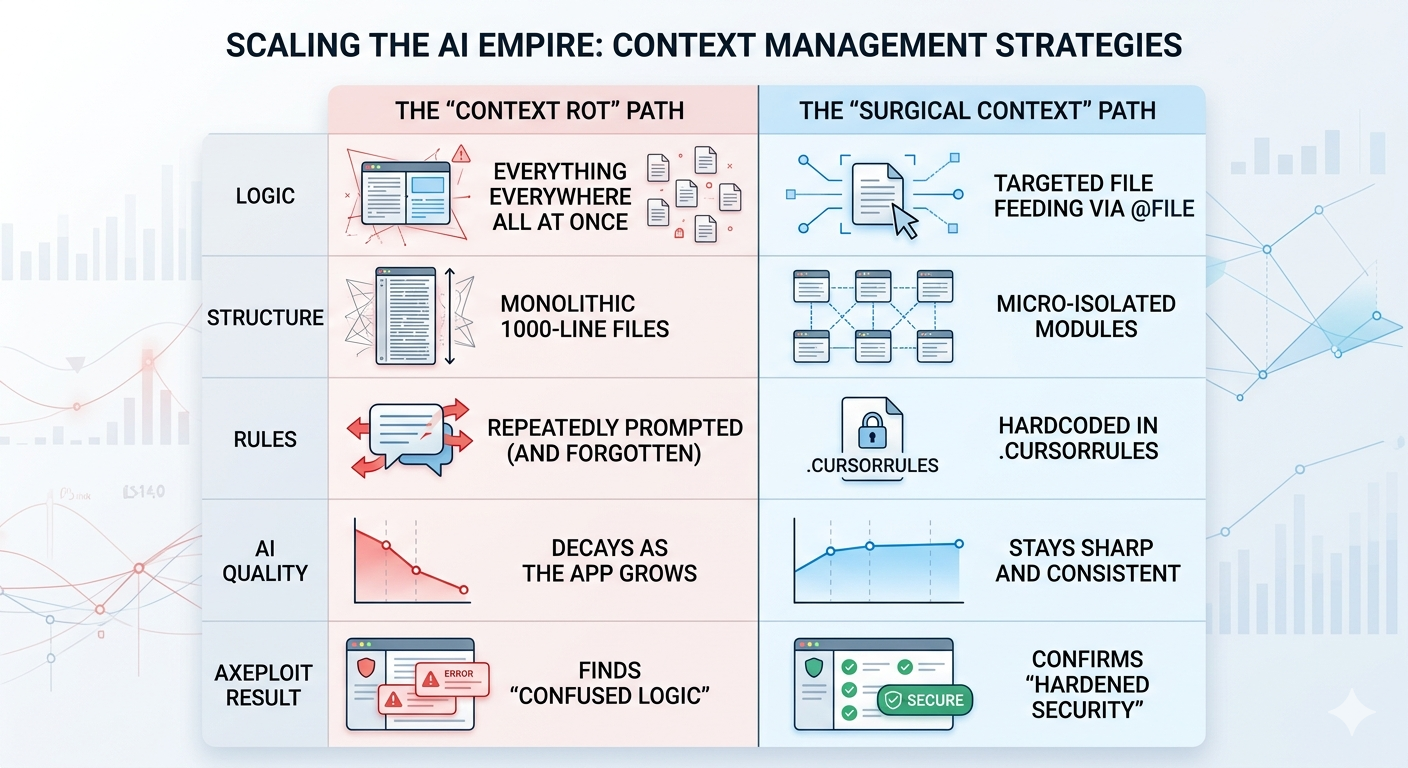
If you have a 2,000-line file, the AI is trying to "hold" all 2,000 lines in its working memory while it suggests a change on line 1,950. As the file grows, the "signal-to-noise" ratio drops. The AI starts getting distracted by code at the top of the file that has nothing to do with what you’re doing at the bottom.
The Fix: Chop it up. If a function is more than 50 lines, it probably deserves its own file. By isolating logic into tiny, single-purpose modules, you are effectively giving the AI a magnifying glass. When the AI only sees a 40-line file, its "reasoning" remains 100% sharp.

2. Hardcoding the "Laws of Physics" with .cursorrules
Every project has "The Way We Do Things Around Here." Maybe you use Tailwind for styling, or maybe you strictly use Functional Components.
Instead of reminding the AI of these rules every three prompts (which wastes precious context space), you should hardcode them into a .cursorrules file. Think of this as the "Constitutional Law" of your codebase. It stays in the background, permanently narrowing the AI’s creative field so it doesn't wander off into "Hallucination Territory."
Standard .cursorrules should include:
- Technical Constraints: "Never use Axios; use the native Fetch API."
- Security Constraints: "All database queries must use the Prisma client to prevent injection."
- Styling Constraints: "No inline styles. Ever."
3. Surgical Precision: The Power of @file
The biggest mistake people make is clicking "Chat with Entire Codebase." This is the equivalent of trying to read a specific page of a book while 50 people are screaming other chapters at you.
To keep the AI smart, you must be a Context Surgeon. Use targeted file feeding. If you are working on the Login page, only feed the AI the @login-page.tsx and the @auth-api.ts. By manually limiting the scope, you ensure the AI's entire "brain power" is focused on the relationship between those two files, rather than wandering off into your README.md.
4. Why Axeploit is the "Safety Net" for Scaling
Context Rot isn’t just a nuisance; it’s a security liability. When an AI "forgets" a pattern, it usually forgets the boring parts like permission checks or input validation. It focuses on the "cool" feature and leaves the back door unlocked.
This is where Axeploit enters the picture. While a developer (and an AI) might lose the thread as a codebase scales, Axeploit doesn't have "memory lapses." Our autonomous agents treat your scaled app as a single, unified attack surface.
Whether the AI forgot a middleware check in a legacy file or introduced a new IDOR vulnerability because it didn't "see" the relevant auth logic, Axeploit’s scanners catch the rot before it reaches production.

The Bottom Line
Software engineering is the art of managing complexity. AI gives us a massive head start, but if you don't manage the Context, the complexity will eventually win.
Isolate your logic. Hardcode your rules. Be surgical with your files. If you manage the context today, you won't have to spend all of next month refactoring the "Spaghetti" your AI cooked up while it was confused.