In today’s hyper-connected corporate world, Microsoft Teams is the central nervous system for business communication. Whether you are a Chief Information Security Officer (CISO) protecting enterprise data, a developer integrating APIs, or a corporate employee coordinating daily tasks, we all rely on the inherent trust of these platforms. But what happens when that trust is manipulated?
In May 2026, Microsoft disclosed a significant security flaw, tracked as CVE-2026-32185, that shatters this trust. This vulnerability exposes a critical weakness in the Android version of Microsoft Teams, allowing hackers to execute sophisticated spoofing attacks.
Here is a comprehensive breakdown of how this vulnerability works, the steps hackers take to exploit it, and exactly what your organization must do to stay secure.
The Anatomy of the Attack: How Hackers Exploit Teams
To understand the threat, we first need to look at how applications store data on your device. When you use Microsoft Teams, the app constantly accesses local files and directories on your smartphone to function correctly.
The core issue behind CVE-2026-32185 is a misconfiguration in how Microsoft Teams for Android handles these file permissions. Essentially, files or directories that should be strictly locked down are left accessible to external parties operating within the same local environment.
The Hacker's Playbook: Steps to Exploitation
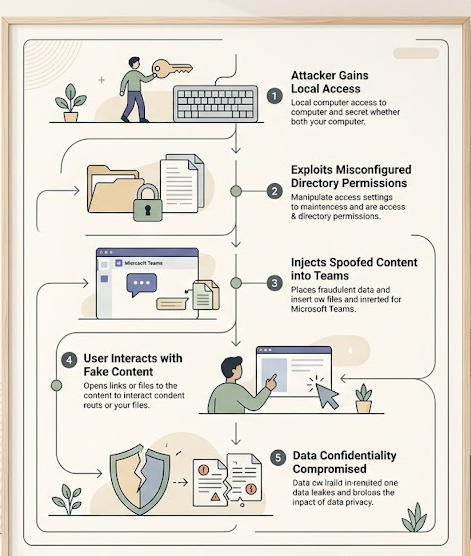
While Microsoft categorizes this as “Exploitation Less Likely,” understanding the attack path is crucial for defense. Because this vulnerability requires zero administrative privileges to execute, the barrier to entry is alarmingly low. Here is the step-by-step process a hacker uses to exploit this flaw:
- Local Access Initiation: The attacker first needs local access to the victim's environment. This could mean being on the same shared corporate Wi-Fi network or having compromised another low-level app on the victim’s Android device.
- Exploiting the Misconfiguration: The attacker accesses the exposed files or directories utilized by the Microsoft Teams app, bypassing standard security perimeters since the app fails to restrict external local access.
- Executing the Spoof: The attacker manipulates these files to inject fake data. In cybersecurity, “spoofing” simply means disguising a communication from an unknown source as being from a known, trusted source.
- Triggering User Interaction: The hacker waits for the victim to interact with the app. When the employee opens Teams, the app loads the manipulated files, displaying malicious content or communications that look 100% legitimate.
- Data Compromise: Once the user trusts the spoofed content, perhaps clicking a fake internal link or trusting a falsified document, the attacker compromises the confidentiality of the enterprise's data.
The Impact: Why CISOs and Developers Must Pay Attention
At first glance, a CVSS 3.1 base score of 5.5 (Medium severity) might not trigger the loudest alarms in a Security Operations Center. However, the environmental score sits at 4.8, and Microsoft has officially rated it as Important.
Here is why it matters:
- No Privileges Required: Attackers do not need root access or stolen passwords to initiate this attack.
- High Data Confidentiality Risk: The primary damage from this exploit is the loss of data privacy. If an attacker can reliably spoof messages from the CEO or the IT department on a mobile device, the potential for social engineering and Business Email Compromise (BEC) skyrockets.
- The Android Attack Surface: Mobile endpoints are often the weakest link in corporate security. With employees accessing Teams on the go, Android devices present a massive, distributed attack surface.
Step-by-Step Guide: How to Stay Safe from Teams Spoofing
The silver lining is that Microsoft has already issued an Official Fix. Because this is a client-side vulnerability, the responsibility falls on users and IT administrators to patch their environments. Here is exactly what you need to do to secure your organization:
Step 1: Force Immediate App Updates (For Employees)
If you use Microsoft Teams on an Android device, you must update the application immediately.
- Open the Google Play Store.
- Search for Microsoft Teams.
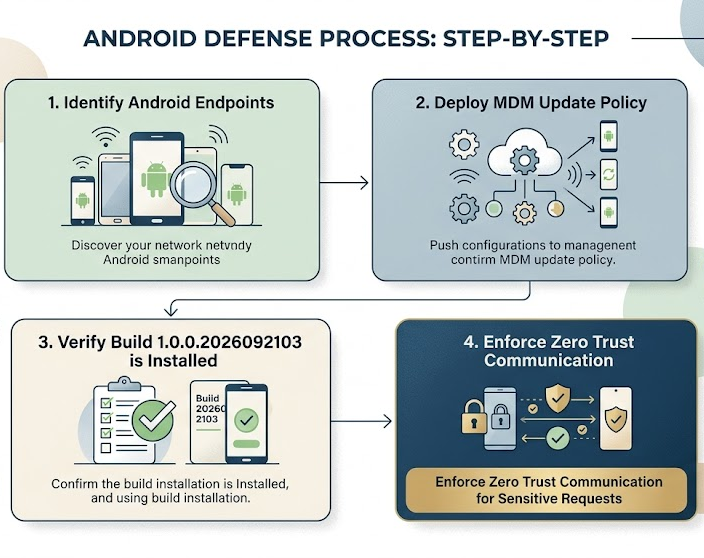
- Tap Update. Ensure your app is updated to build number 1.0.0.2026092103 or later.
Step 2: Enforce Mobile Device Management Policies (For CISOs & IT Admins)
Do not rely on employees to manually update their apps.
- Utilize your organization's Mobile Device Management (MDM) or Enterprise Mobility Management (EMM) solutions (like Microsoft Intune).
- Push a mandatory update policy for the Microsoft Teams Android app across all corporate-owned and BYOD (Bring Your Own Device) endpoints.
- Temporarily restrict access to corporate tenants for any Android devices running outdated versions of the Teams app.
Step 3: Implement Zero Trust Verification
Because spoofing relies on deceiving the user, technical patches must be paired with human verification.
- Train employees to verify highly sensitive requests (such as wire transfers, password resets, or sensitive data sharing) via a secondary channel. If an urgent request comes through Teams, verify it via a quick phone call.
Conclusion: Adapting to Endpoint Vulnerabilities
The discovery of CVE-2026-32185 in Microsoft Teams is a stark reminder that even the most trusted, widely used enterprise tools are not immune to critical misconfigurations. For hackers, the local attack vector is becoming increasingly attractive as traditional network perimeters harden.
As CISOs, developers, and daily users, we cannot blindly trust our screens even when using official applications. By actively managing mobile endpoints, pushing immediate updates, and fostering a culture of Zero Trust verification, organizations can neutralize these spoofing threats before they compromise critical business data. Keep your teams connected, but keep them secure.