Over the weekend of April 18 and 19, 2026, people browsing Seiko USA's corporate site did not get the usual press updates. The Press Lounge section had been replaced with a blunt defacement and an "urgent security" style message. The page said the site was compromised. It also made a much bigger allegation: that attackers had reached Seiko's Shopify backend and taken the company's entire customer database.
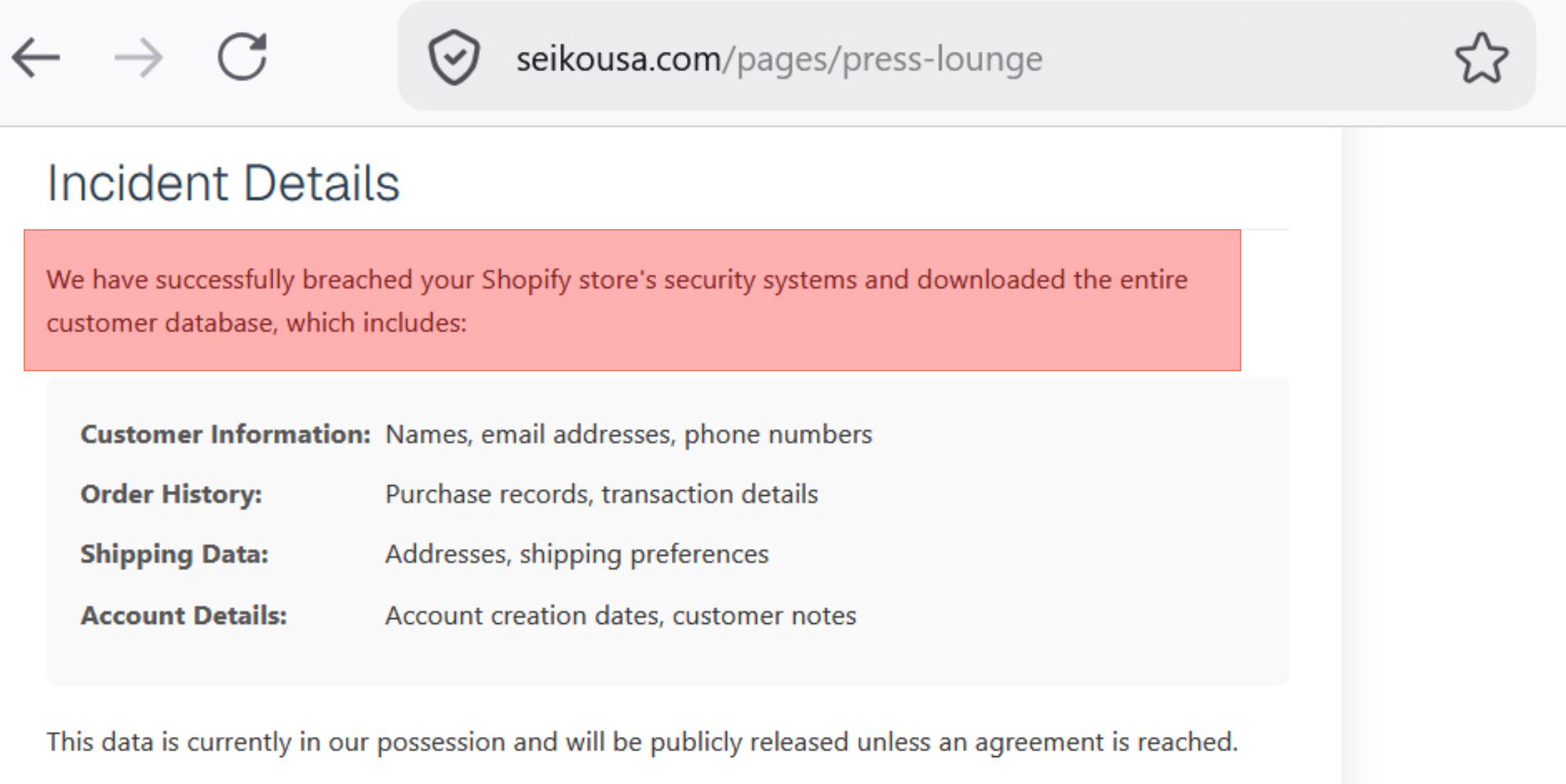
That second part is not the same as graffiti on a webpage. If it were true, it would be a full ecommerce incident: regulated data, customer trust, law enforcement, and a messy recovery path. If it were false or exaggerated, it would still be a serious lesson in how modern attacks mix public drama with unverified extortion claims.
Here is the clean read on what we can treat as fact, what we should treat as allegation, and what you should check in your own Shopify stack before you learn about it from a headline.
What Actually Happened in Public
The part we can anchor on is simple. Unauthorized content appeared on a customer facing section of Seiko USA's website. Visitors saw a HACKED style message instead of normal Press Lounge material. That is website defacement. It means someone had enough access to publish through whatever pipeline feeds that section, whether that was a CMS account, a marketing integration, a compromised credential on a third party tool, or something else in the chain.
After the story spread, reporting from outlets including BleepingComputer and TechRadar noted that Seiko USA removed the message and restored the Press Lounge. So the visible incident ended the way most defacements end: the page got cleaned up.
The harder question is what happened behind the scenes.
What the Attackers Claimed About Shopify
The defacement text did not stop at "we broke your news page." It claimed access to Seiko's Shopify environment and exfiltration of a complete customer database. The alleged data categories matched what criminals usually brag about after a real commerce breach: names, emails, phone numbers, order history, shipping addresses, and account style metadata.
The message also included a ransom style clock. Multiple reports summarized it as a roughly 72 hour window for Seiko to begin negotiations, with an implied threat that the database could be sold or published.
One detail showed up again and again in coverage, and it is worth treating as a teaching moment even if the broader breach claim never gets confirmed. The attackers allegedly told Seiko administrators to open Shopify, find a specific customer profile by ID, and use a contact email they claimed to have added to that record as the negotiation channel. Reporting consistently referenced customer ID 8069776801871.
If that instruction reflected reality, it would be a nasty operational tell. It suggests tampering inside the merchant's customer records, not just a static page swap on the marketing site. It also suggests a channel that looks "internal" to a busy team, which is exactly where social engineering and missed alerts thrive.
Why Shopify Keeps Showing Up in Headlines
Shopify is a high value control plane. Admins, apps, tokens, themes, and exports all sit next to PII and money movement. One weak session or over scoped app can do outsized damage, which is why "we hit your Shopify" reads plausible even when the public evidence is only a defaced page. Your response plan should start from logs, not from the headline.
What You Should Verify in Your Store This Week
You do not need to work at a watch brand to copy the checklist. If you run commerce on Shopify or any hosted stack with a rich admin, walk through these items on a calendar rhythm, not only when you panic.
Audit admin users and staff accounts. Remove people who no longer need access. Enforce MFA everywhere it is supported. If someone says MFA is annoying, compare that annoyance to explaining a breach to customers. Shopify’s own walkthroughs cover creating and managing staff, turning on two-step authentication, and requiring two-step for everyone in the organization.
Review installed apps and integrations. Uninstall what you do not recognize. Read scopes like you read a contract. An app with broad customer read permissions is a data exfiltration tool if its token walks out the door. Use Shopify’s working with apps guide and the account security best practices page, which calls out third-party app risk explicitly.
Look for customer profile anomalies. Random email addresses on high value or dormant accounts, odd internal notes, tags you did not create, and sudden bulk exports are all worth treating as signals. If your team only notices those changes because a ransom note points at a specific customer ID, you waited too long. Pair manual review with Shopify’s fraud analysis on orders and their notes on importing and exporting customers, since bulk exports are a common exfiltration path to audit.
Separate marketing surfaces from commerce control. Press pages should not be a soft path into panic. If your marketing site and your store share credentials, sessions, or sloppy OAuth links, you increase blast radius. Shopify’s store security overview is a practical starting point; for architecture-level thinking about who can publish or change what, skim OWASP’s Authorization Cheat Sheet.
Prepare three comms templates before 2 a.m.: confirmed compromise, confirmed incident without data loss, and active investigation. Legal and support should agree on language before an attacker writes your press release for you. In the United States, the FTC publishes a plain-language Data Breach Response: A Guide for Business. If GDPR applies, use the UK ICO’s Personal data breaches guidance for notification expectations and timelines.
Where Axeploit Fits
Seiko is a wake up call. Checking your own storefront and integrations is a different job than reading the news. Manual log review finds what you already thought to search for. It does not replay what an attacker tries next week.
Axeploit's AI agents probe authorization boundaries and risky workflows the way an attacker would. You submit a URL. The fleet runs without asking you to tune scanners or decode CVE spreadsheets.
If you ship commerce, treat the admin panel as part of your attack surface, not as someone else's problem. Run the checklist, then let an autonomous test show you what you missed.
Scan your app now: https://panel.axeploit.com/signup