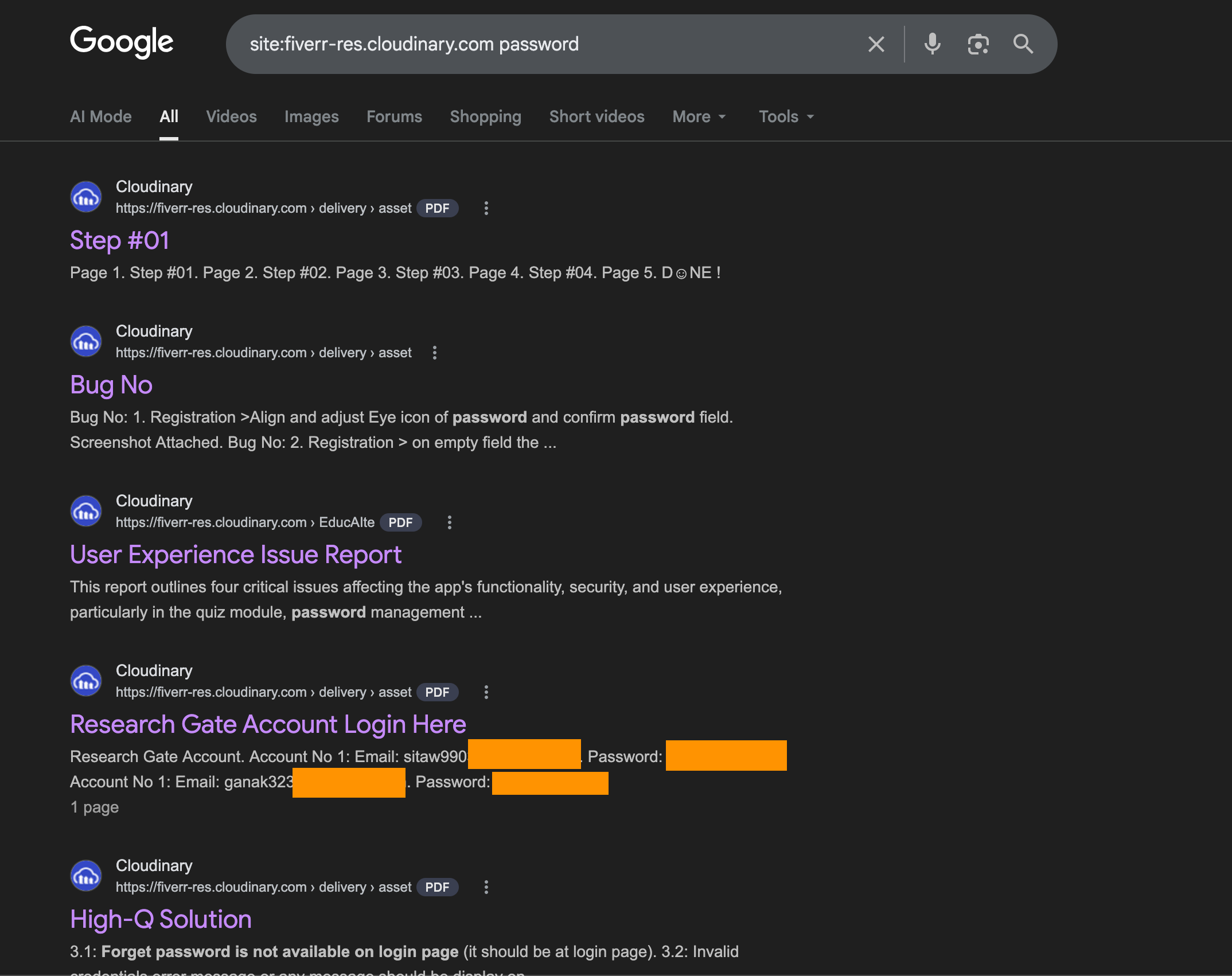
Type this into Google:
site:fiverr-res.cloudinary.com passwordYou'll find PDFs containing admin passwords to live servers. VPN credentials for corporate networks. Root login details for AWS instances. Database connection strings with plaintext passwords baked in. API keys for production environments. All sitting in Google's search index, all accessible to anyone with a browser.
This isn't a theoretical attack. Fiverr's entire file delivery system uses public, unsigned Cloudinary URLs. Every PDF and image exchanged between freelancers and clients through Fiverr's messaging got a permanent public link. Google crawled those links and indexed the contents.
Try a few more dorks:
site:fiverr-res.cloudinary.com "admin" "password" filetype:pdfsite:fiverr-res.cloudinary.com vpn credentialssite:fiverr-res.cloudinary.com "root" "ssh"The results are real. People who hired freelancers through Fiverr handed over server credentials, VPN configs, admin panels, and API keys in shared PDFs. Every one of those documents is now searchable on the open internet.
How Server Credentials Ended Up on Google
The workflow is straightforward. A business owner hires a freelancer on Fiverr to set up their WordPress site, configure their VPN, manage their AWS infrastructure, or fix a database issue. To give the freelancer access, they send a PDF through Fiverr's messaging with the credentials: server IP, username, password, SSH key, or VPN config file.
Fiverr uses Cloudinary to process and serve these files. Cloudinary supports signed URLs with expiration, the same way S3 presigned links work. Fiverr chose not to use that feature. Every file gets a permanent public URL with no authentication, no expiration, and no access control.
Somewhere in their platform, HTML pages reference these file URLs in a way Google's crawler can follow. The crawler found the URLs, fetched the PDFs, indexed the text inside them. Now a Google search returns the contents.
The researcher reported this to Fiverr's security team 40 days before going public. No response. Hours after the Hacker News post hit 600+ points, the files were still live.
Why Credentials in Shared Files Are an Attacker's Goldmine
A leaked password in a PDF is worse than a leaked password in a database breach. Here's why.
Database breaches typically expose hashed passwords. An attacker still needs to crack the hash, and modern bcrypt or argon2 hashes take serious compute. A password in a PDF is plaintext. No cracking needed. Copy, paste, log in.
Credentials shared in project handoff documents usually come with context. The PDF doesn't just say "password123." It says "Server: 45.33.xx.xx, User: root, Password: [plaintext], Port: 22." That's a complete access package. The attacker doesn't need to figure out what the credential is for. The document explains it.
Most of these credentials are never rotated. The freelancer finishes the job. The business owner moves on. The password stays the same for months or years. The Fiverr message thread sits in their account history, and the PDF sits on Cloudinary's CDN, indexed and waiting.
This is what makes Google dorking so effective. You don't need to break into anything. You search for documents that contain credentials, and the search engine hands them to you. The attack surface isn't a vulnerability in code. It's a misconfiguration in how files are stored and served.
Your App Probably Has the Same Problem
If your application lets users share files, you should be asking one question: can someone outside the conversation access those files by URL alone?
Vibe coders hit this pattern constantly. You prompt for "add file sharing between users" and the generated code drops files into a public S3 bucket or serves them through a CDN with no access checks. The upload works. The file renders in the UI. Everything looks correct. The authorization is missing entirely.
A Google dork against your own domain is the fastest sanity check. Try:
site:yourdomain.com filetype:pdfsite:your-bucket.s3.amazonaws.comIf anything sensitive shows up, you have the same class of vulnerability Fiverr has. The files are public. The URLs are permanent. And Google is indexing them.
What Axeploit Catches Automatically
The Google dork approach is manual. You type queries, scan results, check files one by one. It tells you what's already exposed but not what could be exposed tomorrow.
Axeploit's AI agents take the attacker's approach and run it against your entire application automatically. They probe file storage endpoints for public access. They test whether uploaded files are reachable without authentication. They check for predictable URL patterns that an attacker could enumerate. They attempt to access files belonging to other users by manipulating identifiers. And they flag every instance where a file that should be private is accessible to the outside world.
No configuration. No security expertise required. You submit your URL and a fleet of AI agents does what the Hacker News crowd did to Fiverr, except they do it to your app before an attacker does.
Fiverr's credentials are still on Google. Don't let yours be next.
Scan your app now: https://panel.axeploit.com/signup
[At the time of writing, Cloudinary file permissions have been updated.]