Attackers started exploiting CVE-2026-32475 on August 19, 2026, the same day Elementor shipped the fix. Between that day and August 23, Wordfence blocked more than 190,000 exploitation attempts, and the total since is closing on 200,000. If your site ran Elementor Pro 4.2.1 or earlier during that window, updating is the second thing you should do. The first is checking whether someone got there before you.
Exploitation started the same day the fix shipped
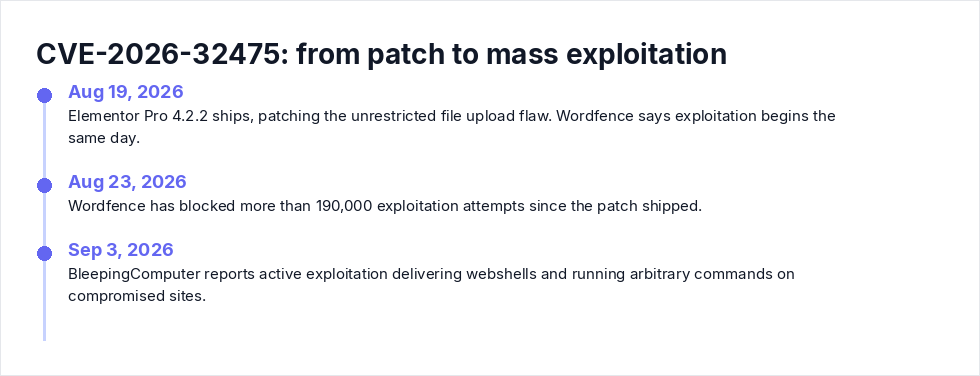
The timeline matters here, so let me lay it out.
Elementor Pro 4.2.2, released August 19, patches an unrestricted file upload flaw (CWE-434) in a plugin with more than 6 million active installations. Wordfence says exploitation began that same day. By September 3, BleepingComputer was reporting active exploitation delivering webshells and running arbitrary commands on compromised sites.
A public proof of concept is on GitHub. The bug was reported by Tin Pham (TF1T) through the Patchstack Bug Bounty program, and a second CVE assignment, CVE-2026-17590, was rejected as a duplicate. The CNA scored it CVSS 9.0 (CVSS:3.1/AV:N/AC:H/PR:N/UI:N/S:C/C:H/I:H/A:H). NVD has not published its own assessment. Do not let the AC:H in that vector comfort you. "High attack complexity" did not stop a quarter million blocked attempts in under a week, because the PoC absorbs the complexity for the attacker.
One CVE database tracks ten known issues for Elementor Pro. This is not a plugin that gets attacked once and forgotten.
The bug: one loop bails, the other obliges
You need the mechanics to understand the detection steps, so here is the short version.
Two loops in modules/forms/fields/upload.php disagree about your upload. The attacker submits the form's File Upload field as an array: an empty first element, a PHP payload as the second. The validation() method hits the empty entry (UPLOAD_ERR_NO_FILE) and aborts entirely, never inspecting file two. The process_field() method, on the other hand, politely skips the empty entry and moves the .php payload into wp-content/uploads/elementor/forms/ under a uniqid()-based filename, keeping the attacker-supplied extension.
Delivery is a POST to /wp-admin/admin-ajax.php with action=elementor_pro_forms_send_form. Per the PoC documentation, no authentication and no nonce. The post_id, form_id, and upload field name sit in the public page HTML. The only precondition is a published page with a Form widget containing a File Upload field, which BleepingComputer describes as a common configuration.
Two details make the filename problem worse. Patchstack notes that uniqid() output is time-derived and potentially guessable, and that in some configurations the exact file URL leaks through form autoresponder emails. The attacker does not need directory listing. They request the shell directly, and that request shows up in your access log. Remember that. It is your best signal.
"My form had a required field and CAPTCHA." Check anyway.
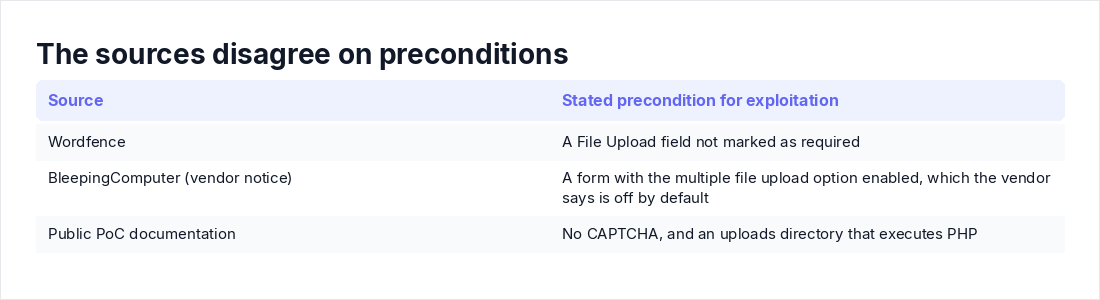
The sources genuinely disagree on preconditions. Wordfence says exploitation requires a File Upload field not marked as required. BleepingComputer, citing the vendor's notice, says the risk applies to forms with the multiple file upload option enabled, which the vendor says is off by default. The PoC adds no CAPTCHA and an uploads directory that executes PHP.
You could spend an afternoon reconstructing your exact form configuration from August, or you could spend ten minutes looking for the shell. One of those settles the question.
The check the advisories skip: are you already hosting a shell?
PHP files where only PDFs and images belong
The forms directory stores legitimate submissions: images, PDFs, résumés. BleepingComputer's reporting is blunt about this: a PHP file in /wp-content/uploads/elementor/forms/ is a strong indicator of compromise and should trigger cleanup.
# Executable files anywhere in the uploads tree (adjust to your docroot)
find /var/www/html/wp-content/uploads -type f \
  \( -iname "*.php" -o -iname "*.phtml" -o -iname "*.phar" \) -ls

# Everything written to uploads since the day before the patch
find /var/www/html/wp-content/uploads -type f -newermt "2026-08-18" | less
On a healthy site the first command returns nothing, or close to it. Read whatever you find. An empty or near-empty file is usually benign. Anything with eval, base64_decode, shell_exec, or a $_REQUEST gate is not. The second command bounds your review to the exposure window, which keeps a site with years of uploads manageable.
The access-log pattern: one POST, then a GET with a random filename
The exploit is a two-step. POST to the form handler, then GET the dropped file to run commands. POST bodies are not logged by default, but the GET is, random filename and all.
# Who hit the Elementor Pro form endpoint
grep "elementor_pro_forms_send_form" /var/log/apache2/access.log \
  | awk '{print $1}' | sort | uniq -c | sort -rn | head -20

# Anyone executing PHP out of the forms upload directory
grep -E "GET /wp-content/uploads/elementor/forms/[^ ]*\.ph" \
  /var/log/apache2/access.log
Adjust paths for nginx (/var/log/nginx/access.log) and check rotated logs with zgrep if your retention is short. The pattern you are hunting is the same source IP POSTing to admin-ajax.php and then, seconds or minutes later, GETting a .php file under the forms directory with a 200 response. A 200 on that GET means the shell executed. Treat it as confirmed compromise. Wordfence has also published IPs behind thousands of attacks, which are worth adding to blocklists and worth grepping your historical logs against.
Admin users, cron events, core checksums
A shell that landed weeks ago has had time to dig in. Three WP-CLI commands cover the common persistence moves:
wp user list --role=administrator
wp cron event list
wp core verify-checksums
Any administrator you do not recognize, any wp-cron event you did not schedule, any core file that fails checksum verification: assume full compromise. Elementor Pro itself is a premium plugin, so wp plugin verify-checksums cannot validate it against wordpress.org. Download a clean copy from your Elementor account and diff against what is on disk.
What the PHP process is doing right now
The shell runs with the privileges of your PHP-FPM or web server user, which means it can read wp-config.php, walk into your database, and call out to command infrastructure. SentinelOne's guidance for this CVE points at exactly that telemetry: the PHP process spawning sh, bash, or python, and outbound connections from PHP to IPs you do not know. A quick look:
ss -tup | grep -i phpAnything listening or dialing out that you cannot explain deserves scrutiny. If you have an EDR or forward web and PHP-FPM logs to a SIEM, this is the query to run there. The same triage order applies here as in any supply-chain alert: establish whether you are hit before you declare yourself patched.
Found a shell? Contain first, delete second
Do not just rm the file and move on. Copy it somewhere safe, record its timestamps, and pull every log covering the window around its creation time. Then block the file's URL at the web server or take the site to maintenance while you work.
Rotation is mandatory, because the shell could read your configuration: WordPress administrator passwords, the database credentials in wp-config.php, and any API keys stored there. Regenerate the WordPress salts and keys too, which kills every active session. Audit the user tables and cron again after cleaning.
My position on rebuilds: if the shell was reachable for more than a day or two, restore from a backup that predates the first malicious POST. Manual cleanup of a site an attacker has lived on for weeks is a confidence game you usually lose. And obviously, if you have not already, update to 4.2.2. Just remember Patchstack's warning: the update removes the vulnerability, not anything uploaded through it.
Why the patch window keeps failing, and what actually works
Same-day exploitation, a public PoC, six million installs. Manual plugin update cadences, the weekly batch, the staging review, the fear of breaking a client's page layout, lose that race every single time. This is not a discipline problem you can exhort away, and AI-assisted exploit development is compressing the window further. When exploit code goes from disclosure to GitHub in hours, "we patch within 7 days" is not a control. It is an admission.
The deeper failure is conceptual. Teams close the ticket at "updated." But there are two windows, not one: the vulnerability window, which the patch closes, and the dwell window, which only hunting closes. Elementor Pro sits at six million installs and this is its tenth tracked issue. The next bug in it, or in any form plugin with an upload field, will follow the same script.
What actually works is a mitigation that does not care how fast you patch: never execute PHP out of the uploads tree. On Apache with mod_php, drop an .htaccess in wp-content/uploads/ with php_flag engine off. That directive does nothing under PHP-FPM, which most modern stacks run, so there you deny the files instead:
# Apache 2.4 + PHP-FPM, in server config or .htaccess
<FilesMatch "\.ph(p|tml|ar)$">
    Require all denied
</FilesMatch># nginx
location ~* ^/wp-content/uploads/.*\.ph(p|tml|ar)$ {
deny all;
}Wordfence users get the same effect from the "Disable Code Execution for Uploads directory" option, which Wordfence says blocks these attempts outright. And if you are ever caught unpatched again, blocking unauthenticated access to the form endpoint at a WAF is a valid break-glass move. It kills form submissions until you roll it back, which is exactly the point.
Had every Elementor site run with uploads execution disabled, this CVE would have been a non-event. That is the standard to hold your stack to.
Checking one site by hand takes fifteen minutes. Checking a fleet of client sites every time a plugin CVE drops is a different problem, and it is where the gap between annual pentests gets expensive. If the gap here is coverage between annual tests, Axeploit's pentest workflow is the product page that matches this article.
Key takeaways
- Update to Elementor Pro 4.2.2, but treat the patch as step two. It does not remove webshells already dropped through the flaw.
- Any
.php,.phtml, or.pharfile underwp-content/uploads/elementor/forms/is a strong indicator of compromise. Pair thefindwith access-log greps for the POST toelementor_pro_forms_send_formfollowed by a GET to a new file. - Check persistence before declaring victory: unexpected admin users, new wp-cron events, core files that fail checksum verification.
- If you find a shell, rotate admin passwords, database credentials, and wp-config.php API keys. If dwell time was more than a couple of days, rebuild from backup.
- Permanently deny PHP execution in the uploads directory. It neutralizes this entire bug class, not just this CVE.