An attacker does not need your password or your MFA to become an administrator on your WordPress site right now. They need a vulnerable version of the miniOrange SAML 2.0 SSO plugin and two chainable bugs, CVE-2026-61979 and CVE-2026-15981, that let them forge a SAML response the plugin accepts as authentic. The free edition's users got a fix and a public advisory in July. The six paid editions got fixes with no advisory at all, and their WordPress dashboards still show no update warning. Exploitation attempts are already underway, and on August 16 DigitalOcean blocked a real forged admin session. This is the triage, detection, and cleanup guide that the disclosure coverage skipped.
Start here: which edition and version are you actually running?
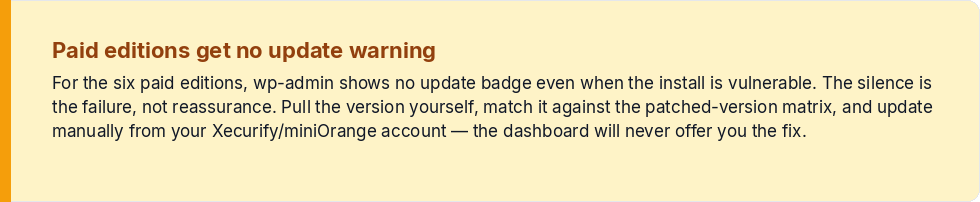
The plugin family, built by Xecurify, is not one plugin. It is seven distinct, independently versioned editions distributed under a single WordPress slug. The free edition has about 10,000 downloads; the six paid editions account for roughly 30,000 customers, and those customers are the ones most likely to be exposed right now, because nothing in wp-admin told them to move.
Do not trust the Plugins page. For the paid editions, no update badge will appear even if you are vulnerable. Pull the version yourself, from the plugin's settings screen or from the command line:
wp plugin list --format=tableFind the miniOrange entry and note the exact version string. Because each edition has its own numbering line, the version usually tells you which edition you have.
The patched-version matrix nobody consolidated
| Edition | Patched at |
|---|---|
| Free, single site | 5.4.5 |
| Premium, single site | 13.0.4 |
| Standard, single site | 17.06 |
| Premium / Enterprise / All-Inclusive, multisite | 20.2.8 |
| Enterprise / All-Inclusive, single site | 26.0.3 |
| VIP, single site | 32.0.8 |
| VIP, multisite | 35.0.7 |
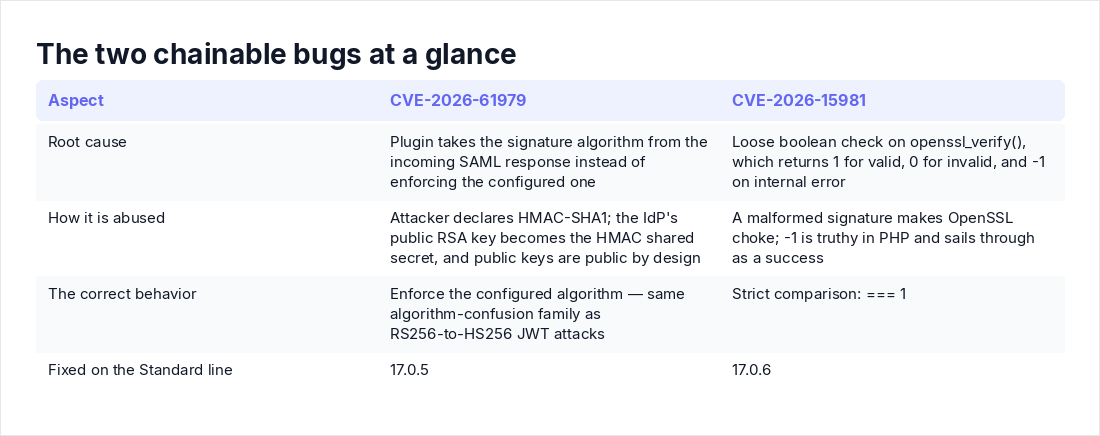
Anything below the number for your line is exposed. On the Standard line specifically, 17.0.5 fixed the signature-algorithm bug (CVE-2026-61979) and 17.0.6 fixed the OpenSSL error-handling flaw (CVE-2026-15981); the 17.06 figure in public reporting is the same release. A third, less severe bug requiring administrator interaction was also disclosed with no public technical detail, so go to the latest release for your edition rather than stopping at the floor.
The first hour: patch it, or shut it down cleanly
If you run the free edition, update normally and verify the version afterward. If you run a paid edition, log into your Xecurify/miniOrange account, download the current build, and install it manually. Patchstack has warned that the dashboard will not offer you this update. Waiting for it is how you stay vulnerable.
If you cannot patch today, deactivate the plugin. Set a local password on at least one admin account first, or you will lock yourself out:
wp user update youradminuser --prompt=user_pass
wp plugin deactivate <miniorange-slug>
Deactivating drops you back to WordPress password authentication, so make sure those passwords are strong. That is still a far better position than an open forgery endpoint.
Now the step almost everyone misses: kill every live session. The exploit produces a session cookie, and updating the plugin does nothing to cookies already issued. WordPress invalidates all sessions when its salts change:
wp config shuffle-saltsFollow that with password resets for every administrator. It is cheap insurance even if you believe you are clean.
The hunt: did someone get in before you patched?
The strongest signal: an admin session with no IdP login
A legitimate SAML login has a shape: the user gets redirected to your identity provider, authenticates there, and the IdP posts a signed response back. A forged login skips the IdP entirely. The attacker posts a crafted response directly to the site, and your identity provider never sees a thing.
So reconcile the two sides. Pull sign-in logs from Microsoft Entra ID, the Okta System Log, Google Workspace login audit, or OneLogin events for the past several weeks, and compare them against administrator activity on the site. Every genuine SSO login to WordPress should have a matching IdP event naming that application. An admin session, a settings change, or a new account with no corresponding IdP authentication is your smoking gun. This is exactly how DigitalOcean caught its incident: an administrator session originating outside its trusted network, traced back to a chained exploit against a Standard-edition site running 16.1.9.
Web log hunting
Your access logs will not contain the forged response itself, because POST bodies are not logged by default. What you can hunt is the request metadata. First, find the ACS (assertion consumer service) path in the plugin's service provider metadata tab. Then:
grep 'POST /your-acs-path' /var/log/nginx/access.log | awk '{print $1}' | sort | uniq -c | sort -nr(Use your own log path, /var/log/apache2/access.log or wherever your server writes it.) Look for direct POSTs at odd hours, source IPs with no prior page or asset requests, and POSTs whose timing does not line up with a preceding redirect to your IdP. If the site sits behind a CDN or reverse proxy, confirm you are reading real client IPs (X-Forwarded-For, or the real_ip module), otherwise everything looks like it came from the proxy.
Patchstack has observed exploitation attempts and opportunistic scanning from six IP addresses across Europe, Africa, and the United States. Do not bother just blocking that list. It will change, and a public proof of concept targeting the free edition means volume can spike at any time.
Accounts, plugins, and files worth auditing
wp user list --role=administrator --fields=ID,user_login,user_email,user_registered --format=table
wp cron event list
Look for admin accounts you do not recognize and recent unexpected registrations. Then check the plugin's own settings: the IdP entity ID, SSO URL, and x.509 certificate should still match your real identity provider. An attacker who got admin access can swap that certificate for their own and keep signing in long after you patch. That one setting turns a one-day bug into permanent access.
Round it out with wp core verify-checksums, a review of wp plugin list and wp theme list for anything you did not install, and a look inside wp-content/mu-plugins. Checksums for the paid plugin will not exist on wordpress.org, so if you want certainty there, diff it against a fresh download from your vendor account.
One honest caveat: WordPress core keeps almost no authentication history. If you had no activity-log plugin running, your evidence is web logs, IdP logs, and whatever changed on the site. Finding nothing is reassuring. It is not conclusive.
If you find something: the short IR checklist
- Snapshot first. A VM snapshot or a full copy of files and database, taken before you clean anything.
- Update or deactivate the plugin, shuffle salts, and reset passwords for all administrators and any account active during the suspicious window.
- Rotate whatever an admin could reach: the IdP credentials and certificates configured in the plugin, API keys and SMTP credentials stored by other plugins, and database credentials if you find webshells.
- Remove rogue users, rogue plugins, and unexpected cron events. If file integrity is in doubt, restore from a backup dated before the earliest suspicious log entry, then patch again.
- Watch for re-entry for at least two weeks. The scanning is opportunistic, and your site was already on someone's list.
How the two bugs work, and why they chain so well
CVE-2026-61979: your public key becomes the attacker's signing secret
The plugin took the signature algorithm from the incoming SAML response instead of enforcing the one you configured. An attacker declares HMAC-SHA1. The plugin then verifies the signature as an HMAC, using the IdP's RSA public key as the shared secret. Public keys are public by design, so anyone on the internet can compute an HMAC that validates. Forge an assertion that says "I am the site administrator," sign it with the public key, and the plugin accepts it. This is the same algorithm-confusion family as the old RS256-to-HS256 JWT attacks. The wrapper is SAML this time; the mistake is identical.
CVE-2026-15981: when an error code passes as "valid"
PHP's openssl_verify() returns 1 for a valid signature, 0 for an invalid one, and -1 when OpenSSL itself hits an internal error. The plugin's mo_saml_validate_signature() used a loose boolean check, essentially this pattern:
if (openssl_verify($data, $signature, $key)) {
    // treated as valid
}
In PHP, -1 is truthy. A malformed signature that makes OpenSSL choke returns -1 and sails through as a success. The correct check is a strict === 1. Put the two bugs together and you get what DigitalOcean observed in the wild: a forged response converted into a genuine administrator session cookie. Some vulnerability listings score these at 9.8, though that figure has not been corroborated across primary coverage. Either way, the number does not change what you do next.
"My scanner says I'm clean" and other reasons this will linger
Three beliefs will keep sites exposed. First, "no update in wp-admin, so I must be patched." For the paid editions, the absence of a warning is the failure, not the reassurance. Second, "my vulnerability scanner reports the plugin as unaffected." DigitalOcean noted that because all seven editions share a single slug, scanners and vulnerability databases keyed to the free edition's version line frequently reported paid installations as safe when they were not. Trust the matrix, not the scanner. This is the same failure mode that makes point-in-time, database-keyed scanning so unreliable, and it is exactly why we argue for a continuous threat exposure pipeline over scan-and-forget.
Third, "WordPress plugin CVEs are weekly noise." Usually a fair position. Here there is a public PoC, active scanning, and a documented real-world admin compromise. This one sits above the noise line.
There is also a bigger lesson. The moment you delegate login to a plugin, that plugin becomes part of your identity perimeter, with full power to say who is an administrator. We see the same pattern across third-party SaaS integrations generally: the connector you installed to make life easier is the way in.
Bugs like these live in the auth handshake itself, in how signatures get verified and sessions get issued, which is precisely where version-matching scanners go blind. If you want the auth and object-level checks in this article run against a live app, start with Axeploit's API security checker.
Key takeaways
- Treat every miniOrange SAML SSO install as suspect until you have matched its edition and version against the matrix by hand. Dashboards and scanners misreport the paid editions.
- Below the patched line: update manually from your Xecurify account, or deactivate after setting local admin passwords. Then shuffle salts and reset admin credentials, because patching does not revoke forged sessions.
- The most reliable detection is a cross-check: any WordPress admin session or admin action with no matching event in your IdP's sign-in logs indicates a forged response.
- On any sign of compromise, snapshot, revoke sessions, rotate IdP and stored plugin secrets, audit users, files, and cron, and restore from a pre-incident backup if integrity is uncertain.
- Exploitation is active, a public PoC exists, and the August 16 incident on Standard 16.1.9 shows this is not theoretical.