When the ua-parser-js maintainer's npm token was stolen in October 2021, the poisoned release sat live for about four hours. npm audit reported zero vulnerabilities during those four hours, and zero on every day before that, for a package with 7 million weekly downloads used by Facebook, Microsoft, Amazon, and Google. If your incident plan starts with "run the scanner," you do not have an incident plan.
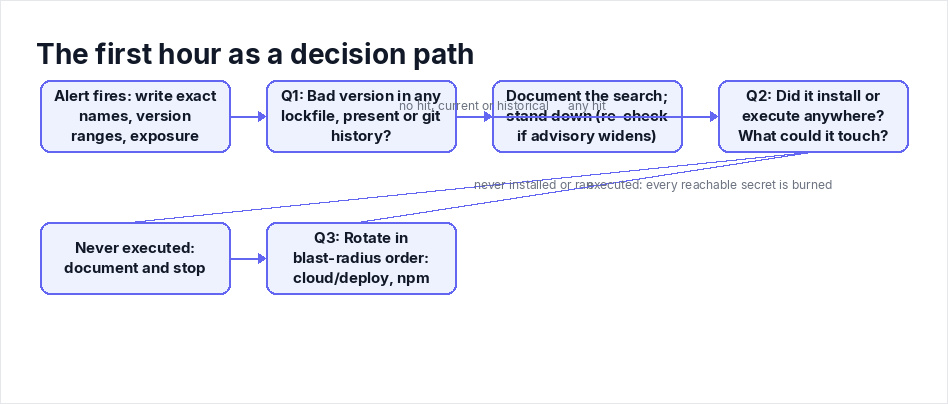
This is the playbook for the hour after the alert fires. Three questions, in a fixed order: Is a bad version in our lockfile? Did it actually execute anywhere? Which secrets rotate first? Everything else waits.
Minute 0 to 10: Get the advisory's real scope, not the headline's
Headlines blur scope, and the scope determines what you search for. When two malicious packages impersonating Axios were caught on March 31, 2026 (a campaign Microsoft Threat Intelligence attributed to Sapphire Sleet, a North Korean state actor), Axios itself was never backdoored. Teams that spent their first hour auditing a clean HTTP client with 70 million weekly downloads wasted it; teams that searched for the two fake package names did not.
Before you touch a terminal, write three things at the top of a shared doc: exact package names, exact affected version ranges, and the exposure window with timestamps. TanStack's incident involved 42 packages and 84 malicious versions. The @redhat-cloud-services compromise on June 1, 2026 hit at least 32 packages across 96 versions. You cannot triage "the npm thing." You can triage a list.
Question 1 (minutes 10 to 25): Is a bad version in any lockfile, present or past?
Your package.json is lying to you. A semver range tells you what could install; the lockfile is the only record of what did install on a given Tuesday. Poisoned releases usually look like a routine patch bump, so start from the lockfile, in every repo that has one.
# what's resolved right now (lockfileVersion 2/3)
node -e "const l=require('./package-lock.json');
  for (const [p,m] of Object.entries(l.packages||{}))
    if (p.includes('node_modules/PACKAGE_NAME')) console.log(p, m.version);"

# who depends on it (transitive inclusion shows up here)
npm ls PACKAGE_NAME
Search history, not just HEAD
This is the step most teams skip, and it is where incidents get missed. The malicious version may have been installed during the exposure window and then replaced by a "fix" bump yesterday. A clean current lockfile does not clear you, because credential theft happened at install time, weeks ago.
# commits that touched the package's lockfile entry
git log --oneline -G'"node_modules/PACKAGE_NAME"' -- package-lock.json

# inspect what was resolved during the advisory window
git show <commit>:package-lock.json | grep -A2 '"node_modules/PACKAGE_NAME"'
Search everywhere the package could live: service repos, internal apps, dev tooling, staging and production pipelines, and your artifact repository if you vendor tarballs. Remember that the malice often sits several levels deep in the tree, which is why npm ls matters more than a grep of your direct dependencies.
Decision rule: no lockfile, artifact, or image ever contained a listed version, then you document the search, set a reminder to re-check if the advisory widens, and stand down. Any hit, historical or current, moves you to question 2.
Question 2 (minutes 25 to 45): Did it actually run, and what could it touch?
A version sitting in a lockfile is exposure. A version that executed is a breach. The difference decides how much of your night this takes, so do not conflate them.
Execution happens in three places, and you need an answer for each. Install-time payloads fire through preinstall, install, and postinstall lifecycle scripts, which is where most npm malice hides. Runtime payloads fire on require() or import, which means --ignore-scripts does nothing for them; we dissected an import-time Linux backdoor in the RedC2 4.0 npm campaign, and it never needed a lifecycle hook. And the environment matters as much as the mechanism: a dev laptop, a CI runner, and a production build box each hold different keys.
Read the install logs like an attacker wrote them
Pull CI run logs from inside the exposure window. Confirm the install step ran, confirm which version it resolved, and check whether your pipeline uses npm ci --ignore-scripts. If it does and the payload is install-time, CI likely dodged it, but every developer who ran a plain npm install on their laptop did not. Then hunt the output itself for the tells that show up in poisoned builds: unexpected outbound requests during install, long base64 blobs, a curl ... | sh buried in the noise.
Egress is your only witness
If you have GitHub's Actions network firewall enabled (it is in technical preview and logs outbound traffic from workflow runs), grep those logs for domains outside your normal baseline. Otherwise fall back to proxy logs or VPC flow logs. On a machine you suspect, check for the indicators that keep appearing in these campaigns:
find node_modules -name '.npmrc' -o -name 'setup_*.js' -o -name 'bun_environment.js'
grep -rEl "eval\(atob|Buffer\.from\(|child_process\.exec|process\.env\.(NPM_TOKEN|GITHUB_TOKEN)" node_modules/PACKAGE_NAME
A .npmrc inside node_modules is a huge red flag. So is an install.js or setup_*.js that appeared out of nowhere, eval(atob(...)), Buffer.from(<base64>, 'base64'), and anything reading NPM_TOKEN or GITHUB_TOKEN from the environment.
Decision rule: if the package installed and executed on any system, treat every secret reachable from that system as compromised. This is not my paranoia; it is exactly what TanStack's maintainers told their users after their May 2026 compromise. If it never installed anywhere, you are done except for documentation.
Question 3 (minutes 45 to 60): Rotate in blast-radius order
Rotate everything the execution environment could reach. Since you cannot do it all in fifteen minutes, order by how fast a stolen secret converts to damage:
- Cloud and deploy credentials first. CI deploy keys, cloud tokens, anything OIDC-minted with production reach. These are usable from any machine on the internet within seconds of theft, and harvesting cloud and CI/CD secrets was the explicit goal of the May 28, 2026 campaign that pushed 14 typosquatted packages in four hours. Leaked cloud keys also stay live far longer than people assume, as we found in the 9,300 AWS keys investigation.
- npm automation tokens second. The Shai-Hulud variant behind the @redhat-cloud-services compromise was self-replicating: infected systems published backdoored packages on their own. A stolen publish token does not just hurt you, it turns your account into the next advisory your peers are triaging.
- Source-control tokens third. TanStack's root cause was a GitHub Actions trust boundary abused through
pull_request_target, cache poisoning, and OIDC token extraction, not a leaked npm token. A VCS token lets an attacker rewrite your workflows and wait. - Developer-machine material last, but do not skip it. SSH keys, personal
.npmrctokens, local cloud credentials. A separate May 2026 campaign of 33 dependency-confusion packages existed specifically to profile and fingerprint build environments for follow-on attacks. Slow does not mean safe.
One honest caveat: if you have egress logs proving nothing left the box, and the environment held no reachable secrets, you can descope. Most teams discover at this point that they have no egress logs at all. Absence of evidence is not evidence, so when in doubt, rotate.
"It is only a devDependency" and other ways to talk yourself out of this
The most common pushback I hear is that the compromised package never shipped to production, so the risk is theoretical. That inverts the actual threat. The pipeline is the target now. The @redhat-cloud-services attacker went through GitHub Actions OIDC, compromising the CI/CD system itself rather than bothering with an npm token. TanStack was cache poisoning and workflow abuse. Your devDependencies execute in exactly the two places where your most powerful credentials live: CI runners and developer machines. Production is what attackers reach through those systems, not instead of them.
The second pushback is "we pin exact versions." Good. Keep doing that. Pinning with --save-exact freezes your graph going forward, but it says nothing about what you resolved during the exposure window, which is why the lockfile history search in question 1 exists. Prevention and triage answer different questions, and tonight is triage.
After the hour: shrink the next one
Once rotation is underway, the boring checklist items genuinely earn their place: npm ci (never npm install) in CI, --ignore-scripts where your build tolerates it, provenance checks with npm audit signatures. Look at npm's staged publishing, which holds releases for approval and 2FA, and trusted publishing, which drops long-lived tokens entirely (CircleCI joined as a provider in April 2026). GitHub's June 2026 changes, safer actions/checkout defaults, a read-only Actions cache for untrusted triggers, and egress logging, all close paths that were abused in these exact incidents. And stop treating this as a once-a-year audit: a continuous threat exposure pipeline is what turns "did we ever install that version" from a panic grep into a query.
Triage answers whether the package ran and what it could steal. The follow-up question is what it could do inside the application that consumes those dependencies. If you want the same checks pointed at the app that consumes those packages, start at Axeploit.
Key takeaways
- The lockfile, not
package.jsonand not the headline, defines your exposure. Search git history, because a clean HEAD can hide a bad install from three weeks ago. - Presence is not execution. Confirm where install scripts or imports actually ran, using CI logs, egress data, and on-host indicators, before you rotate a single secret.
- If it executed, every secret in that environment is burned. Rotate cloud and deploy credentials first, npm tokens second (worms turn you into the distributor), source control third, developer machines last.
- "It is only a devDependency" is backwards: devDependencies run where the deploy credentials live, and the pipeline is now the primary target.
- Write down your answers as you go. The postmortem starts during hour one, not after it.