Most people use Nmap like a black box:
- run command
- wait
- get ports and services
That works fine until results look weird. Then you need to know what is happening under the hood.
I read through the Nmap source in projects/ and mapped the execution path. This post is the practical internal model: what Nmap does first, how it decides port states, how timing adapts, and where service and script output really comes from.
Source links
- Entry orchestration: `nmap.cc`
- Host batching and discovery: `targets.cc`
- Core scan loop and state transitions: `scan_engine.cc`
- Raw packet probe construction: `scan_engine_raw.cc`
- Connect scan internals: `scan_engine_connect.cc`
- Service/version detection engine: `service_scan.cc`
- OS detection engine: `osscan2.cc`
- NSE runtime bridge: `nse_main.cc`
1) Entry point and scan plan: nmap.cc
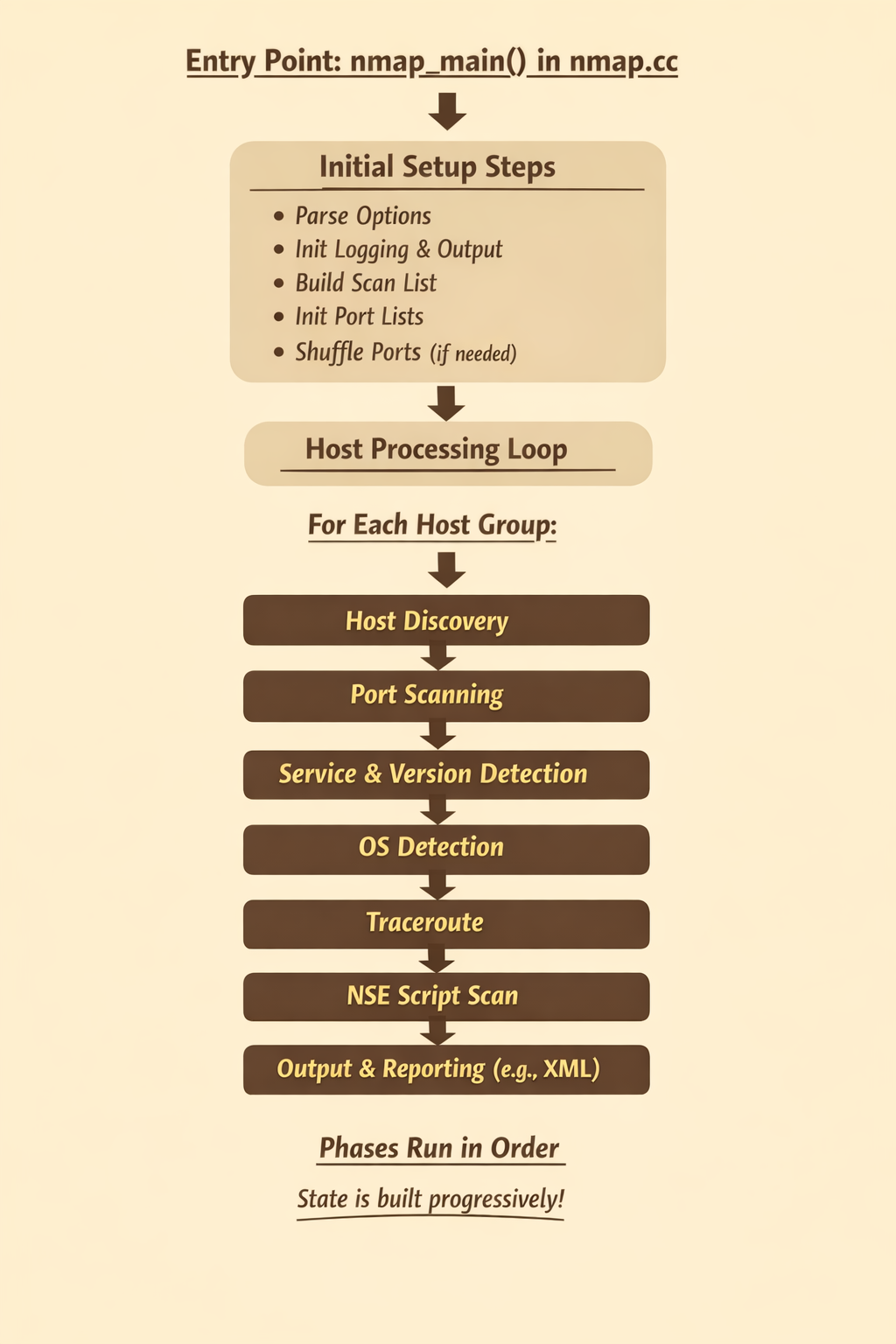
The high-level flow starts in nmap_main() in nmap.cc.
Reference: `nmap.cc` (`nmap_main`)
Nmap does a few critical setup steps before any packets move:
- parses flags into global options (
parse_options) - initializes logging and output formats
- builds the scan list (TCP/UDP/SCTP/IP protocol sets)
- initializes
PortListstate maps - shuffles ports unless you asked for fixed order
Then it enters the host processing loop.
For each host group, Nmap runs phases in this rough order:
- Host discovery and host-group preparation
- Port scan(s) via
ultra_scan(...) - Service/version detection via
service_scan(...) - OS detection via
OSScan::os_scan(...) - Traceroute (if enabled)
- NSE script scan (
script_scan(...)) - Output rendering (normal, grepable/machine, XML)
This order matters because later phases consume earlier state. Service detection only runs on discovered open ports. NSE scripts use host and port context produced by previous phases.
2) Host discovery and batching: targets.cc
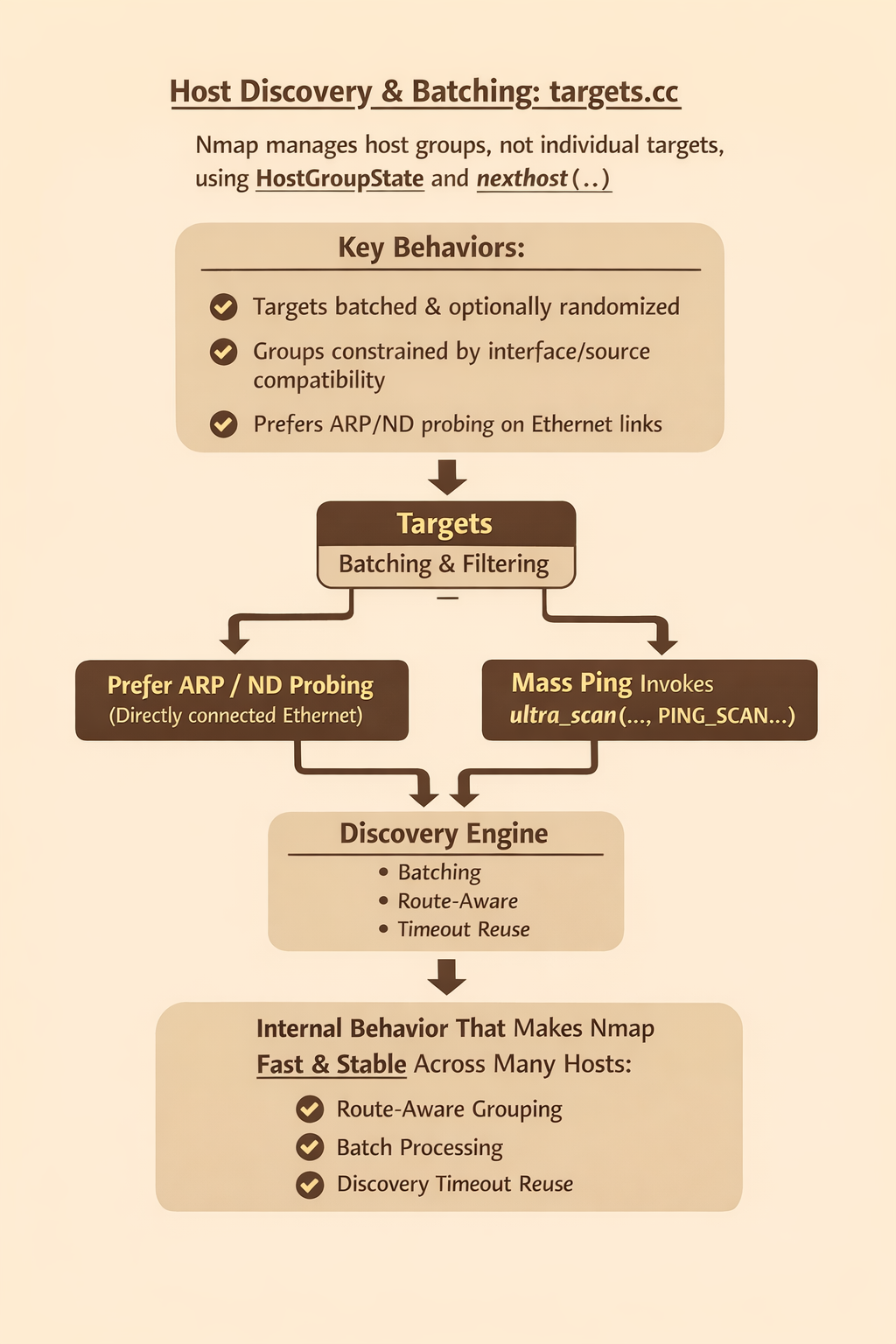
Nmap does not scan one target at a time by default. It manages host groups through HostGroupState and nexthost(...).
Reference: `targets.cc` (`massping`, `nexthost`, `HostGroupState`)
Internal behavior that is easy to miss:
- Targets are batched and optionally randomized.
- Groups are constrained by interface/source compatibility for raw scans.
- ARP or ND probing is preferred on directly connected Ethernet-style links when possible.
- If ARP/ND is not the path, Nmap calls
massping(...), which itself invokesultra_scan(..., PING_SCAN, ...).
This is one reason Nmap can feel fast and stable across many hosts. It is not just "send ping to each IP." It is batching + route-aware grouping + a discovery engine that reuses timeout knowledge across invocations.
3) The core engine: ultra_scan in scan_engine.cc
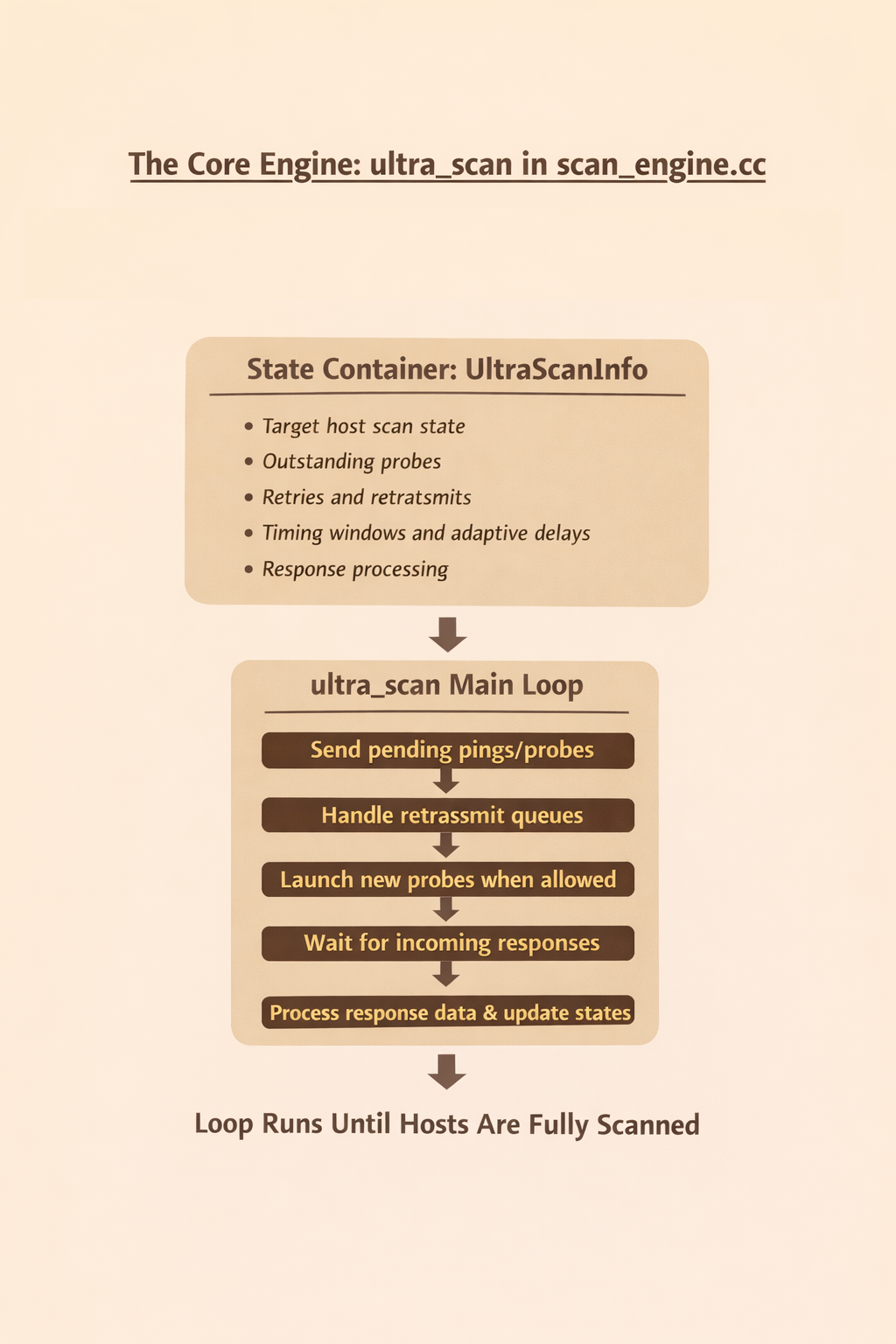
The heart of modern Nmap scanning is ultra_scan(...).
Reference: `scan_engine.cc` (`ultra_scan`)
Think of UltraScanInfo as the state container for:
- target host scan state
- outstanding probes
- retries and retransmits
- timing windows and adaptive delays
- response processing
The main loop inside ultra_scan repeatedly does:
- send pending pings/probes
- handle retransmit queues
- launch new probes when allowed
- wait for incoming responses
- process response data and update states
That loop runs until there are no incomplete hosts left.
Why this design works
Nmap keeps both per-host and group-level timing data. It can fall back to group-level behavior when host-level confidence is low, then tighten once enough responses exist.
When packet loss/rate limiting is suspected, it can:
- bump retry counters
- increase inter-probe delay
- avoid overreacting to noisy ICMP behavior
So Nmap is not using a fixed timeout table. It is continuously tuning.
4) Raw packet probes vs connect scan paths
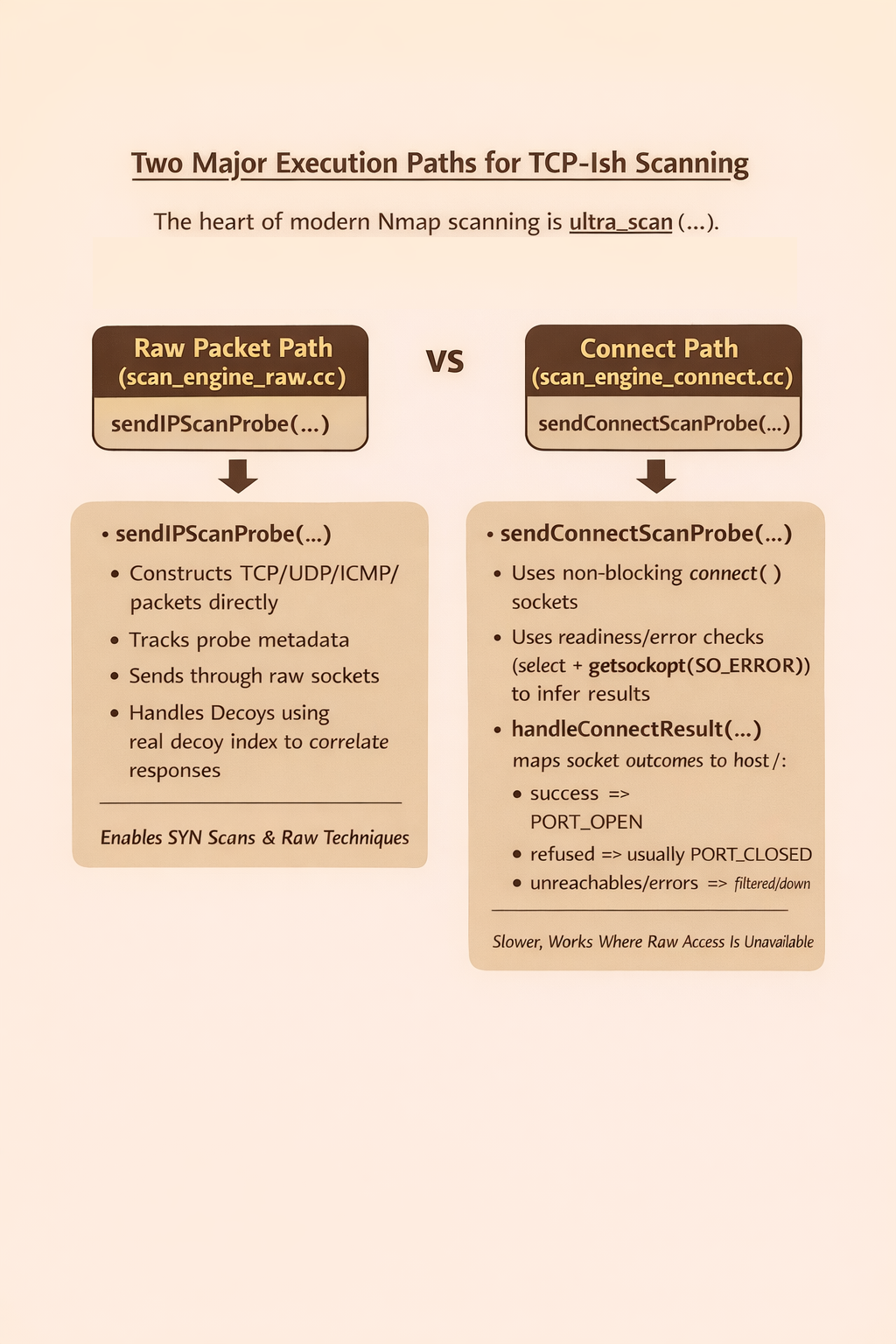
Nmap has two major execution paths for TCP-ish scanning:
Raw packet path (scan_engine_raw.cc)
sendIPScanProbe(...) constructs packets directly for TCP/UDP/SCTP/ICMP/IP-protocol probes, tracks probe metadata, and sends through raw sockets.
Reference: `scan_engine_raw.cc` (`sendIPScanProbe`)
It also handles decoys in the same send routine. The selected "real" decoy index is retained for response correlation while additional decoy traffic is transmitted as configured.
This path is what powers SYN scans and other raw techniques.
Connect path (scan_engine_connect.cc)
sendConnectScanProbe(...) uses non-blocking connect() sockets, then uses readiness/error checks (select + getsockopt(SO_ERROR)) to infer result.
Reference: `scan_engine_connect.cc` (`sendConnectScanProbe`, `handleConnectResult`)
handleConnectResult(...) maps socket outcomes to host/port state:
- success =>
PORT_OPEN - refused => usually
PORT_CLOSED - admin/protocol unreachable style errors => filtered/down semantics
This path is slower and noisier than raw SYN in many cases, but it works without raw-packet privileges in environments where raw scan methods are unavailable.
5) How Nmap decides port state
Port state assignment is not a simple one-response table. It is stateful and constrained.
Inside ultrascan_port_pspec_update(...), Nmap enforces transition rules such as:
- closed should not flip to filtered in contradictory ways
- open state is sticky unless scan semantics allow change
- filtered/open transitions are constrained by scan type
The noresp_open_scan behavior is key for scans like UDP where no response can imply open|filtered behavior, and for modes that intentionally alter default interpretation.
In practice this means Nmap preserves logical consistency over time instead of blindly trusting the latest packet.
6) Service/version detection: service_scan.cc + nmap-service-probes
After ports are identified, service detection is a separate engine.
References:
service_scan(...):
- initializes probe definitions (
AllProbes::service_scan_init) - builds
ServiceGroupacross target open ports - launches async I/O through
nsock - feeds responses into matcher pipeline
The matcher side parses directives from nmap-service-probes:
matchandsoftmatchrules- regex compilation via PCRE2
- templates for product/version/extrainfo/CPE extraction
So service detection is not "port 443 means HTTPS." It is active protocol fingerprinting using response signatures plus rule-based extraction.
That is why you can see outputs like product and version fields even when services run on non-standard ports.
7) OS detection: osscan2.cc
OS detection is its own subsystem (OSScan).
Reference: `osscan2.cc` (`OSScan::os_scan`)
Key details:
- Targets are split by IPv4/IPv6.
- IPv4 can be chunked into smaller groups for better fingerprint accuracy.
- Scans run in rounds (
startRound, sequence/timing tests, end round, retries). - Unmatched hosts are compared against the fingerprint DB (
nmap-os-db) to find closest candidates.
This is less about one packet and more about response behavior across multiple crafted probes and timing relationships.
8) NSE scripts: nse_main.cc lifecycle
NSE is embedded Lua orchestration, not just "run script files."
Reference: `nse_main.cc` (`open_nse`, `script_scan`)
open_nse() initializes a Lua 5.4+ runtime, loads nse_main.lua, registers native C-backed helpers, and sets script selection context.
script_scan(...) then executes per phase:
- pre-scan (
SCRIPT_PRE_SCAN) - scan (
SCRIPT_SCAN) - post-scan (
SCRIPT_POST_SCAN)
NSE maintains target mappings and script result structures so outputs can be attached at script, host, or port granularity and exported cleanly in normal/XML output.
This architecture is why NSE can do both discovery-style enrichment and active checks using shared scan context.
Practical takeaway
Nmap is best thought of as a staged pipeline with adaptive feedback loops:
- discovery builds candidate hosts
- scan engine classifies port state with retry/timing logic
- service detection fingerprints application protocols
- OS detection scores stack behavior
- NSE enriches and tests using embedded scripting
If you treat it as a single "port scanner command," you miss why results vary by flags, privileges, network shape, and target behavior.
If you understand the internals, the output stops being magic and starts being explainable.
---
What this means for builders: tools like Nmap give powerful infrastructure visibility, but they do not prove your app authorization logic, session handling, and business workflows are safe. If you are shipping fast with AI-assisted code, pair network scanning with application-layer validation.
Want autonomous security testing that checks real user flows and auth boundaries, not just open ports? Try Axeploit.