If you watch movies, you probably think of a cyberattack as a high-stakes, action-packed event. You picture a hacker in a dark room furiously typing green code to smash through a company’s complex firewall.
But as we settle into 2026, the reality of cybersecurity is far less cinematic and a lot more practical.
Recent threat intelligence reports from leading cybersecurity analysts have revealed a massive shift in how cybercriminals operate. Today’s hackers aren’t wasting time trying to “break in” by picking the digital lock. Instead, they are finding your spare keys and simply walking right through the front door.
Here is a breakdown of how modern intrusions actually happen, how these sneaky tactics could affect your computer, and what you can do to keep your digital doors securely locked.
How Are Hackers Actually Getting In?
Historically, hackers relied on finding highly technical flaws in software known as “vulnerabilities,” and exploiting them. But over the last few years, tech companies have gotten much better at patching these holes.
Because the digital “windows” are now almost shatterproof, hackers have changed their strategy to target the human element. By using stolen passwords, hijacking trusted IT software, and tricking everyday people, they can bypass millions of dollars in cybersecurity defenses. Here are the four main ways they do it:
1. The Stolen Front Door Key: Abusing VPNs
Since the rise of remote work, Virtual Private Networks (VPNs) have become standard. A VPN is basically a secure, private digital tunnel that lets an employee working from their living room safely log into their company's internal network.
How hackers use it: According to recent 2026 threat data, nearly a third of all network intrusions start right here. Hackers buy stolen usernames and passwords off the dark web. They then log into the company's VPN using those legitimate credentials. To the company's security system, it doesn’t look like a hack; it just looks like “Sarah from Accounting” logging in from home. Once inside, the hacker has the run of the place.
2. The Fake IT Guy: Hijacking Remote Tools
If you've ever had a computer problem at work, you've probably had an IT person use a “Remote Desktop” tool to take over your mouse and fix the issue from afar.
How hackers use it: Hackers love these Remote Monitoring and Management (RMM) tools. Because these programs are supposed to be on your computer to help you, your antivirus software totally ignores them. Hackers will secretly install their own versions of these tools. Because it blends in with normal IT activity, the hacker can sit quietly in the background, stealing data and watching your screen without ever setting off an alarm.
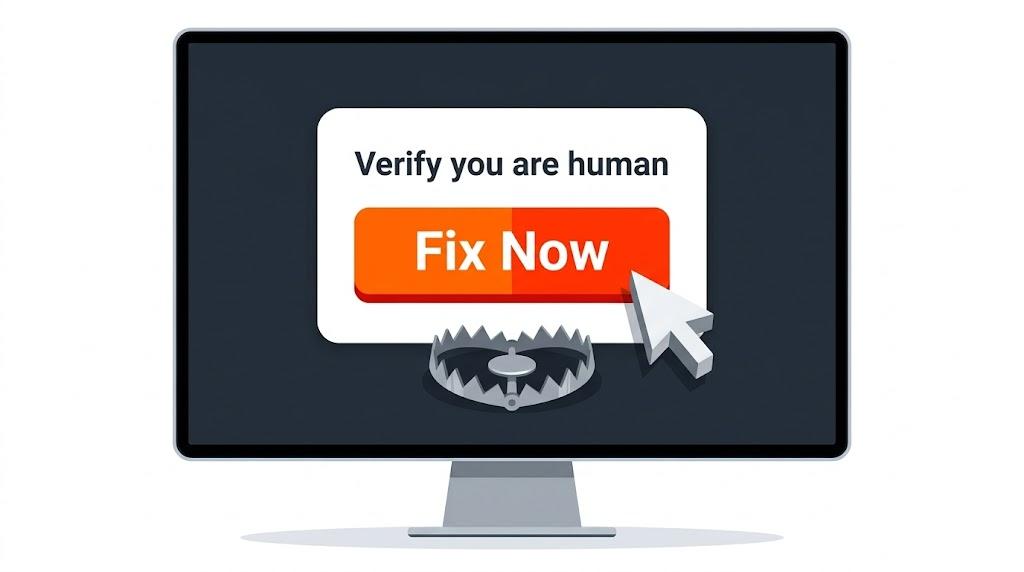
3. The Deceptive Pop-Up: “ClickFix” and Fake CAPTCHAs
This is the most common and most dangerous tactic used today, driving over 57% of recent security incidents. It relies entirely on tricking the user into doing the dirty work for them.
How hackers use it: You might visit a compromised website and see a pop-up that says, “Verify you are human,” displaying a broken CAPTCHA puzzle like ClickFIx. The screen will then give you instructions to copy a line of text and paste it into your computer's “Run” or “Terminal” window to “fix” the problem.
This is called a ClickFix campaign. There is no virus to accidentally download. The hacker is literally tricking you into manually turning off your own security and giving them access.
4. Stealing the VIP Wristband: Bypassing MFA
We are all told to use Multi-Factor Authentication (MFA). That text message or app code you need to type in after your password. And you absolutely still should! But hackers have found a clever workaround.
How hackers use it: They don't try to guess your MFA code. Instead, they send you a highly convincing fake login page (like a fake Microsoft 365 or Google login email). You type your password, and you type your MFA code into their fake site.
The fake site instantly passes those details to the real site, logs you in, and the real site issues a hidden “session token.” Think of this token like a VIP wristband at a concert; it tells the website, “This person already proved who they are; don't ask them to log in again for a while.” The hackers steal that digital wristband, put it on their own computer, and bypass your MFA entirely.
What This Means for Your Computer
Whether you are running a small business network or just trying to keep your personal laptop safe, this shift in hacker behavior means your mindset needs to change.
You can no longer rely purely on antivirus software to save you. If a hacker is using your actual passwords, or if they trick you into running a command yourself, the antivirus thinks you are just doing your normal daily tasks. This kind of “routine access” can lead to stolen financial data, locked files (ransomware), and compromised personal identities.
How to Protect Your System in 2026
The bad guys have realized that human psychology is much easier to crack than computer code. But that is actually empowering: it means you have the power to stop them.
Here are the best ways to keep your digital doors locked:
- Treat Passwords Like Gold: Because hackers are “logging in,” your passwords are the frontline. Never reuse passwords across different websites. Use a trusted password manager so every account has a unique, unbreakable code.
- Pause Before You Paste: Never, ever copy and paste strange text commands into your computer's system files or “Run” dialog boxes just because a website or pop-up told you to. Legitimate websites will never ask you to do this to verify your identity or fix a video player.
- Audit Your Tools: If you run a business, ensure you know exactly what remote IT tools are authorized on your network. Remove old, unused remote software immediately.
- Watch for “Weird” Logins: Utilize security settings that flag unusual behavior (Conditional Access). If you always log in from Chicago on a Mac, your system should throw an immediate red flag if someone suddenly logs in with your exact credentials from Eastern Europe on a Windows machine.
By staying alert, understanding their new tricks, and keeping a tight grip on your digital keys, you can ensure cybercriminals stay exactly where they belong: locked out.