The most convincing phishing email your finance team will receive this year will not contain a single typo. It will quote a real thread, match the sender's sign-off, and reference a project only your company knows about. The raw material for it is a mailbox the attacker already owns, and the tooling to turn that mailbox into a perfect impersonation is getting cheaper by the month.
John Hammond put a short, sharp label on this recently: phishing that writes like you. Here is what that actually looks like as an attack pipeline, why it breaks the training model most of us grew up with, and which controls still hold when the prose is indistinguishable from the real sender.
The typo died and nobody updated the training
For two decades, awareness training taught people to spot phishing by its mistakes: spelling errors, awkward grammar, generic greetings. That heuristic is now a liability, because it tells users that clean writing means safe writing. Safely Using AI calls the old assumption, "bad writing equals phishing," increasingly outdated, and they are right.
Attackers are using GPT-class text generation to produce error-free copy and to tune tone, formality, and phrasing until it matches how a specific person communicates. One figure making the rounds claims 82.6% of phishing messages last year were at least partly AI-designed.
The pipeline, step by step
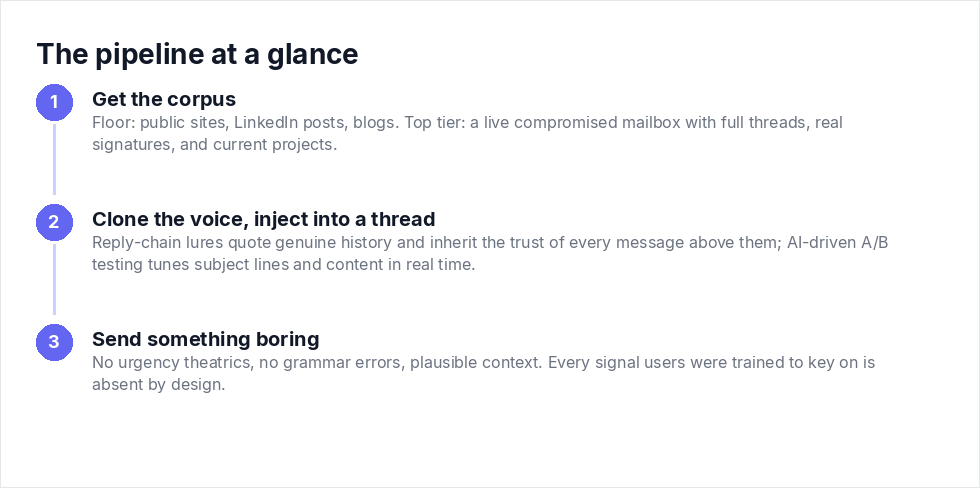
Step 1: get the corpus
Given enough samples, ( blogs, Linkedin Posts, Reddit Posts, Facebook, Youtube interviews ) , AI can learn how a specific person writes: tone, common phrases, formatting habits, even email structure. The floor is public material.
The ceiling is worse. Confidential messages leaked in earlier breaches can be copied far more closely. And the top tier is a live compromised mailbox, which hands the attacker full threads, real signatures, current projects, and the natural back-and-forth rhythm between two people who actually know each other.
Step 2: clone the voice, then inject into a thread
With the corpus in hand, the same technique imitates coworkers, managers, vendors, and executives. It also extends well past email into text messages, chat conversations, support requests, and internal announcements. Anything written is fair game.
Delivery is where it gets nasty. Reply-chain attacks drop the lure into an existing conversation, quoting genuine history, so the malicious message inherits the trust of every legitimate message above it. TraceSecurity describes attackers running AI-driven A/B testing on subject lines, structures, and content variants in real time to optimize campaigns. The campaign tunes itself. Supporting infrastructure includes lookalike domains hosting credential-harvesting portals, plus deepfake voice and video impersonating executives or IT support to backstop the pretext. A voicemail that sounds like your CFO asking "did you get my email?" is no longer science fiction.
Step 3: send something boring
Here is the example Safely Using AI gives of a normal-seeming lure:
"Hey, I need you to review this document before the meeting. Let me know once you've opened it."
Read that as a detection problem. No urgency theatrics. No grammar error. Plausible context. Every signal your users were trained to key on is absent by design.
Content-based training cannot survive this
UBC's awareness guidance, updated November 18, 2025, still leans on content indicators: unusual language patterns, generic content, overly formal tone, urgency-driven subject lines, lack of contextual awareness, inaccurate details. That list made sense against mass-mail phishing. Against a model trained on the sender's own corpus, it inverts. The fake can have better context, better tone, and cleaner grammar than the legitimate mail sitting next to it in the inbox.
TraceSecurity puts the human side plainly: "Employees are more likely to fall for phishing attempts that appear to come from a colleague or manager, especially when the email content aligns with their current work responsibilities." Alignment with current work is exactly what a thread-aware clone provides.
So the fix is not a better eyeball. Safely Using AI frames the behavioral pivot well: stop asking "Does this look fake?" and start asking "Is this request unusual?" Retarget your training and your phishing simulations around request classes: bank detail changes, credential resets, MFA enrollment, sensitive file access, gift cards. Grade people on what they do with the request, not on whether they spotted a comma splice. There won't be one.
The controls that survive a perfect clone
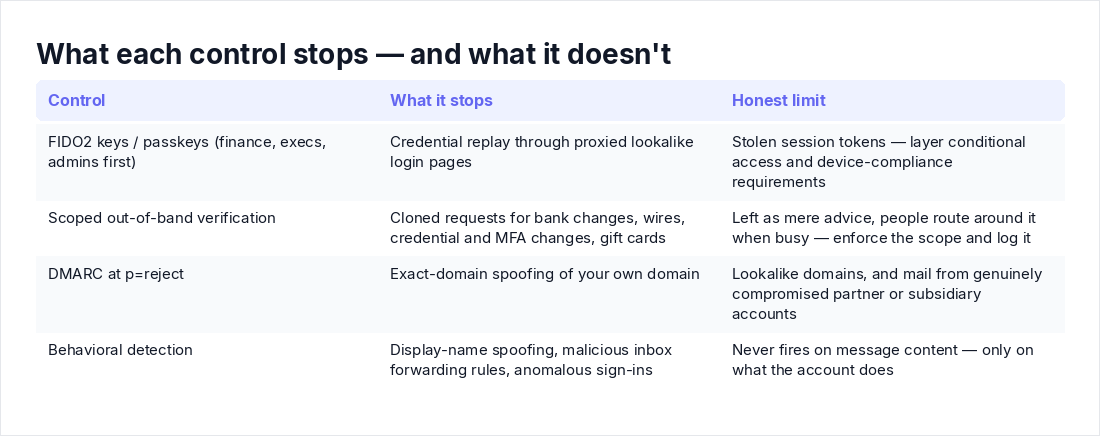
Everything below shares one property: it works even when the message content is flawless. That is the filter you should apply to every control you buy or build from here on.
1. Phishing-resistant MFA on the accounts that matter
Lookalike domains proxy real login pages. One-time codes and push approvals relay through those proxies without complaint. FIDO2 security keys and passkeys bind the credential to the origin, so a proxied page on the wrong domain gets nothing the attacker can replay.
Prioritize finance, payroll, executives, and IT admins. If you are stuck on push notifications for a while, enforce number matching as the floor, and layer conditional access with device-compliance requirements to make stolen session tokens harder to use.
2. Out-of-band verification as a control, not a suggestion
Safely Using AI's consumer advice is a quick phone call, a separate email, or a message through an approved platform, especially for requests touching sensitive files, financial transactions, login approvals, passwords, or gift cards. That is correct, but in an organization it has to be a scoped, enforced control or people will route around it when they are busy.
Keep the scope tight: bank detail changes, wire instructions, credential and MFA changes, gift card purchases. Verify through contact information you already hold, never through contact details supplied in the requesting message. A workable policy looks like this:
Requests that REQUIRE out-of-band verification before execution
(number from the vendor master file or corporate directory,
never from the message itself):
 - New or changed bank details, any amount
 - Wire or ACH instructions above $5,000 (dual approval above $25,000)
 - Password resets, MFA device changes, mailbox delegation
   for finance and executive staff
 - Gift card purchases, any amount, from any requester,
   including the CEO
Log the verification in the ticketing system before acting.
3. DMARC at p=reject, with honest limits
SPF and DKIM aligned, DMARC enforced:
_dmarc.yourdomain.com TXT "v=DMARC1; p=reject; rua=mailto:dmarc-reports@yourdomain.com; fo=1"If you are still at p=none, you are monitoring, not defending. But say the limits out loud: DMARC stops exact-domain spoofing of your domain. It does nothing about lookalike domains, and it does nothing about mail sent from a genuinely compromised account at a partner or subsidiary. Leadership tends to think the DNS record fixed BEC. It did not.
4. Behavioral detection over content inspection
UBC notes that generative phishing bypasses detection built on keyword matching and known patterns, and slips past spam filters. So stop paying the detection budget to read prose and start paying it to watch behavior. Two queries worth adapting (Microsoft 365 Defender advanced hunting):
External senders impersonating internal display names:
let InternalNames =
    IdentityInfo
    | where Timestamp > ago(14d)
    | summarize by AccountDisplayName;
EmailEvents
| where Timestamp > ago(7d)
| where SenderFromDomain != "yourdomain.com"
| where SenderDisplayName in~ (InternalNames)
| project Timestamp, SenderFromAddress, SenderDisplayName, Subject, RecipientEmailAddress
Suspicious inbox forwarding rules, a classic post-compromise move:
CloudAppEvents
| where Timestamp > ago(7d)
| where ActionType in~ ("New-InboxRule", "Set-InboxRule")
| extend Params = tostring(RawEventData.Parameters)
| where Params has_any ("ForwardTo", "RedirectTo")
| project Timestamp, AccountDisplayName, Params
Add first-time sender and recipient pairs, reply-to addresses that differ from the From address, and sign-in anomalies like impossible travel. None of these fire because of what the email says. They fire because of what the account does, which is exactly the property you want when the writing is perfect.
"But style cloning is still rare"
A fair pushback from practitioners is that most of the queue is still commodity junk, so why re-architect now. Two answers.
First, reply-chain and thread-hijack attacks from compromised mailboxes already happen today with no AI involved. The model raises fidelity and cuts the attacker's time per target, and automated A/B testing means the campaign improves itself while you sleep. The trend line only goes one way.
Second, nothing in the defense stack above is speculative insurance. Phishing-resistant MFA, scoped out-of-band verification, DMARC enforcement, and behavioral detection all pay off against the BEC and credential phishing hitting you this quarter. The business risks TraceSecurity lists (fraudulent wire transfers, breaches from stolen credentials, reputational damage, regulatory penalties) are current events, not predictions. You are closing gaps you are already being billed for.
Key takeaways
- Stop grading users on typos. Train request classification instead: "Is this request unusual?" survives a perfect clone, "Does this look fake?" does not.
- Assume the attacker's corpus is at least your public posts and at worst a compromised mailbox with full thread history. Thread-level imitation is a today problem.
- Put FIDO2 keys or passkeys on finance, executives, and admins first. Number-matched push is the floor, not the goal.
- Make out-of-band verification a scoped, logged control for payments, credential changes, and MFA changes. "Pause and assess" is a poster, not a control.
- Enforce DMARC at p=reject, then move email detection budget from content filtering to behavioral signals like display-name spoofing, inbox rule changes, and anomalous sign-ins.