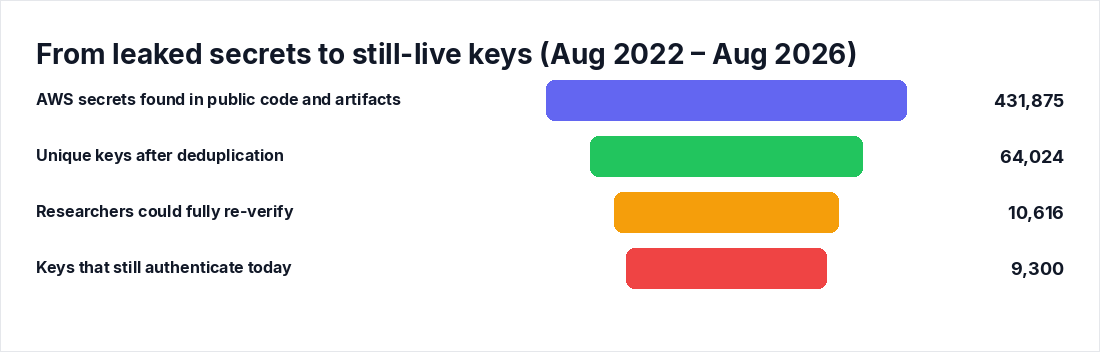
Truffle Security spent four years collecting AWS keys that leaked into public code, and the result is ugly: more than 9,300 keys exposed between August 2022 and August 2026 still authenticate today. Of the 10,616 keys researchers could fully re-verify, 88% still worked as of August 10. Hundreds open the door to an entire corporate AWS account, root keys included.
If you run AWS, the question is not whether this is a problem in the abstract. It is whether one of those keys is yours. Here is how to answer that today, and what to do if the answer is yes.
The numbers that should worry you
From BleepingComputer's August 21, 2026 report on Truffle Security's findings:
- 431,875 AWS secrets found across code repositories, Git history, datasets, Docker images, registries, and CI logs
- 64,024 unique keys after deduplication, mapped to 50,654 AWS accounts
- 817 keys tied to companies, of which 526 were AWS root keys
- 242 keys belonged to IAM users holding the AdministratorAccess policy
- 768 keys across those two sets grant what researchers describe as full control of a company's AWS account
- Hugging Face was the single largest source: 8,482 unique key exposures, 17.9% of them root keys
The age data is the part I keep coming back to. Of the 2,903 keys with available creation dates, the median key was 1,831 days old, roughly five years. The oldest was 17.4 years. These are not keys that leaked last week. They are credentials nobody has touched since before some of your engineers were hired.
With AdministratorAccess or root in hand, an attacker can read or wipe your data, create rogue admin users for persistence, and run cryptominers on your bill.
Step 1: Inventory every long-lived key you own
You cannot rotate what you have not counted. Start with the IAM credential report, which lists every IAM user, every access key, its age, and when it was last used:
aws iam generate-credential-report
aws iam get-credential-report --query 'Content' --output text | base64 -d > credential-report.csv
Open the CSV and sort by access_key_1_last_rotated and access_key_2_last_rotated. Anything older than 90 days is a rotation candidate. Anything active with a last-used of "N/A" is a deletion candidate.
For any specific key, check whether it is actually doing anything:
aws iam get-access-key-last-used --access-key-id AKIAIOSFODNN7EXAMPLEIf the last-used date is months old, that key is dead weight with live permissions. Kill it.
Do this for every account in your organization, not just the production one you happen to be sitting in. Truffle Security mapped keys across more than 50,000 accounts, and the forgotten sandbox account is exactly where five-year-old keys live.
Step 2: Scan your own code, history, and artifacts
The AKIA prefix (long-term keys) and ASIA prefix (temporary keys) make AWS credentials trivially grep-able. Do not grep manually, though. You need Git history, deleted files, CI logs, and container images, and you need verification so you are not chasing test strings.
TruffleHog with --only-verified tests each candidate key against AWS and only reports ones that authenticate:
# Scan a repo including full Git history
trufflehog git https://github.com/your-org/your-repo --only-verified

# Scan an entire GitHub org
trufflehog github --org=your-org --only-verified

# Scan a container image
trufflehog docker --image your-registry/your-image:tag --only-verified
Gitleaks is the other standard option. It is faster for pre-commit hooks and CI gating, though it does not verify keys by default:
gitleaks detect --source . -vCover the places the research actually found keys: Hugging Face datasets and model repos, CI build logs (often public even when the repo is not), Docker images, and Git history. Deleting a key from the current HEAD does nothing. The commit that added it is still there.
Also search outside your org. Run the same scans against your company name and domains on public dataset hubs. Someone's fine-tuning experiment from 2023 with your credentials baked into a notebook is precisely how Hugging Face ended up at the top of the leak list.
Step 3: Check whether a key has already been used against you
A leaked key that has not been abused yet is a race, not a reprieve. Hunt CloudTrail for each IAM user's activity:
aws cloudtrail lookup-events \
  --lookup-attributes AttributeKey=Username,AttributeValue=ci-deploy-user \
  --max-results 50
If you pipe CloudTrail into Athena or a SIEM, query by access key ID and look at the shape of the traffic:
SELECT eventTime, eventName, sourceIPAddress, userAgent
FROM cloudtrail_logs
WHERE userIdentity.accessKeyId = 'AKIAIOSFODNN7EXAMPLE'
ORDER BY eventTime DESC;
What you are looking for: source IPs outside your known egress ranges or VPN space. User agents that do not match your tooling (your pipelines show the AWS CLI or SDK versions you pinned; an attacker's often do not). And calls inconsistent with that user's job. A CI deploy role calling iam:CreateUser or iam:AttachUserPolicy from a residential IP is not a mystery. It is an incident.
Step 4: Rotate without an outage
Here is the runbook I use. It is boring, and boring is what you want.
- Create a second key for the IAM user (users can hold two):
aws iam create-access-key --user-name ci-deploy-user- Deploy the new key everywhere the old one lives. Update your secrets manager and CI variables. Do not forget the one EC2 box with a credentials file.
- Verify the new key is taking traffic:
aws iam get-access-key-last-used --access-key-id <NEW_KEY_ID>Wait until LastUsedDate populates.
- Disable the old key. Do not delete it yet:
   aws iam update-access-key --user-name ci-deploy-user \
     --access-key-id <OLD_KEY_ID> --status Inactive
AWS's own incident guidance says disable first, because if something breaks you can flip the key back to Active in seconds while you find the missed dependency.
- Watch the old key's last-used for a few days. Calls against a disabled key fail, but the attempt tells you where the straggler lives.
- Once quiet, delete it:
aws iam delete-access-key --user-name ci-deploy-user --access-key-id <OLD_KEY_ID>The trap: session tokens survive rotation

This is the part most rotation guides skip, and it matters. Rotating or disabling an IAM user's long-term key does NOT invalidate temporary session credentials that were minted from it. Temporary credentials live anywhere from 15 minutes to 36 hours depending on how they were issued, and they keep working until they expire.
If you believe a key was exposed, close that window with an explicit deny using the aws:TokenIssueTime condition, exactly as AWS's security blog prescribes. Attach this as an inline policy on the affected user:
{
  "Version": "2012-10-17",
  "Statement": [
    {
      "Sid": "DenyTokensIssuedBeforeRotation",
      "Effect": "Deny",
      "Action": "*",
      "Resource": "*",
      "Condition": {
        "DateLessThan": {
          "aws:TokenIssueTime": "2026-08-22T00:00:00Z"
        }
      }
    }
  ]
}
Set the timestamp to just before you rotated. Remove the policy after 36 hours, by which point every pre-rotation token has aged out on its own.
If AWS emails you about an exposed key
AWS monitors for public exposure too. When it becomes aware of a leaked key, it applies a quarantine policy to limit what the key can do and notifies the customer. Two things to know.
First, those notifications typically go to the root account email, which in many companies is an alias nobody monitors. Check it now. Second, a quarantine policy is a tourniquet, not a fix. The key is still yours to disable and rotate using the runbook above. If you find exposed credentials in the wild, yours or someone else's, you can report them to aws-security@amazon.com.
The actual fix: stop minting long-lived keys
Everything above is cleanup. The reason 9,300 keys still work is that IAM user access keys stay valid until someone disables them, and nobody does. AWS's recommendation, and mine, is to replace them with IAM roles and federation, which vend temporary credentials. There is nothing long-lived left to leak.
In practice:
- CI/CD: use OIDC federation. GitHub Actions and GitLab both support assuming a role directly, so no AWS keys get stored in CI secrets at all.
- Workloads on AWS: instance profiles and task roles. If an app on EC2 or ECS has a credentials file, that is a bug.
- Humans: federate through your identity provider instead of issuing IAM user keys.
- Root: delete all root access keys. There is no legitimate daily use for one.
Add budget alerts on every account while you are at it. If a key does leak and someone spins up GPU instances for mining, the spend anomaly is your tripwire while CloudTrail catches up.
"We'd know if one of our keys leaked"
Three flavors of pushback I hear, and why none of them hold.
"We rotate keys regularly." The median leaked key in this dataset is five years old. Rotation policies get written, not executed. Pull the credential report and look before you argue.
"The key was removed from the repo." Copies persist in Git history, CI logs, datasets, and forks. Truffle Security found hundreds of thousands of secrets by scanning exactly those places. Treat any credential that touched a public source as compromised, full stop.
"AWS would have told us." Maybe, if AWS detected that specific exposure and the notification reached a monitored inbox. Their process exists and it helps, but 9,300 still-valid keys is the empirical proof that it does not catch everything.
To automate everything, give Axeploit a try https://axeploit.com
Key takeaways
- Run the IAM credential report across every account today, sort by key age, and flag anything over 90 days or never used.
- Scan your repos, Git history, CI logs, images, and public datasets with
trufflehog --only-verified. A verified hit is a live key, not a false positive. - Disable before you delete, verify last-used on the new key before cutting over, and add an
aws:TokenIssueTimedeny to kill session tokens minted from an exposed key. - Delete root access keys entirely and move CI, workloads, and humans to roles and OIDC federation so there are no long-lived keys left to leak.
- Watch the root account email for AWS quarantine notifications, and set budget alerts as your cryptomining tripwire.