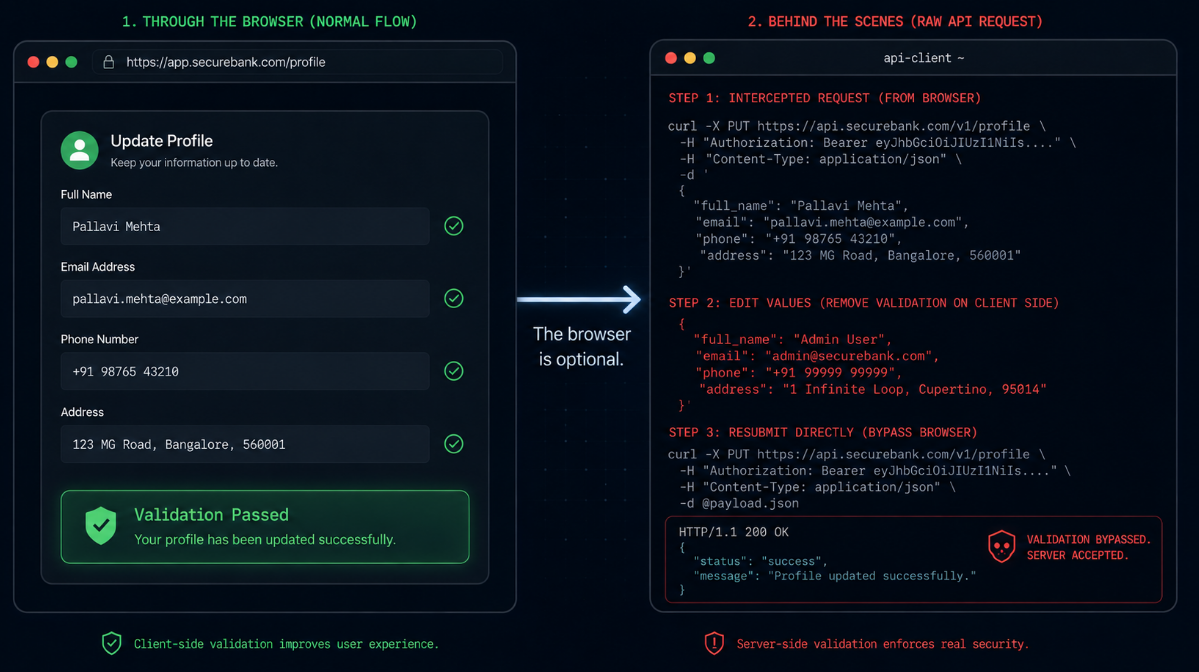
Every form on your application has two layers of validation, and only one of them matters for security.
The first layer lives in the browser. JavaScript checks that the email field looks like an email, that the password meets the length requirement, that the discount code is alphanumeric. This layer exists for a good reason: it gives users instant feedback without a round trip to the server, and it makes the product feel responsive and well-built. It is a usability feature.
The second layer lives on the server, and it is the only layer an attacker cannot bypass by opening developer tools.
The distinction sounds obvious when stated plainly. It is routinely forgotten in practice, because the frontend validation works so well, so consistently, for so many users, that it starts to feel like a security control rather than a convenience feature. Developers build the frontend check, see it functioning correctly in every test they run by hand, and move on to the next feature. The server-side equivalent gets implemented less rigorously, or not at all, because the form "already validates."
This is the single most common root cause behind a wide range of vulnerabilities that show up in security assessments: SQL injection, broken authorization, price manipulation, privilege escalation, and a long list of business logic failures. Different symptoms, same disease. The application trusted the client.
This post is a structured, ten-point audit you can run against your own application this week. Each point describes the assumption that fails, why it fails, and what to check.
Why Frontend Validation Cannot Be a Security Control
Before the checklist, it is worth being precise about why this distinction matters so much.
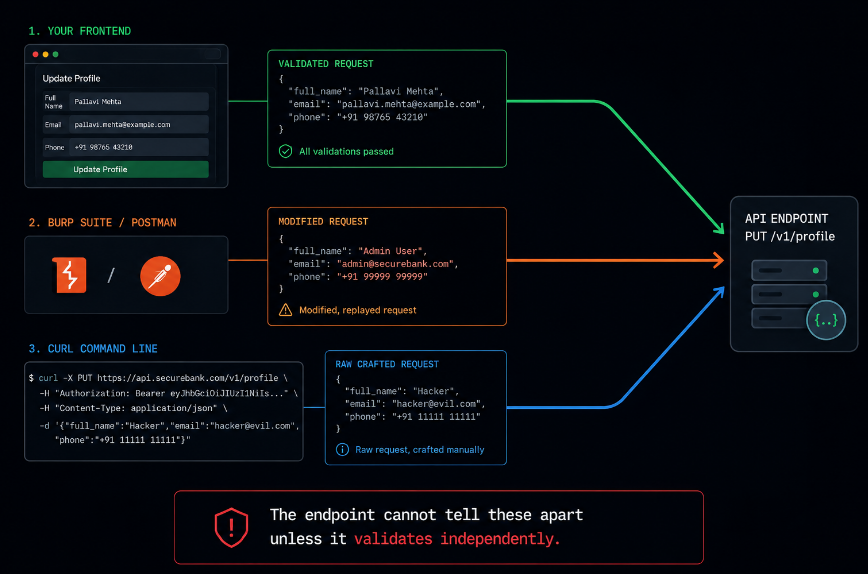
Any request your frontend sends to your server can be sent by something other than your frontend. A browser's developer tools let any user inspect, modify, and resend network requests with arbitrary values. Tools built specifically for this purpose Burp Suite, Postman, curl make it trivial to construct a request that never passes through your JavaScript validation at all. The request goes straight to your API with whatever payload the sender chooses.
This is not a sophisticated attack. It does not require specialized skill. It is the default behavior of every API testing tool, and it is the first thing any competent attacker or security tester does when assessing an application: open the network tab, find the request, and start modifying it directly.
If your server trusts that a value has already been validated because the frontend validates it, your server is trusting something it cannot verify. The frontend validation tells you nothing about the request the server actually received. It only tells you what would have happened if the user had used your interface as intended.
The 10-Point Audit
1. Re-verify every numeric boundary the server actually enforces
Price fields, quantity fields, discount percentages, age fields, file size limits any numeric value with a business rule attached needs to be checked again at the server. If your frontend prevents a quantity field from going below zero but your API accepts negative integers, an attacker can submit a negative quantity and potentially manipulate a total calculation in their favor. Audit every numeric input by sending boundary values directly to the API: zero, negative numbers, extremely large numbers, decimal values where integers are expected, and non-numeric strings.
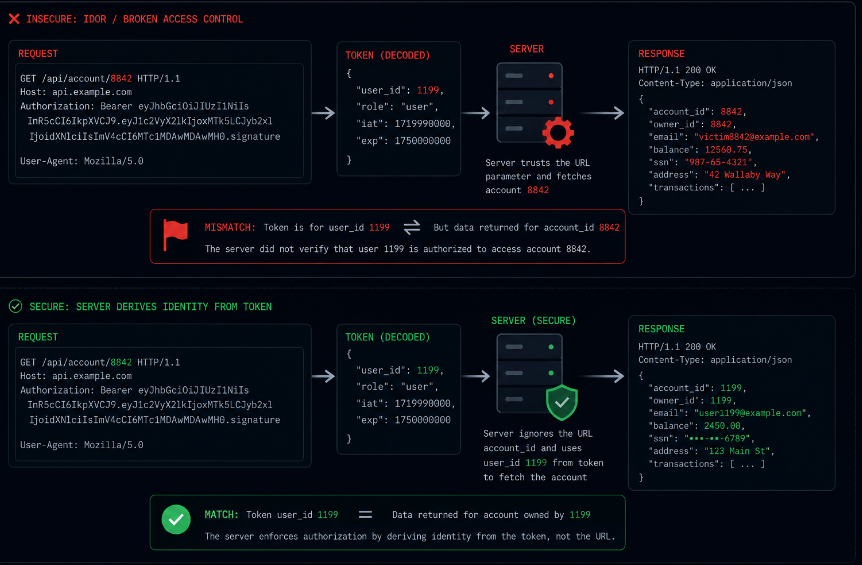
2. Confirm authorization checks use the authenticated identity, not request parameters
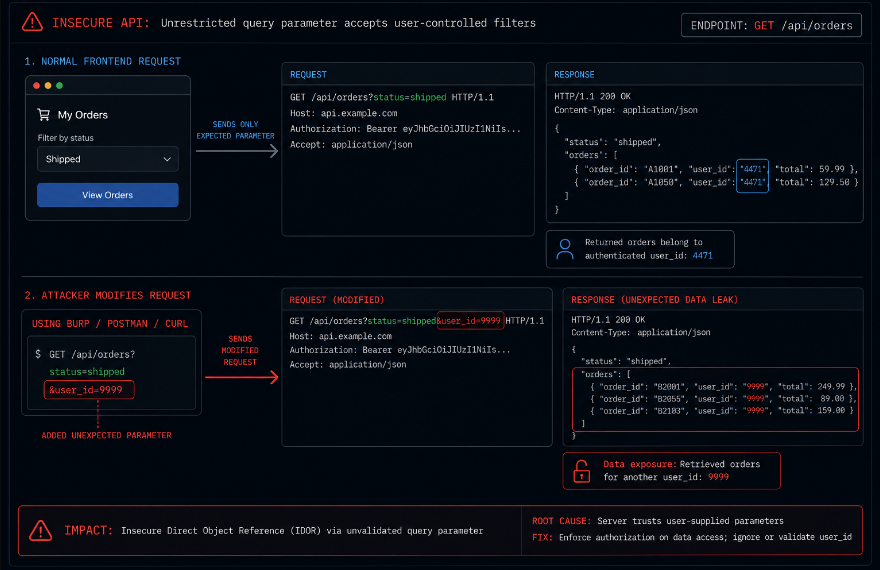
This is the single most common failure pattern in modern APIs. An endpoint that accepts a user_id, account_id, or tenant_id as a request parameter and uses that value to determine what data to return is trusting the client to tell it who is asking. The server should derive identity exclusively from the verified session token or JWT, never from a parameter the client supplied. Test this by authenticating as one user and substituting another user's identifier in every request parameter you can find. If the response includes data belonging to the substituted identifier, the authorization check is broken.
3. Check that role and permission fields cannot be set by the client
Registration forms, profile update endpoints, and account creation flows sometimes accept more fields than the frontend exposes. If your user registration API accepts a role or isAdmin field in the request body, and the server does not explicitly strip or ignore it, a client that adds that field manually can self-assign elevated privileges. Audit every endpoint that creates or updates a user-related object by submitting requests with additional fields not present in the frontend form: role, is_admin, permission_level, account_type. If the server accepts and applies them, this is a critical finding.
4. Validate file uploads by content, not by extension or declared type
A frontend file picker can restrict the file types a user selects, and the Content-Type header in the upload request can be set to anything the client wants. Neither of these is a security control. The server needs to inspect the actual bytes of the uploaded file checking magic numbers or using a proper file-type detection library before deciding how to handle it. Audit this by renaming a script file with an image extension and setting the Content-Type header to image/jpeg, then uploading it directly to the API. If the server accepts and stores it without inspecting the actual content, the validation is cosmetic.
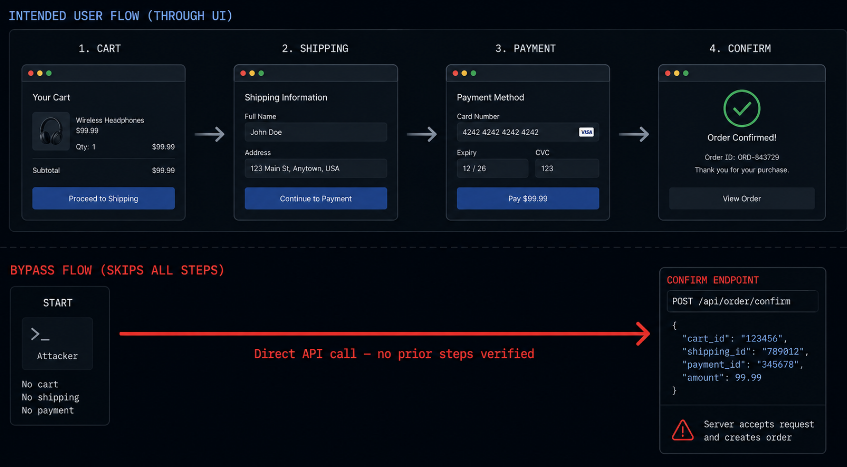
5. Verify that multi-step workflows enforce state on the server
Checkout flows, onboarding sequences, multi-step forms any process with a defined order of steps needs server-side enforcement of that order. If the frontend simply hides and shows different screens based on local state, an attacker can call the API endpoint for step four directly without ever completing steps one through three. Audit this by mapping every step in a workflow to its corresponding API call, then attempting to call later steps directly, with no prior steps completed, using a fresh session.
6. Confirm rate limits and frontend "disable button after click" logic are mirrored server-side
Disabling a submit button after one click prevents a well-behaved browser from double-submitting a form. It does nothing against a direct API call. If your application relies on this pattern to prevent duplicate purchases, duplicate coupon redemptions, or duplicate account creation, audit it by sending the same request twice in rapid succession directly to the API, bypassing the UI entirely. If both requests succeed, the protection exists only in the browser.
7. Check that sensitive comparisons happen with constant-time logic, not simple equality
Token validation, API key checks, and password comparisons that use a simple string equality operator can leak timing information that allows an attacker to guess the correct value byte by byte. This is a subtler check than most on this list, but it matters disproportionately for authentication-adjacent code. Audit any code path that compares a secret value submitted by the client against a stored value, and confirm it uses a constant-time comparison function rather than a standard equality check.
8. Validate that pagination and filtering parameters cannot be used to bypass scope
APIs that accept filter, sort, or pagination parameters sometimes pass those parameters directly into a database query without validating that the requested scope is something the user is permitted to see. An endpoint that lets a user filter their own orders by status might also allow a user_id filter parameter that was intended for internal admin tooling but was never removed from the public-facing endpoint. Audit every list or search endpoint by attempting to add filter parameters that are not exposed in the frontend UI, checking whether the server applies them without verifying they are within the authenticated user's scope.
9. Confirm that error responses do not differ in ways that leak information
Frontend forms typically show a generic "Login failed" message regardless of whether the username or password was incorrect. If the server's actual API response differs a different status code, a different response body, or a different response time depending on which field was wrong an attacker bypassing the frontend can use those differences to enumerate valid usernames or extract other information the UI was designed to hide. Audit this by sending direct API requests with valid and invalid usernames, valid and invalid passwords, and comparing the raw responses for any distinguishing signal: status code, response body content, or response timing.
10. Verify that client-side computed totals are recalculated on the server
Shopping carts, invoice generators, and any feature that calculates a total based on selected items are a frequent target for this class of bug. If the frontend calculates the total price and sends that total to the server as part of the request, and the server trusts it rather than recalculating from the underlying item prices stored in the database, an attacker can submit any total they choose. Audit every endpoint that processes a payment or generates an invoice by submitting a request with a manipulated total while keeping the underlying item list the same, and confirm the server independently recalculates the correct value rather than accepting what was submitted.
Running the Audit in Practice
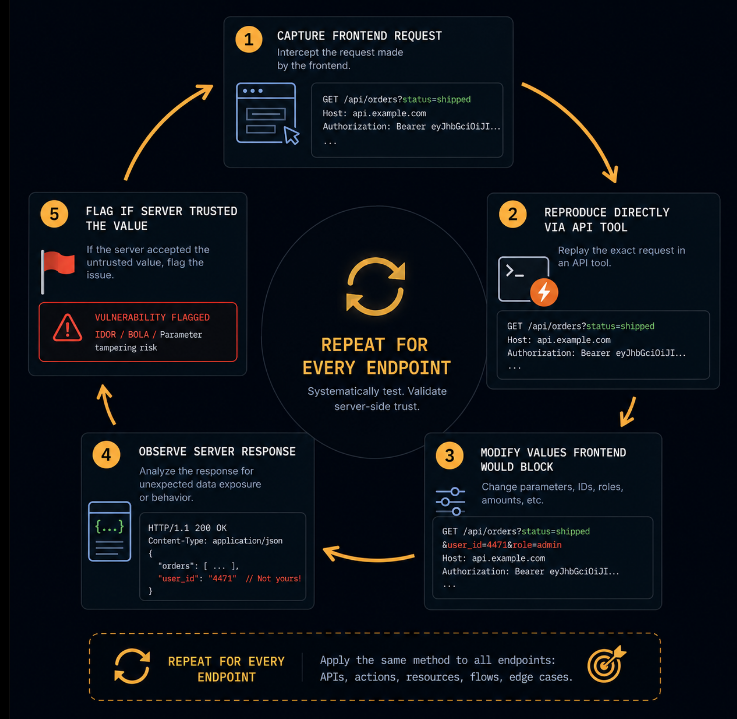
This list is most useful as a literal checklist applied against a specific application, endpoint by endpoint. The methodology that makes it efficient is consistent across all ten points: identify the request your frontend sends for a given action, reproduce that request directly using a tool like Burp Suite, Postman, or curl, and then systematically modify the values the frontend would never send out-of-range numbers, substituted identifiers, additional fields, skipped steps, manipulated totals and observe how the server responds.
The pattern to look for in every case is the same: does the server's behavior change in a way that reveals it trusted a value it should have independently verified? If the server accepts a negative quantity, returns another user's data, applies an unauthorized role, stores an unvalidated file, allows a skipped workflow step, processes a duplicate request, leaks timing information, returns out-of-scope data, leaks distinguishing error details, or accepts a manipulated total, the audit has found something worth fixing.
This methodology mirrors how a real attacker, or a competent penetration tester, approaches an unfamiliar application. They do not start by trying exotic attack techniques. They start by asking the most basic question: what does this server actually verify, independent of what the interface in front of it was designed to allow?
Why This Keeps Happening Even on Mature Teams
It is worth addressing directly why this category of vulnerability persists even on teams that genuinely care about security and have invested in code review, static analysis, and security training.
The frontend works correctly almost all the time. Every manual test a developer runs goes through the browser, exercises the frontend validation, and produces the expected result. The feedback loop that would reveal the gap a request bypassing the frontend entirely simply never happens during normal development and testing, because developers test their applications the way users use them: through the interface.
This means the absence of server-side validation is invisible under every normal testing condition. It only becomes visible when someone deliberately tests the application the way an attacker would: outside the interface, directly against the API, with values the interface was never designed to send. Most QA processes do not include this. Most code review does not catch it, because the code that is missing the check simply does not have a visible gap in the diff there is no line of code that says "and now skip the validation." There is just an absence.
This is precisely the category of finding that automated, behavior-driven security testing is built to catch, because it operates the way an attacker does: as an authenticated user, sending requests directly to the API, independent of whatever the frontend would have allowed.
Closing: The Browser Was Never the Boundary
The frontend is not a security boundary. It never was. It is a user experience layer that happens to sit in front of your actual security boundary, which is the server.
Every check on this list traces back to the same root cause: code that assumes a request arrived through the interface it was designed for, rather than verifying independently what the request actually contains and who actually sent it. That assumption is invisible during normal development. It is the first thing tested, deliberately, by anyone assessing the application with adversarial intent.
The fix for each of these ten points is, individually, straightforward. Validate boundaries on the server. Derive identity from the verified token, not from request parameters. Strip privileged fields from client input. Inspect file content, not declared type. Enforce workflow state server-side. Mirror rate limits at the API layer. Use constant-time comparison for secrets. Scope filters and pagination to authenticated permissions. Normalize error responses. Recalculate totals independently.
None of these are difficult engineering problems. The difficulty is comprehensiveness finding every place in a real, growing application where one of these ten patterns has been missed, across every endpoint, as the application changes week over week.
That is not a one-time audit. It is a standing question that needs to be asked continuously, against the application as it actually runs in production, because every new feature is a new opportunity for the same trust assumption to slip back in.
Axeploit runs exactly this kind of audit, continuously, against your live application. Its AI agents authenticate as real users, send requests directly to your API independent of your frontend, and systematically test every one of the patterns in this checklist: identity substitution, privilege field injection, file content validation, workflow bypass, duplicate submission, and price manipulation. It finds the gap between what your frontend allows and what your server actually verifies, before someone else does.