Behind every app you use, every website you visit, and every online purchase you make, there is a database silently working in the background to store and organize information.
But if you’re building a new app, launching a startup, or just trying to understand the tech world, you’ll inevitably run into a massive debate: SQL or NoSQL?
If you don’t have a degree in computer science, reading technical documentation about databases can feel like trying to read another language. Terms like “relational schemas,” “ACID compliance,” and “horizontal scaling” are enough to make anyone’s eyes glaze over.
But here is the good news: the core concepts are actually very simple. Here is a plain-English, jargon-free breakdown of the difference between SQL and NoSQL, how they work, and which one is right for your next project.
What is a Database, Anyway?
A database is simply a digital filing cabinet. Its entire job is to store data so that a computer program can find it, update it, or delete it as quickly as possible. The difference between SQL and NoSQL isn't about what they do; it's about how they organize the files inside that cabinet.
SQL: The Highly Organized Spreadsheet
SQL (often pronounced “sequel”) stands for Structured Query Language. Databases that use SQL are known as Relational Databases.
The Rules of Relational Data
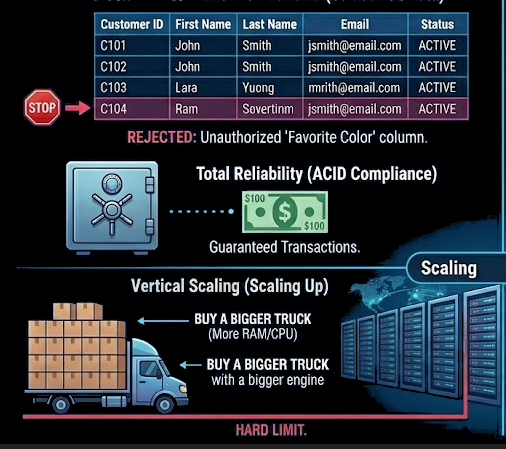
To understand SQL, think of a perfectly organized Microsoft Excel spreadsheet. If you want to add a new customer to an SQL database, there are strict rules. The database has predefined columns: First Name, Last Name, Email, and Phone Number.
If you try to add a customer but want to include their Favorite Color or a Profile Picture, the SQL database will reject it. You cannot break the template.
The Superpower of SQL: Total Reliability
Because SQL is so strict, it is incredibly reliable. It excels at linking data together (creating “relations”). For example, it can flawlessly link a customer's ID to their exact order history and their shipping address.
In the tech world, this reliability is called ACID compliance. It essentially means the database guarantees that transactions are processed safely. If you transfer $100 from your bank account to a friend, the database ensures that either the whole transaction happens, or none of it happens. It will never accidentally deduct your money without crediting your friend.
Popular SQL Options
- Top Platforms: MySQL, PostgreSQL, Microsoft SQL Server, Oracle.
- Best Used For: Banking apps, accounting software, complex e-commerce checkouts, and any business where data accuracy is the absolute highest priority.
NoSQL: The Flexible Digital Folder
NoSQL stands for Not Only SQL. These are known as Non-Relational Databases.
The Freedom of Non-Relational Data
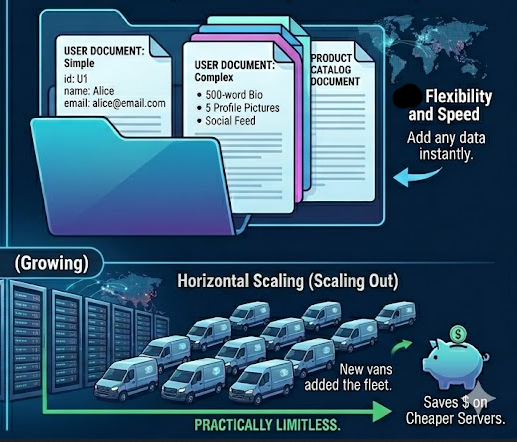
If SQL is a strict Excel spreadsheet, NoSQL is a flexible digital folder on your computer. Inside a NoSQL database, you don’t have to force your data into rows and columns. You can store data as “documents” (which look a lot like standard text files).
Because there are no strict templates, you can throw a document containing a user’s Name and Email right next to a document containing a user’s Name, Email, 500-word Bio, and 5 Profile Pictures. The NoSQL database doesn't care; it happily stores them both.
The Superpower of NoSQL: Extreme Flexibility and Speed
Because NoSQL doesn't have to check a massive rulebook every time you add or pull data, it is incredibly fast and flexible. If your development team decides to add a new feature to your app tomorrow, they don't have to spend hours restructuring the entire database. They can just start throwing the new type of data in immediately.
Popular NoSQL Options
- Top Platforms: MongoDB, Cassandra, Redis, Amazon DynamoDB.
- Best Used For: Logs, rapid prototyping, real-time analytics, and apps that handle massive, unpredictable amounts of data (like smart home devices).
The Bottom Line: Which One Should You Choose?
There is no universally "best” database. There is only the best tool for your specific job.
When to Choose SQL
- You are building a financial app, an accounting tool, or a complex inventory system.
- Your data is structured, predictable, and rarely changes its format.
- Accuracy and strict rules are more important to you than extreme flexibility.
When to Choose NoSQL
- You are building a content management system, or logs for a mobile app where features change rapidly.
- You expect to store massive amounts of unstructured data (like thousands of text posts, or sensor data).
In modern tech, many large companies actually use both. They might use SQL to handle their secure billing and payments, and NoSQL to power their lightning-fast product catalog and user reviews.
By understanding the basic DNA of how these databases store information, you can make smarter decisions for your software, save your developers time, and build a product that scales beautifully as your business grows. All the data could be compromised due to simple malware or fishing attacks. Regular audits are necessary. Audit up to 7500 vulnerabilities with Axeploit and keep your network secure.