The password reset flow is the account recovery mechanism of last resort. When everything else has failed the user has forgotten their password, their device has been lost, their session has expired the reset flow is what stands between them and losing access to their account permanently.
It is also one of the highest-risk surfaces in any web application, because it is the mechanism that allows account access to be re-established without the original credential. Any vulnerability in the reset flow is, by definition, an account takeover vulnerability. Not for one account potentially for every account on the platform, because the reset flow is the same code path for every user.
Password reset poisoning is a class of vulnerability that exploits a specific and common implementation mistake: the application constructs the password reset link using the Host header from the incoming HTTP request. The Host header, which the browser sends with every request to specify which domain it is talking to, is attacker-controlled. A request sent directly to the server not through a browser, but through a tool that allows arbitrary header manipulation can specify any value for the Host header.
If the application uses that value to build the reset link, the attacker can cause the reset email to contain a link pointing to their own domain. The victim receives a legitimate email from the legitimate sender with a legitimate token but when they click the link, they navigate to the attacker's server, which captures the token and uses it to take over the account.
The implementation mistake takes minutes to introduce. The attack takes fifteen minutes to execute once the vulnerability is found. The consequences affect every user on the platform.
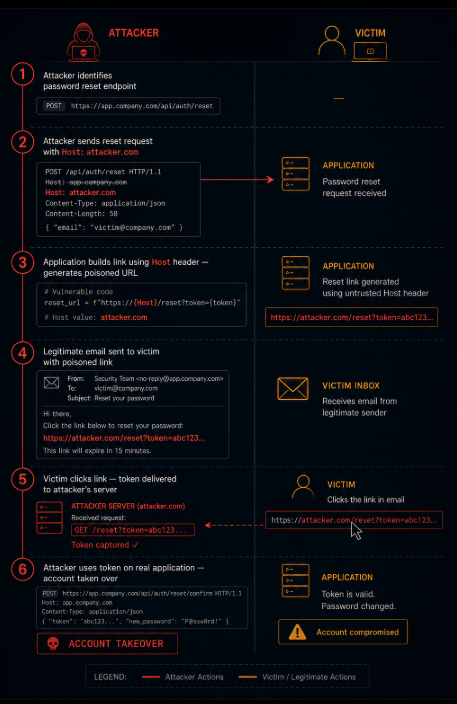
How the Attack Works: Step by Step
Understanding password reset poisoning requires understanding precisely where the attacker-controlled input enters the application logic.
Step 1: The attacker finds the password reset endpoint.
The password reset flow typically begins with a form that accepts an email address. The attacker does not need an account on the platform to test this — the reset flow is designed for users who cannot log in, so it is accessible without authentication.
Step 2: The attacker crafts a poisoned reset request.
The attacker sends a password reset request for the victim's email address. Critically, they send this request with a manipulated Host header:
POST /forgot-password HTTP/1.1
Host: attacker.com
Content-Type: application/x-www-form-urlencoded
email=victim@company.com
Step 3: The application builds the reset link using the Host header.
The vulnerable application constructs the reset URL using the host from the incoming request:
python
reset_url = f"https://{request.headers.get('Host')}/reset-password?token={token}"
With the manipulated Host header, this produces:
https://attacker.com/reset-password?token=LEGITIMATE_TOKEN
Step 4: The victim receives the poisoned email.
The email arrives from the legitimate application email address. The subject line, the branding, the body text everything looks correct. The reset link appears in the email. The domain in the link is attacker.com, but the path and token look legitimate, and most users do not carefully examine the domain in a password reset link before clicking.
Step 5: The victim clicks the link.
The victim's browser navigates to https://attacker.com/reset-password?token=LEGITIMATE_TOKEN. The attacker's server logs the request, capturing the token. The server can respond with anything a fake password reset form to capture the new password, a redirect to the real application to avoid suspicion, or simply an error page.
Step 6: The attacker uses the captured token.
The attacker submits the captured token to the real application's password reset endpoint with a password they choose. The token is valid because it was legitimately generated by the application. The account is now under the attacker's control.
Why Applications Trust the Host Header
The Host header exists for a legitimate reason: it tells the server which virtual host is being accessed when multiple domains are served from the same IP address. The server needs to know the intended host to serve the right content.
When an application generates URLs for emails, for redirects, for API responses it needs to know what domain to use in those URLs. The most natural place to get this is from the request itself. The Host header says what domain the request is targeting. Using it to construct response URLs seems self-consistent.
The flaw in this reasoning: the Host header is provided by the client, not by the server. In a normal browser request, the client and the server agree on the host because the client is sending requests to the domain it resolved via DNS. In a direct HTTP request using a tool that allows arbitrary header manipulation, the client can specify any value for the Host header, including a domain the server does not control.
The application that uses request.Host or request.headers['Host'] or request.get_host() to construct password reset links is using attacker-controlled data in a security-critical operation the generation of a one-time credential that enables account takeover.
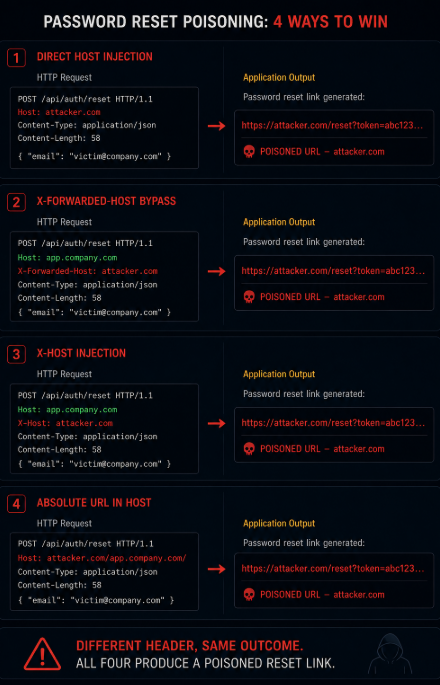
The Header Bypass Variants
A naive implementation of password reset poisoning protection might check that the Host header matches a configured expected value before using it. This check, however, can frequently be bypassed through related headers that many applications and middleware frameworks also trust.
The X-Forwarded-Host header. When an application is behind a reverse proxy or load balancer, the proxy typically adds an X-Forwarded-Host header to indicate the original host the client requested. Applications running behind proxies often read X-Forwarded-Host in preference to Host for URL construction. An attacker can inject this header directly:
POST /forgot-password HTTP/1.1
Host: app.company.com (legitimate)
X-Forwarded-Host: attacker.com (attacker-controlled)
If the application or its framework reads X-Forwarded-Host for URL construction without validating that it matches an expected value, the same poisoning attack succeeds even though the Host header is correct.
The X-Host header. Some frameworks and applications use a non-standard X-Host header for similar purposes. This header is less commonly handled by framework middleware, making it less likely to be validated. If the application reads it for any purpose related to URL construction, it is a potential injection point.
The X-Forwarded-Server and X-HTTP-Host-Override headers. Various frameworks and proxy configurations introduce additional headers that can influence URL construction. Systematic testing of all headers that might affect URL generation is necessary to fully characterize the attack surface.
Absolute URL in the Host header. Some parsers handle Host: attacker.com/legitimate-path by accepting the full string including the path. The host becomes attacker.com and the path from the header is appended before the application's own path. Applications that do not validate the absence of path separators in the parsed host value may be vulnerable to this variant.
Framework-Level Trust and Why Whitelisting in the Application Layer Is Insufficient
Many frameworks provide methods for obtaining the current request URL that are supposed to be aware of proxy headers and configured trusted proxy lists. The availability of these methods leads developers to believe that the framework handles host validation correctly.
In practice, the security depends entirely on the framework configuration:
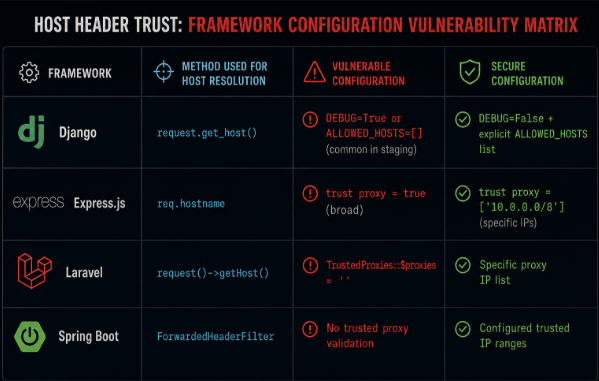
Django's request.get_host() reads from ALLOWED_HOSTS and will raise an error if the computed host is not in the list but only if DEBUG is False. In development mode, ALLOWED_HOSTS is often empty or set to a wildcard, and this check is disabled. A staging environment deployed with development settings, or a misconfigured production deployment, does not benefit from this protection.
Express.js req.hostname reads from X-Forwarded-Host by default when the trust proxy setting is enabled. If trust proxy is enabled without being restricted to specific trusted proxy IP addresses, any client can inject X-Forwarded-Host and have it read as the authoritative host.
Laravel's request()->getHost() and request()->url()** depend on the trusted proxy configuration. If the application is behind a load balancer and proxies are trusted broadly, the same X-Forwarded-Host` injection applies.
Spring Boot has similar configuration dependencies around ForwardedHeaderFilter and trusted proxy ranges.
The pattern is consistent across frameworks: the framework provides a mechanism to correctly determine the host, but the mechanism depends on configuration that is frequently left at an insecure default, especially in non-production environments that are occasionally promoted to production or that share code with production.
The Scope of Impact: Why This Affects Every Account
Unlike most vulnerabilities that affect specific data or specific users, password reset poisoning has platform-wide scope when exploited at scale.
A single attacker can request password resets for every registered email address on the platform if they can enumerate those addresses, or if they have access to a list of users. Each reset request results in a poisoned email sent to that user. Any user who clicks the link delivers their reset token to the attacker.
In a targeted attack, the attacker sends a reset request for a single high-value account an administrator, an executive, a user with elevated privileges. The attacker has high confidence that the target will receive and click the email because reset emails are expected communications that users tend to act on promptly.
In a broad attack, the attacker sends reset requests for every email address they can obtain from LinkedIn, from the platform's public API, from scraping and waits for token deliveries. Not every user clicks immediately. Some users do not click at all. But in a platform with thousands of users, even a small percentage of clicks represents a significant number of compromised accounts.
The attack scales linearly with the attacker's ability to trigger reset emails, and the cost of triggering reset emails is essentially zero for an application without rate limiting on reset requests.
Rate Limiting and Its Limitations Against This Attack
Rate limiting on password reset requests is a necessary control but not a sufficient defense against password reset poisoning.
Rate limiting prevents the attacker from sending thousands of poisoned reset requests per minute. It does not prevent the attacker from sending a small number of targeted poisoned requests over a longer period. A rate limit of ten reset requests per IP per hour still allows the attacker to target ten high-value accounts per hour from each IP address they use.
More fundamentally, rate limiting addresses the volume of the attack without addressing the root cause the fact that the application is using attacker-controlled data to construct the reset link. An application that correctly validates the host before using it in the reset link is not vulnerable to this attack regardless of the volume of requests. An application that rate limits but still uses the attacker-controlled Host header is still vulnerable to targeted attacks within the rate limit.
The correct defense is not rate limiting the attack it is eliminating the vulnerability that the attack exploits.
The Correct Fix: Hardcoded Base URL
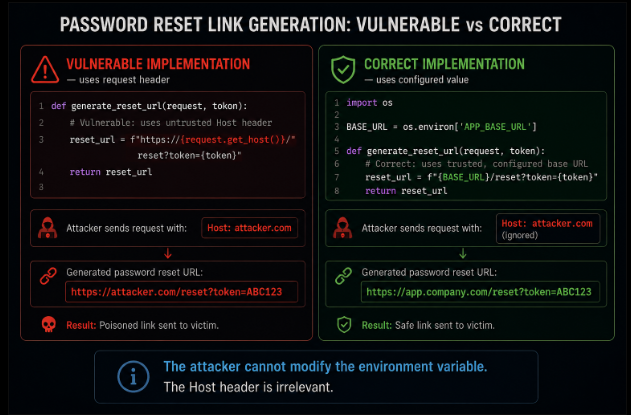
The single most reliable defense against password reset poisoning is to never use the request's Host header to construct URLs in any security-sensitive context. Instead, the application should use a hardcoded, configuration-managed base URL for all email links, redirects, and other security-critical URL generation.
python
# Vulnerable uses request host
reset_url = f"https://{request.get_host()}/reset-password?token={token}"
# Correct uses hardcoded configuration value
BASE_URL = os.environ.get('APP_BASE_URL', 'https://app.company.com')
reset_url = f"{BASE_URL}/reset-password?token={token}"
The APP_BASE_URL is set in the application's environment configuration not derived from any incoming request. An attacker can manipulate every header in the request. They cannot manipulate the environment variable on the server.
This fix is straightforward and complete. The application knows what its base URL is it is a property of the deployment, not of the incoming request. Using the deployment's configured URL eliminates the entire class of host header injection attacks on reset links.
Secondary controls that reduce risk:
Validate the Host header against an allowlist before using it, even if you are also using a hardcoded URL for most operations. Any code path that reads the Host header should validate it against the expected values for the deployment.
Remove or ignore X-Forwarded-Host, X-Host, and related headers at the load balancer or ingress layer for any traffic that does not genuinely originate from a trusted proxy. These headers should only be trusted when they arrive from your known proxy infrastructure.
Log and alert on reset requests where the incoming Host header does not match the expected application domain. These requests are either misconfigured clients or active attack attempts, and both are worth knowing about.
Testing for Password Reset Poisoning
The test is straightforward and can be conducted in a few minutes once access to the password reset endpoint is established.
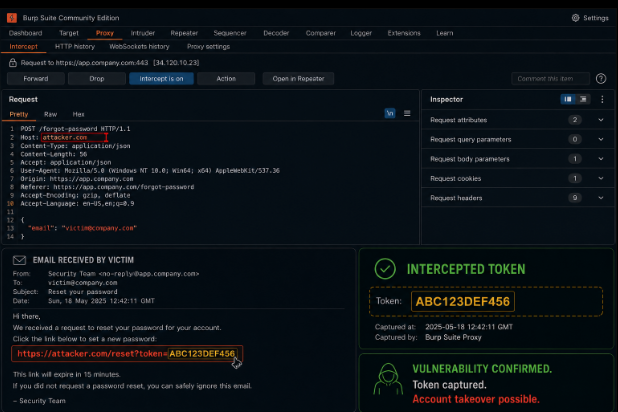
Basic host header test:
- Open a request interception tool (Burp Suite, Postman, or similar)
- Navigate to the password reset page and initiate a reset for an email address you control
- Intercept the reset request before it is sent
- Modify the
Hostheader value to a domain you control (or use a webhook service like Burp Collaborator) - Forward the modified request
- Check the email you receive for the reset link
- If the reset link domain has changed to your injected value, the application is vulnerable
X-Forwarded-Host test:
- Initiate a reset request as above
- Keep the
Hostheader correct - Add an
X-Forwarded-Host: attacker.comheader to the request - Forward the request and check the resulting email link
X-Host test:
Repeat with X-Host: attacker.com.
Bypass via Referer or Origin headers:
Some implementations use the Referer or Origin headers as fallbacks for URL construction. Test these as additional injection points.
If any of these tests produces a reset email with a domain other than the application's legitimate domain, the vulnerability is confirmed.
Why Fifteen Minutes
The claim in the title is specific: password reset poisoning is a fifteen-minute bug. That number refers to two different fifteen-minute intervals.
Fifteen minutes to introduce the vulnerability. A developer building the password reset flow, working quickly, reaching for request.get_host() or the framework equivalent to construct the reset URL this decision takes seconds and produces the vulnerability. A developer who knows to use a hardcoded base URL would take roughly the same amount of time to write the correct code. The difference between the vulnerable and secure implementations is knowing which is which.
Fifteen minutes to exploit it. Once the vulnerability is found through a penetration test, through a security scanner, through an attacker systematically probing the authentication surface exploiting it requires: one request with a manipulated header, receiving the poisoned email, extracting the token, submitting the token. For a single-account targeted attack, this takes fewer than fifteen minutes from discovery to account takeover.
The asymmetry is severe. The fix, once the vulnerability is known, takes less than five minutes to implement replace the dynamic host construction with a hardcoded base URL. The vulnerability that takes five minutes to fix after discovery took fifteen minutes to exploit after discovery. The fifteen minutes that matter are the attacker's, not the developer's.
Closing: The Link in the Email Is a Credential
Password reset poisoning works because the reset link in an email is, functionally, a credential a single-use proof that the holder is entitled to take control of the associated account. Anything that influences where that credential is delivered is a security-critical decision.
The application that uses an attacker-controlled header to construct the delivery URL of its own credentials has handed the attacker control over credential delivery. The fix is not to validate the attacker-controlled input more carefully it is to not use attacker-controlled input for this purpose at all.
The application's URL is a property of the deployment. It is a fact that the server knows independently of any incoming request. Using a request header to determine this fact when the server already knows the answer is the pattern that produces the vulnerability.
The reset link should go to one place: the application's configured URL. Not the URL the attacker suggested. The one the application was deployed to serve.
Axeploit tests password reset flows as part of its authentication security coverage sending reset requests with manipulated Host, X-Forwarded-Host, and X-Host headers, checking the resulting reset emails for poisoned URLs, and confirming whether the poisoned token can be used to establish an authenticated session. These tests run against the deployed application using controlled email addresses, producing confirmed account takeover evidence rather than theoretical flags. A password reset poisoning finding from Axeploit includes the poisoned URL, the captured token, and the proof-of-concept session establishment everything needed to understand, reproduce, and fix the vulnerability.