Your NemoClaw setup can print "Using Ollama on localhost:11434" while the socket underneath is bound to 0.0.0.0 and answering on every interface. That gap between the message and the truth is the whole story: any webpage you open can take unauthenticated control of your local model and hide instructions inside it. Most coverage of this disclosure stops at "check your binding." Here is what to do after that.
One installer message, two very different bindings
On August 25, 2026, Oasis Security (now part of Cyera) disclosed a configuration flaw in how NVIDIA NemoClaw stands up its local Ollama inference backend. Oasis reported it to NVIDIA's PSIRT before publishing, and no exploitation had been reported as of the disclosure date. You will see the issue labeled CVE-2026-65105 in Cyera's research and repeated by several outlets, while The Hacker News reports it carries no CVE. Argue about the identifier later. Version numbers matter more than the label fight.
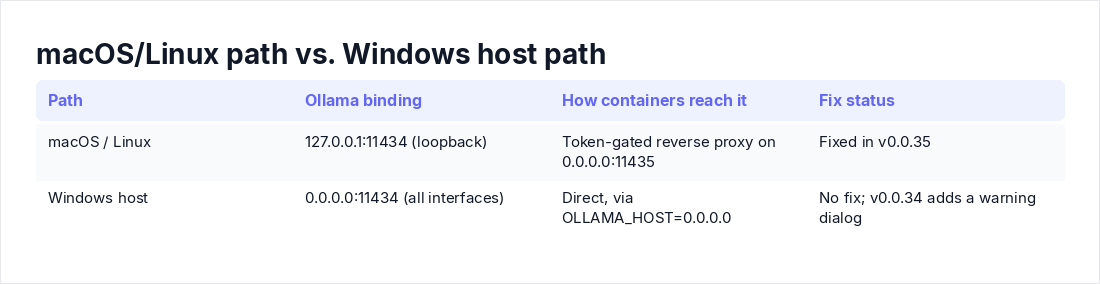
NemoClaw is NVIDIA's open source reference stack for running agents such as OpenClaw inside OpenShell sandboxes, with Ollama as one supported local backend. On macOS and Linux it keeps Ollama on 127.0.0.1:11434 behind a token-gated reverse proxy on 0.0.0.0:11435, and onboarding even restarts a daemon bound elsewhere back to loopback. On the Windows-host path it does the opposite: it sets OLLAMA_HOST=0.0.0.0:11434 so Docker Desktop containers can reach the daemon, then prints the localhost message anyway. Oasis's head of research Elad Luz says v0.0.35 fixed macOS and Linux. The Windows and WSL path has no fix. v0.0.34 added a Windows installer that carries a warning instead, and there is no published timeline.
How a webpage gets from your browser to your model
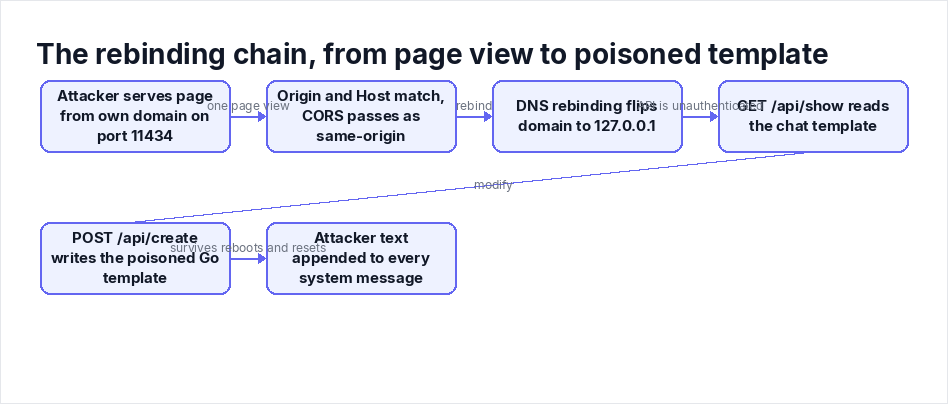
Ollama's API on 11434 has no authentication. It leans on two middleware layers to keep browser traffic out: a CORS Origin check and Host-header validation. The failure, as documented in Cyera's write-up, is that binding Ollama to a non-loopback address skips Host-header validation entirely. The attacker serves a page from their own domain on port 11434, so the Origin and Host headers match and the CORS check waves it through as same-origin. DNS rebinding finishes the job: the domain first resolves to the attacker's server, then flips to 127.0.0.1 (or your LAN IP) while the browser keeps treating requests to that hostname as same-origin. Luz said the full chain was tested on macOS with Firefox against a vulnerable NemoClaw build.
Once through, the payload reads the model's existing chat template via /api/show and writes a modified Go template back through /api/create. The poisoned template appends attacker-controlled text to every system message at inference time. It persists across conversations and survives the agent supplying its own system prompt. Forkast reports it also survives reboots, model reloads, and conversation resets, and byteiota found it lasts until the model is re-pulled or NemoClaw is fully reinstalled. While the API is open, the attacker can enumerate your models, pull or push arbitrary ones, delete what you have, and run inference. And because the daemon sits on 0.0.0.0, any device on your network segment can do all of that directly, no rebinding required.
A planted line in the system message is an instruction channel into every tool your agent can call. If you want the deeper mechanics of why that channel is so hard to close, we broke it down in AI Prompt Injection vs. Command Injection.
Step 1: Find out what is actually listening
Do not trust installer output. Ask the OS.
# Linux
ss -tlnp | grep 11434

# macOS
sudo lsof -nP -iTCP:11434 -sTCP:LISTEN# Windows
Get-NetTCPConnection -LocalPort 11434 -State Listen |
Select-Object LocalAddress, OwningProcessThe decision rule is simple: a listener on 0.0.0.0:11434 or [::]:11434 is exposed. Loopback only is the baseline. Then find out why it is bound that way. Hunt for OLLAMA_HOST in your shell profile, the systemd unit (systemctl cat ollama), the launchd plist, or the Windows machine environment ([Environment]::GetEnvironmentVariable('OLLAMA_HOST','Machine')).
Finally, test from another device on the same network:
curl -m 3 http://<host-ip>:11434/api/tagsIf that returns a JSON list of your models, the daemon is reachable off-box and anyone on the segment has full API control.
One version note. The Hacker News reviewed the NemoClaw repository at commit 17f0ca3b and found that current builds (the default landed in v0.0.106 on August 10) refuse to start the local proxy against a backend not bound to loopback, exiting with a dedicated status code and a refusal message. Three caveats from that same review: the probe can be disabled with NEMOCLAW_OLLAMA_PROXY_SKIP_BIND_PROBE=1, it does not fail closed on hosts where the check cannot run, and it lives inside the proxy, which NemoClaw does not start on the WSL paths. On Windows, the safeguard never fires. Grep your environment for the skip variable while you are in there.
Step 2: Look for a poisoned chat template
Nothing in the NemoClaw repository verifies template integrity. The code queries /api/show only for a model's native context length and its declared tool-calling capability. Detection is on you.
# Every installed model
ollama ls

# Dump one model's template
curl -s http://127.0.0.1:11434/api/show \
  -d '{"name":"qwen3:8b"}' | jq -r '.template' > suspect.tpl
What does suspicious look like? Prose sentences sitting outside the {{ }} template directives, especially anything phrased as a standing instruction: "always", "never mention", a URL you do not recognize. The documented payload appends attacker text to every system message, so pay attention to whatever rides along with the system role. The reliable check is a diff: pull the same tag on a throwaway machine or container, dump that template, and compare the two files. Also scan ollama ls for models you do not remember installing, since the open API lets an attacker pull whatever they want.
My advice is to not spend long on analysis. If anything looks off, or you cannot produce a clean reference copy, treat the model as compromised and move on. Re-pulls are cheap. Forensic certainty about a poisoned template is not.
Step 3: Re-pull, then prove it
A re-pull is the documented way to clear the persistence. A full NemoClaw reinstall is the other. Do every model, not just the one that looked wrong:
ollama ls | awk 'NR>1 {print $1}' | while read m; do ollama pull "$m"; doneAfterward, dump one template again and diff it against your saved suspect copy. The appended text should be gone, and that delta is your confirmation rather than a guess.
Two follow-ons. First, if a template was poisoned, review what the agent did in past sessions. Hidden instructions rode every system message, so look for unexpected tool calls, file access, or outbound connections, and rotate whatever credentials the agent could reach. Second, if you cannot say with confidence which models on the box were installed by you, stop curating and reinstall the stack.
Step 4: Windows and WSL have no patch, so compensate
NVIDIA's documentation tells Windows-host operators not to expose port 11434 to a LAN or the internet. Follow it, but understand the limit: that advice stops your neighbor, not your browser. The rebinding chain reaches the daemon at 127.0.0.1 from a browser process already running on the host, so perimeter rules never see it.
Controls that actually reduce risk on the unpatched path, in order of value:
- Rebind Ollama to loopback. A loopback-bound daemon keeps the Host-header validation that rejects the attacker's rebound hostname. This breaks the browser chain outright. The cost is that Docker Desktop containers lose their direct path to the daemon, which is why NemoClaw opened it up in the first place.
- Give containers an authenticated proxy instead. Mirror what NemoClaw already does on macOS and Linux: Ollama on 127.0.0.1:11434, a token-gated reverse proxy on the container-facing port. A minimal Caddyfile:
:11435 {
    @noauth not header Authorization "Bearer <long-random-token>"
    respond @noauth 403
    reverse_proxy 127.0.0.1:11434
}
Wiring agent clients through a token header takes some configuration. If a client cannot send headers, an IP allowlist restricted to the Docker virtual switch subnet is a weaker but workable fallback.
- Firewall the LAN path anyway. Block inbound 11434 from everything except the Docker subnet:
New-NetFirewallRule -DisplayName "Block Ollama 11434 inbound" `
  -Direction Inbound -Protocol TCP -LocalPort 11434 -Action Block
This kills the direct network attack from other devices. It does nothing for rebinding, which is why it is step three and not step one.
- Filter rebound DNS answers where you control the resolver. Blocking public names that resolve to loopback or private space is a useful layer, not a fix.
- Decide what runs on that box. My blunt position: if the agent on a Windows host touches production credentials or sensitive data, move the workload to a patched macOS or Linux machine until NVIDIA ships a real fix. A warning dialog is not a control.
Re-run the Step 1 checks after every change, and after every NemoClaw or Ollama update, since reinstalls are exactly the moment bindings quietly change.
This advice problem is bigger than NemoClaw
Never used NemoClaw? You are not automatically clear. Ollama's own NemoClaw integration page advises setting OLLAMA_HOST=0.0.0.0 when running inside WSL2 or a container, and years of tutorials repeat the same line for LAN access. Every instance configured that way skips the Host-header check, which is the control Ollama added in v0.1.29 on March 14, 2024, when NCC Group published the first rebinding advisory as CVE-2024-28224. The tutorial advice quietly downgrades your box to pre-fix posture. Treat 11434 as what it is, an unauthenticated admin API. Keep it on loopback by default, and when remote access is genuinely needed, put an authenticated proxy in front and a firewall rule behind it. If your agent also pulls in third-party skills on top of that stack, the trust problem compounds fast; our working guide to OWASP's Agentic Skills Top 10 covers that side.
The pushback I keep hearing
"No exploitation has been reported." True as of August 25, 2026. The chain requires one page view from the victim, plants persistence that survives reboots, and is detected via template dumps nobody was running last month. Reported exploitation is a lagging indicator here, not a safety signal.
"Browsers block websites from talking to localhost." That is the assumption the research dismantles. The page is served from the attacker's domain on port 11434, the CORS middleware passes, and DNS rebinding flips the address to 127.0.0.1. Demonstrated end to end.
"I run stock Ollama, not NemoClaw." Then check whether any guide you followed had you export OLLAMA_HOST=0.0.0.0. If yes, you are in the same posture as the vulnerable path, minus the warning dialog.
One more honest point: everything above is a point-in-time audit. It proves Tuesday's socket was clean and says nothing about the next update, which is the same reason we argue for a continuous exposure pipeline over periodic scanning. For evidence between point-in-time audits, Axeploit pentesting for audits is the page to send a buyer or auditor.
If you want this checked automatically
If you want the auth and object-level checks in this article run against a live app, start with Axeploit's API security checker.
Key takeaways
- The installer saying "localhost:11434" proves nothing. Verify the listener with ss, lsof, or Get-NetTCPConnection, then curl the API from a second device. 0.0.0.0 or [::] means exposed.
- macOS and Linux are fixed as of v0.0.35; Windows and WSL have no patch and no timeline. The v0.0.106 bind probe never runs on the WSL paths and can be switched off, so do not count on it.
- No chat-template integrity check exists anywhere in the stack. Dump every model's template via /api/show, diff against a clean pull, and re-pull anything suspicious. Poisoning persists until a re-pull or full reinstall.
- On unpatched Windows hosts, rebind Ollama to loopback, front containers with an authenticated proxy, firewall 11434 from the LAN, and move sensitive agent workloads off the box until a fix ships.
- Audit every Ollama instance you run, not just NemoClaw's. The OLLAMA_HOST=0.0.0.0 advice, repeated in Ollama's own integration docs, disables the one middleware check that stops DNS rebinding.