If you are a Chief Information Security Officer (CISO), a DevSecOps engineer, or a platform defender navigating the threat landscape of 2026, you already know that the software supply chain is the most contested battleground in cybersecurity. We have spent years hardening our pipelines against malicious code commits and compromised open-source dependencies. But what happens when the source code you download is perfectly clean, but the repository itself is a cleverly disguised trap?
Threat actors are incredibly adaptive. They know that slipping malicious code into a heavily scrutinized open-source project is difficult and often triggers automated security alarms. To bypass these defenses, hackers have pivoted to a brilliant, terrifyingly simple tactic: they are cloning legitimate GitHub repositories, preserving the original code entirely, and instead poisoning the documentation.
This article will break down exactly how attackers are creating perfect digital doppelgängers of trusted open-source tools to distribute malware, why traditional code scanners are completely blind to this threat, and the step-by-step actions you must take to secure your environment with Axeploit.
The Anatomy of a GitHub Repository Clone Attack
A "Supply Chain Attack" occurs when a hacker compromises a third-party tool, library, or vendor that your organization relies on, rather than attacking your secure infrastructure directly. In this specific iteration, attackers are leveraging the inherent trust developers place in the GitHub ecosystem.
Here is the exact methodology cybercriminals are using to deceive modern engineering teams:
Step 1: Creating the Perfect Doppelgänger
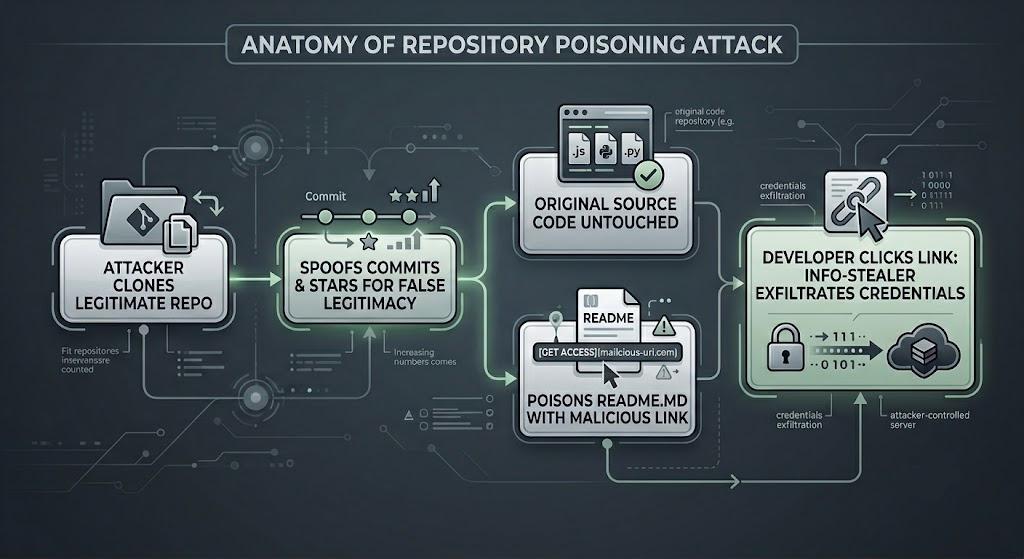
First, the attacker selects a highly popular, legitimate open-source project, often a developer framework, a deployment utility, or an API library. They create a 1:1 clone (a copy) of the repository.
To make the fake repository appear trustworthy to a passing developer, the attacker must fabricate reputation. They use automated scripts to preserve the project's original structure and artificially inflate the project's "Stars" (GitHub's version of a 'like' or endorsement). They also manipulate timestamp tools to spoof a massive, active "Commit History" (the timeline of saved code changes). To a developer moving fast, a repository with 10,000 stars and a three-year history of daily commits looks perfectly legitimate.
Step 2: Poisoning the README
Here is the genius of the attack: the hackers do not touch the .py, .js, or .go source code files. They leave the actual software entirely pristine. Instead, they edit the README.md, the central documentation file that serves as the instruction manual for the repository.
Because developers almost always read the README to find the required installation commands, the attacker quietly inserts a malicious hyperlink or a manipulated command-line string. This might look like a link to download a "required missing dependency," a "pre-compiled binary," or an automated installation script.
Step 3: The Info-Stealer Execution
When the unsuspecting developer clicks the link in the README or copies the poisoned installation command into their terminal, they bypass the repository entirely and connect directly to the attacker's infrastructure.
This link silently downloads an "Info-stealer," a specific type of malware designed to rapidly scour the victim's local machine for sensitive data. Within seconds, the malware harvests AWS credentials, SSH keys, session tokens, and .env (environment) files, sending them straight to the attacker's Command and Control (C2) server.
The SAST Blind Spot: Why Traditional Security Fails
For DevSecOps engineers, the immediate question is: Why didn't our security tools catch this?
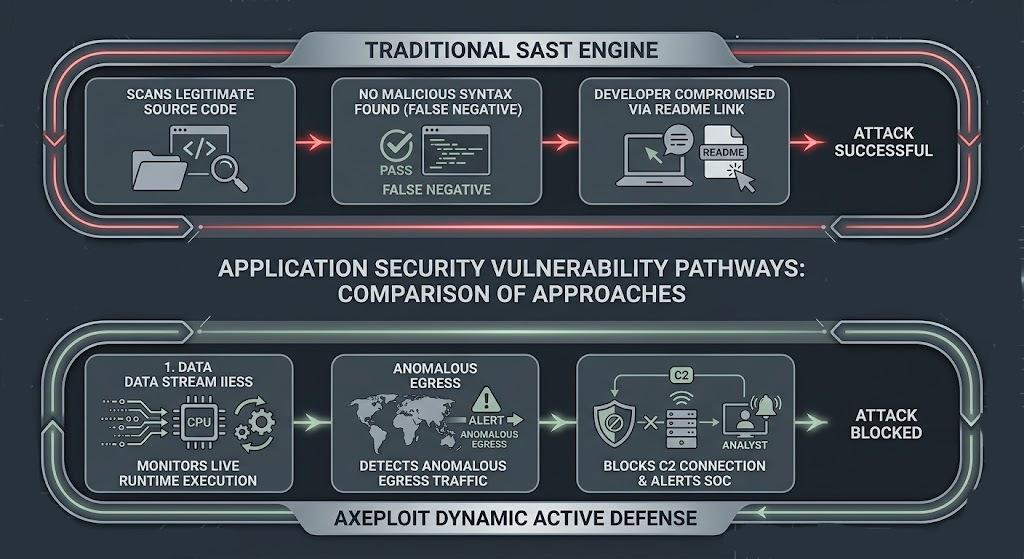
The answer lies in how legacy security tooling operates. Most organizations rely heavily on Static Application Security Testing (SAST) and Software Composition Analysis (SCA). These tools are designed to read through the source code and the dependency manifest files (like package.json or requirements.txt) looking for known vulnerabilities or malicious syntax before the code is executed.
Because the hackers left the original source code completely untouched, the SAST tools analyze the cloned repository, find perfectly safe code, and give it a green light. Static scanners are not designed to analyze the psychological intent of a hyperlink buried in a Markdown (.md) documentation file. The threat isn't in the syntax; it is in the human interaction with the documentation. Traditional scanners are effectively blind to this attack vector.
Defending Your Pipeline: A Step-by-Step Guide
The reality of 2026 is that you can no longer implicitly trust the platforms where code is hosted. Surviving these advanced social engineering attacks requires a shift from passive code scanning to an active, zero-trust mindset.
Here is the step-by-step guide to locking down your environment and leveraging Axeploit to catch what traditional scanners miss.
Step 1: Establish Strict Verification Protocols
Before your developers pull any new tool or library into your ecosystem, you must enforce human-in-the-loop verification.
- Verify the Source: Do not rely on GitHub search bar results. Always navigate to the repository via the official project website or official vendor documentation.
- Check the Creator: Look closely at the URL and the author's username. A malicious repository might be named github.com/facebook-react/react instead of the legitimate github.com/facebook/react.
- Beware of Empty Commits: While attackers can spoof the volume of commits, inspecting the actual commit data often reveals that they are empty, automated timestamp updates rather than real human code contributions.
Step 2: Implement Zero Trust Egress Filtering
An info-stealer is useless if it cannot phone home. You must enforce strict egress (outbound traffic) filtering on all developer machines and continuous integration (CI) environments.
By applying the principle of least privilege at the network level, you ensure that even if a developer accidentally executes a malicious script from a poisoned README, the malware cannot reach out to the attacker's Command and Control (C2) server to exfiltrate your corporate secrets.
Step 3: Deploy Axeploit's Dynamic Active Defense
Because static analysis (SAST) cannot read a developer's mind or police their web clicks, your final line of defense must be active and dynamic. This is where Axeploit becomes an indispensable extension of your Security Operations Center (SOC).
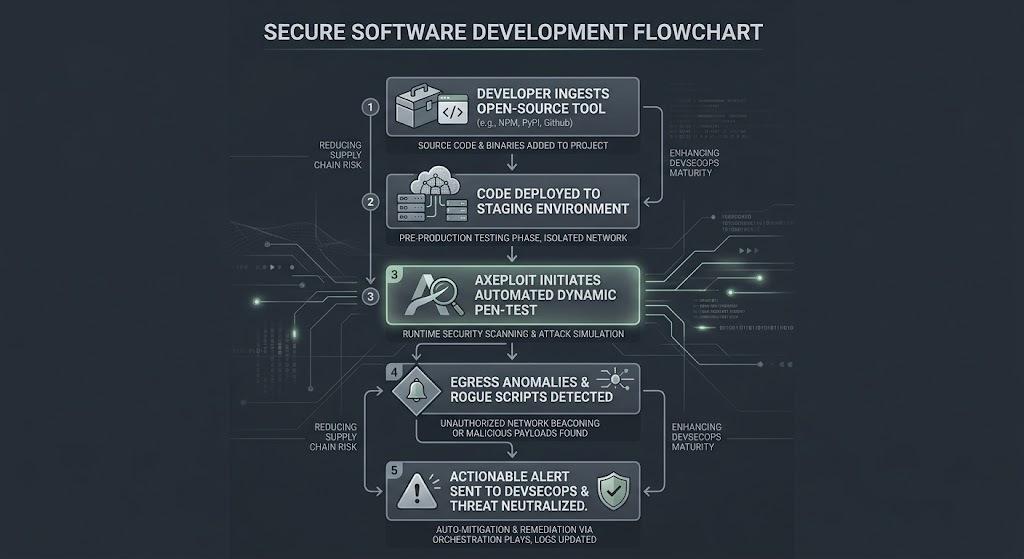
Axeploit operates on the principle of Continuous Threat Exposure Management (CTEM). Instead of just reading your code on paper, Axeploit actively tests and monitors your live, running environments from the outside, mimicking the exact behaviors of an advanced threat actor.
If a developer accidentally downloads an info-stealer from a cloned GitHub repository, and that malware attempts to run a malicious executable, alter your local permissions, or establish a hidden backdoor, Axeploit’s dynamic engine will catch the runtime anomaly immediately. We flag the exposed exploit path, instantly alert your DevSecOps team, and provide actionable remediation insights to isolate the compromised machine before a massive data breach occurs.
Conclusion: Securing the Human Element of the Supply Chain
The widespread abuse of GitHub through cloned repositories and poisoned README files proves that cybercriminals are bypassing our strongest technical perimeters by targeting the human element of software development. As long as developers are pressured to build fast and ship continuously, mistakes will happen. A single errant click on a documentation link should not result in the total compromise of your cloud architecture.
To protect your organization, you must move beyond the illusion that clean code equals a secure application. You must adopt a Zero Trust architecture, strictly control your network egress traffic, and continuously test your live environments for runtime anomalies.