The dangerous thing about AI coding assistants is not that they write bad code all the time. It is that they write code that looks correct while quietly widening the attack surface. In a fast-moving team, that creates a false sense of safety, because the feature works, the tests pass, and the vulnerable pattern feels too ordinary to question.
The risk appears before the code ever ships
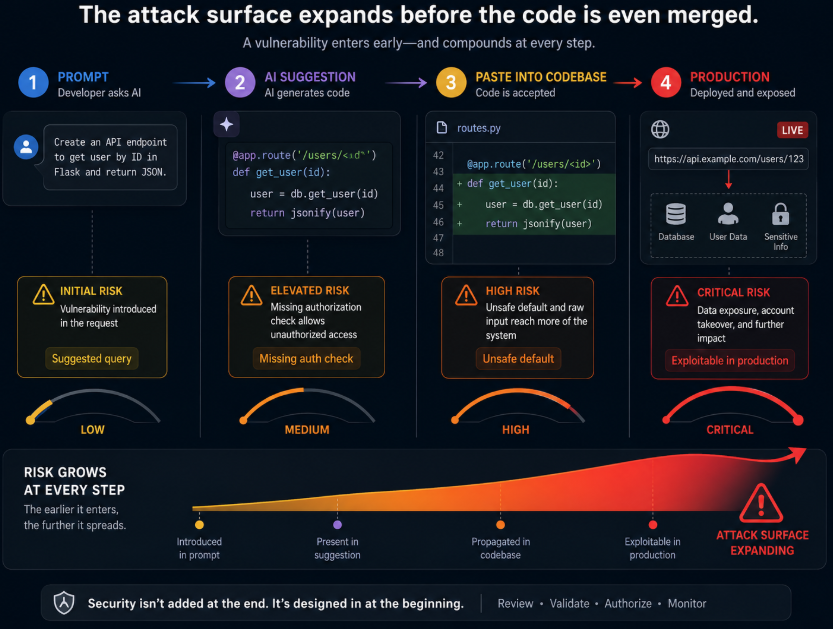
AI coding assistants change the way software is built. They do not just speed up typing. They shape decisions in the moment. A developer asks for a function, an endpoint, a query, a file upload handler, or a quick fix, and the assistant offers something plausible immediately. That speed is useful, but it also means risk enters the workflow earlier than most teams expect.
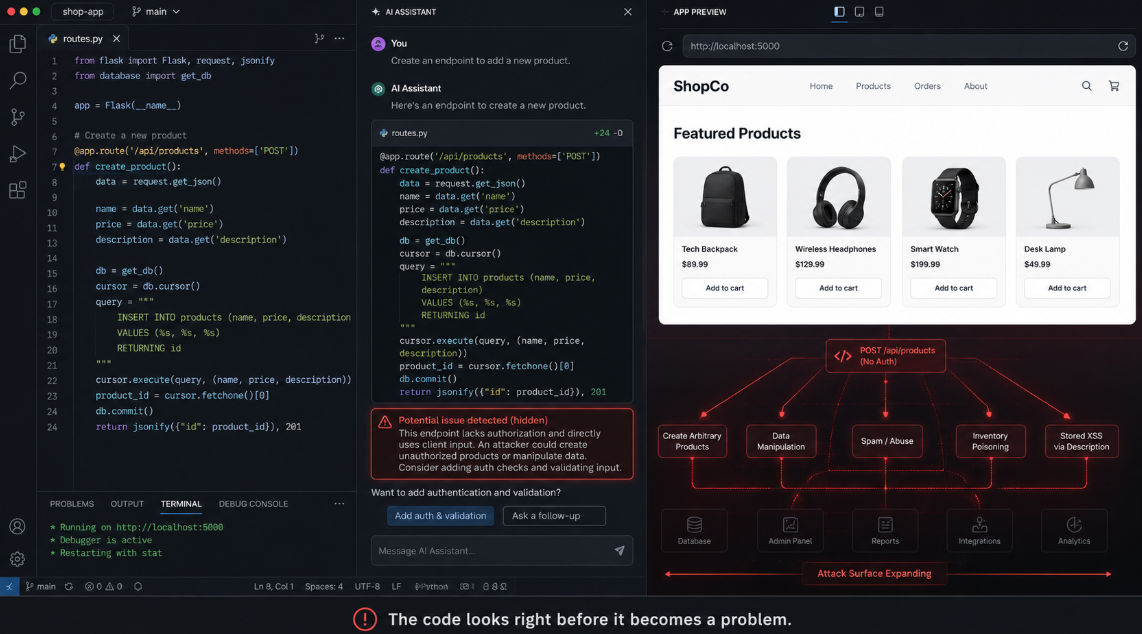
The systemic problem is that these tools optimize for completion, not defense. They are trained to predict likely code, not secure code. In practice, that means they often suggest patterns that are common in public repositories but weak in real systems. A simple request can produce code that forgets authorization checks, exposes sensitive data, trusts user input too much, or handles errors in ways that leak information.
The attack surface becomes invisible because it forms in small pieces. One suggestion adds a raw SQL query. Another creates a file endpoint without strict validation. A third introduces an admin shortcut that bypasses normal checks. No single line looks alarming on its own. The danger comes from accumulation, where a series of “good enough” suggestions turn into a system that is much easier to attack than the team realizes.
What it looks like in real development
A common example is API work. A developer asks for a quick endpoint to fetch user data, and the assistant generates code that checks whether the user is logged in but not whether they are allowed to access that record. The route works. The response looks fine. The flaw shows up when someone changes an identifier and sees another customer’s data.
Another example is database access. An AI assistant may generate a query that interpolates input directly into SQL because it is a familiar pattern from training data or surrounding code. The code runs, the feature seems complete, and the vulnerability stays hidden until someone tries a malicious payload. The same thing happens with file uploads, webhook handlers, redirect logic, and internal admin endpoints.
The bigger problem is speed. When teams use AI assistants throughout the day, code gets reviewed less carefully because every individual change looks small. The result is not one dramatic mistake. It is a steady stream of minor unsafe choices that add up to a much larger exposure than a team would create manually.
Why normal reviews miss the buildup
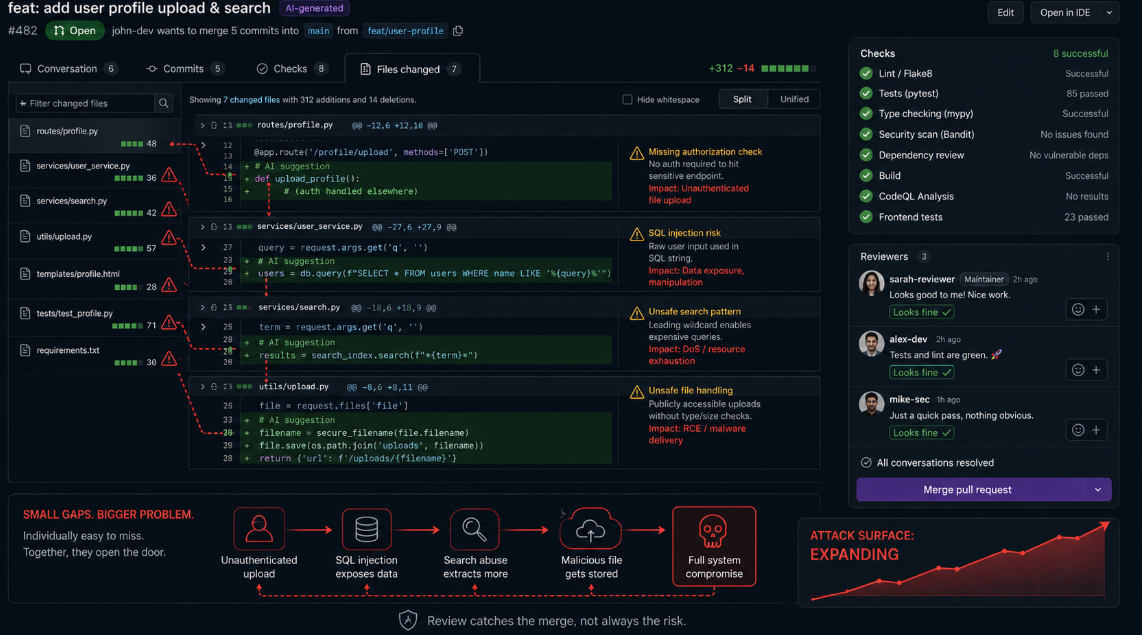
Traditional review processes are built to catch obvious problems at the end of the workflow. A pull request gets reviewed, tests run, and maybe a scanner flags something. That helps, but it is not enough when the risky pattern was introduced earlier by a tool that normalized it before the reviewer ever saw it.
The issue is that most reviews look at finished code, not the moment the code was suggested. By the time a developer pastes in a block from an assistant, the pattern already feels acceptable. Reviewers tend to read for correctness, not for whether the assistant quietly nudged the code toward a dangerous shortcut. That makes real-time AI-generated flaws harder to notice than older, manual mistakes.
There is also a cultural gap. Teams often celebrate AI assistance as a productivity gain and stop there. But productivity without guardrails can increase blast radius. The more code an assistant produces, the more surface area there is for access control mistakes, injection paths, logic flaws, and unsafe defaults. That is why the problem feels invisible. It grows inside the normal pace of work.
What actually helps
The answer is not to ban AI coding assistants. The answer is to stop treating them like neutral tools. They should be used inside a process that assumes they can create risk as quickly as they create value. That means requiring human review for any code touching authentication, authorization, payments, file handling, and data access. It also means pushing teams to verify behavior, not just syntax.
Security teams should test the areas AI assistants tend to weaken: access control, input validation, secrets handling, and business logic. They should also look for repetition. If several AI-generated changes follow the same risky pattern, the issue is probably systemic rather than accidental. That is where tools like Axeploit are useful, because they help expose the kinds of vulnerabilities AI-assisted development introduces in real workflows, including IDOR, auth bypass, SQL injection, and business logic flaws.
The best teams also make secure defaults easy to reuse. If a safe pattern is available as a template, library, or internal standard, the assistant is more likely to follow it. That matters because AI assistants are often only as safe as the environment they are dropped into.
Bottom Line
AI coding assistants are not dangerous because they are smart. They are dangerous because they are fast, confident, and woven into the development moment itself. That makes them part of the attack surface, not just part of the workflow. If you want to see how much risk they may be introducing into your product, you can run an automated scan with Axeploit.