Most developers already do a form of threat modeling, even if they do not call it that. Anytime you ask “what could go wrong here?” before shipping a feature, you are making a risk judgment. The problem is that in small teams, this thinking often stays informal, inconsistent, and dependent on whoever happens to notice the risk first.
That is where lightweight threat modeling helps. You do not need a full security program, a specialized workshop, or a large amount of documentation to do it well. What you need is a simple way to map what you are building, identify what could be attacked, and decide what deserves attention before release.
Why small teams skip it
Small teams skip threat modeling for the same reasons they skip a lot of security work: they are moving fast, they do not have a dedicated security function, and the process sounds heavier than the problem feels. The word “threat modeling” itself can make it seem like a formal exercise reserved for large enterprises with big architecture diagrams and long review meetings.
In reality, small teams are often the ones who benefit most from it. They make architectural decisions quickly, change code frequently, and ship features before the system has time to become deeply layered. That speed is an advantage, but it also means a missed security assumption can survive for a long time if nobody catches it early.
The key is to keep the process small enough that it actually gets used. If the framework takes more than a few minutes to apply, developers will only reach for it when something already feels wrong. A good lightweight threat model should fit naturally into planning, implementation, and release review.
The simple threat modeling framework
You do not need a complex methodology to get value from threat modeling. For small teams, a practical framework can be reduced to four questions:
- What are we building?
- What are we protecting?
- How could it be attacked?
- What is the simplest control that reduces the risk?
This keeps the focus on outcomes rather than process. You are not trying to produce a perfect artifact. You are trying to surface the highest-risk assumptions before they become production issues.
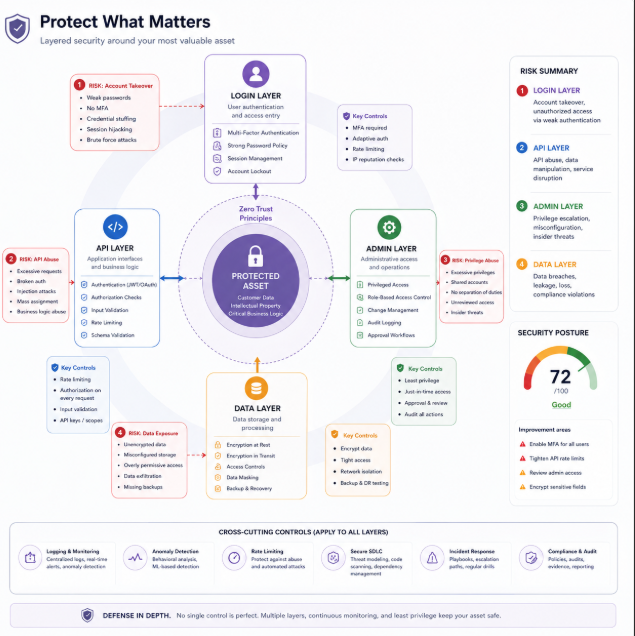
A useful way to apply this is feature by feature. If you are adding login, think about account takeover, credential stuffing, enumeration, and broken session handling. If you are adding file upload, think about malicious files, storage exposure, and access control. If you are adding an admin panel, think about privilege abuse, hidden endpoints, and accidental exposure.
Start with the asset
The first step is to identify what matters. That might be user accounts, payment data, tokens, source code, internal documents, or admin actions. Not every piece of data has the same sensitivity, and not every feature has the same level of business impact.
When teams skip this step, they often focus too much on technical weakness and not enough on consequence. A vulnerability is more serious when it can expose customer data, alter financial records, or unlock privileged actions. By naming the asset first, you make the rest of the discussion much clearer.
This is also where product context matters. A small bug in a personal project may be inconvenient. The same bug in a multi-tenant SaaS platform could affect every customer account. Threat modeling is really about consequence analysis, not just bug hunting.
Trace the attack path
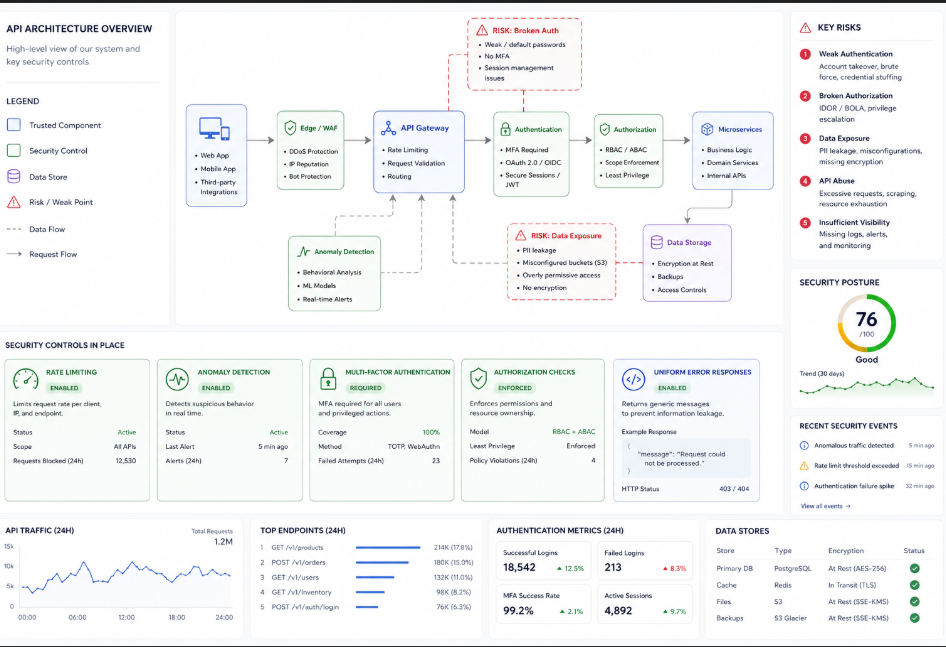
Once you know what matters, ask how an attacker would actually reach it. This step is usually more useful than brainstorming abstract threats. Instead of asking “what are all possible threats,” ask “what path would someone take to get from the public edge to the thing we care about?”
For example, if the asset is a user account, the path may go through registration, email verification, login, session tokens, password reset, and profile changes. If the asset is internal data, the path may go through API endpoints, object references, permissions, and token scopes. Mapping that path often reveals the weakest control in the chain.
This is also where developers can think like attackers without needing deep security expertise. Look for places where input changes state, where identity is trusted, where privileges are assumed, and where the system behaves differently based on a request parameter. Those are usually the places where abuse starts.
Ask what fails first
A good threat model does not try to predict every possible attack. It tries to identify what fails first if something goes wrong. That is a much more manageable question for small teams.
If authentication fails, what can the attacker reach? If authorization fails, what can they see or change? If rate limiting fails, can they brute force, enumerate, or abuse automation? If logging fails, would you even know the attack happened?
This approach turns security into a practical engineering discussion. It moves the team from vague worry to concrete failure modes. Once you know the likely failure points, you can decide whether the fix is input validation, access control, stronger authentication, better monitoring, or a more secure design.
Keep the output small
The best threat models for small teams are short. A page of notes is often enough. What matters is not the length of the document but whether it helps the team make better decisions.
A simple output format can look like this:
- Feature or system.
- Asset being protected.
- Main attack path.
- Top three threats.
- Control or test for each threat.
That is enough to guide implementation and review without slowing delivery. The goal is not to document every theoretical risk. The goal is to avoid shipping a feature with an obvious weakness that nobody explicitly considered.
This also makes threat modeling easier to repeat. If the format is light, the team can use it for new endpoints, new workflows, and new integrations instead of treating it as a one-time event.
Why execution matters more than discussion
A common weakness in lightweight threat modeling is stopping at the discussion stage. The team identifies the risk, agrees that it matters, and then moves on without validating whether the control actually works. That is where many small teams lose the value of the exercise.
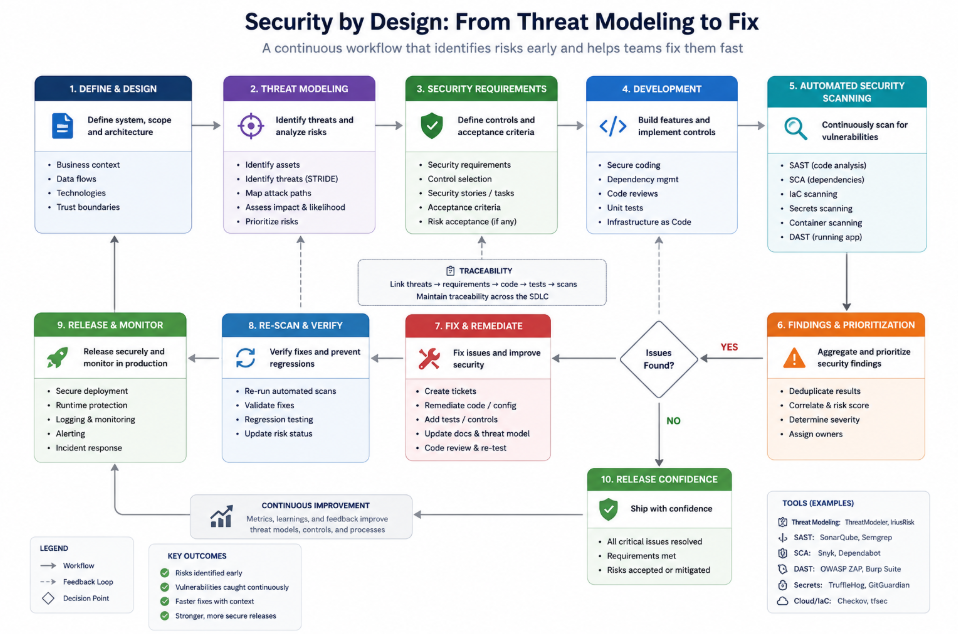
Threat modeling should lead to a testable outcome. If you identified credential stuffing as a risk, then test whether the login flow resists it. If you identified enumeration, then check whether responses leak account existence. If you identified authorization issues, then verify whether object-level access is enforced. The model should point to action, not just awareness.
This is where automated scanning becomes useful for small teams. It gives developers a practical way to execute the model without needing a manual security review for every feature. Once the risk is identified, a scanner can help validate whether the application actually behaves safely under test conditions.
Where Axeploit fits
Axeploit fits naturally into this workflow because it acts as the execution layer for the risks developers identify. If a small team models threats around authentication, enumeration, or access-control weaknesses, automated scanning helps confirm whether those weaknesses are present in practice.
That matters because small teams do not usually have time for deep manual testing on every release. They need a way to convert threat modeling into repeatable verification. A tool like Axeploit supports that by making it easier to test the areas most likely to matter in real-world abuse, especially for API-driven and auth-heavy products.
This is the practical bridge between security thinking and shipping code. Threat modeling helps the team reason about risk. Automated scanning helps the team prove whether the risk is real.
A lightweight routine teams can keep
The easiest way to make threat modeling stick is to attach it to existing development rituals. Use it during feature planning, before merging high-risk changes, and after major authentication or API updates. If it only happens during special meetings, it will fade quickly.
A small team can keep the routine simple:
- Identify the feature.
- Name the asset.
- Map the attack path.
- Pick the top likely abuse cases.
- Verify the risky parts with testing or scanning.
- Fix the highest-impact issue first.
This sequence takes minutes, not days. More importantly, it creates a habit of thinking about security before release instead of after an incident.
Final perspective
Threat modeling does not need to be a formal security discipline that only specialists can use. For solo developers and small teams, it can be a lightweight habit that improves product decisions and reduces obvious risk. The value comes from asking the right questions early and turning those questions into verification later.
That is why the combination of threat modeling and automated scanning works so well for small teams. One helps you reason about risk. The other helps you check whether the risk is actually present. Together, they create a practical security workflow that fits the way modern developers build software.