

If you are a modern developer or a “vibe coder” in early 2026, your superpower is speed. You aren’t building every single feature from scratch; you are standing on the shoulders of giants. With a quick npm install or pip install, you can instantly weave complex payment gateways, data visualization libraries, and AI integrations directly into your project. It feels like magic.
But this magic relies heavily on blind trust. When you pull a library from public repositories like NPM (Node Package Manager) or PyPI (Python Package Index), you are actively importing someone else’s code directly into your pristine environment. This interconnected web of code is your software supply chain.
While open source security is heavily championed by the community, the massive scale of these repositories has created an ideal hunting ground for cybercriminals. Hackers know that compromising a single popular library is infinitely more efficient than trying to hack a thousand different companies individually.
Welcome to the dark side of open source. Here is how threat actors are poisoning the well with malicious packages, and exactly how you can spot them before they infect your codebase.
The Software Supply Chain Under Siege
In a traditional attack, a hacker tries to break through your application's front door (like bypassing a login screen). In a software supply chain attack, the hacker sneaks into the factory that makes the door's hinges.
When your build environment pulls down a compromised library, the malicious code executes almost immediately. It doesn't need to bypass your firewall because you specifically invited it inside. Once active, these malicious packages can silently siphon off your environment variables (like AWS keys and database passwords), open reverse shells for remote control, or quietly alter your business logic.
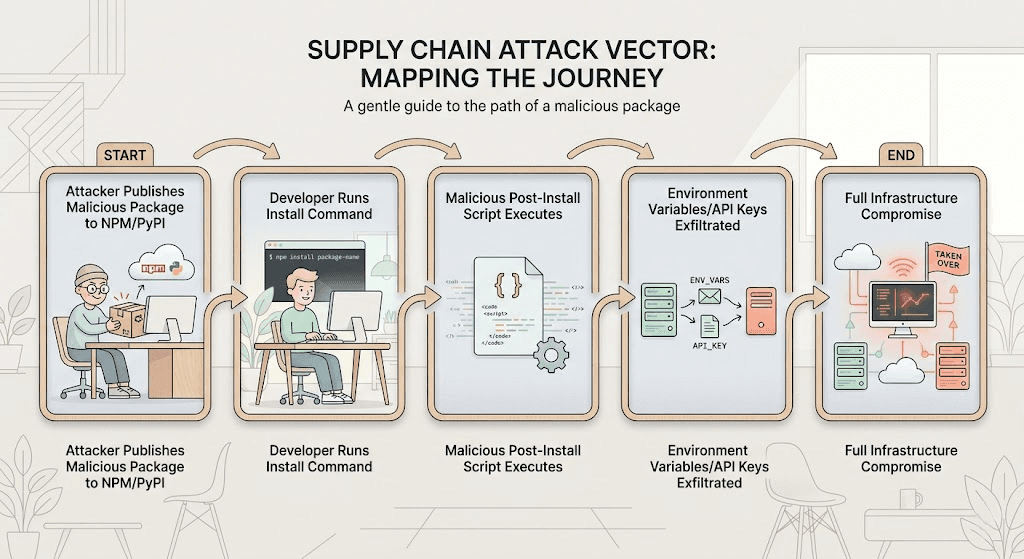
3 Tactics Hackers Use to Poison Your Code
Hackers don't usually break the complex encryption of public registries; they manipulate human behavior and development workflows. Here are the three primary methods they use to trick you into downloading malware.
1. Typosquatting: The Phishing of Package Managers
We’ve all mistyped a URL and ended up on a shady website. Typosquatting brings that exact same concept to the terminal.
Attackers analyze the most downloaded packages on NPM and PyPI and upload their own malicious clones under slightly altered names. If the legitimate package is called requests, the hacker might publish malware under reqeusts, request-api, or request-http.
If you are coding late at night, moving fast, and you accidentally transpose two letters in your terminal, the registry doesn't warn you. It simply downloads the malicious clone. Because these fake packages often wrap the legitimate code to ensure your app still compiles and functions correctly, you might not realize you've been compromised until your servers are breached weeks later.
2. Dependency Confusion: Tricking the Build System
Modern applications often use a mix of public open-source libraries and private, internal packages (e.g., @mycompany/internal-auth). Dependency confusion exploits the way package managers prioritize where they pull this code from.
If your internal build system is misconfigured, it might check public registries before checking your secure, private registry. Hackers comb through public GitHub repositories, job postings, and frontend JavaScript files to find the names of your company's private, internal packages.
Once they find a name, they publish a malicious package with that exact same name on the public NPM or PyPI registry, but they assign it a ridiculously high version number (like v99.9.9). When your build pipeline runs, it sees the public package has a “newer” version than your private one, and it automatically downloads the malware directly into your production environment.
3. Protestware and Hijacked Libraries
Sometimes, the threat doesn't come from a fake package, it comes from the real one.
Maintainers of popular open-source libraries are humans, and their accounts can be compromised. If a maintainer reuses a password and lacks multi-factor authentication (MFA), a hacker can hijack their NPM or PyPI account and push a malicious update to a legitimate package downloaded millions of times a week.
Alternatively, we have seen the rise of “protestware.” This occurs when the original, legitimate creator of a package intentionally sabotages their own code to make a political statement, demand compensation, or retaliate against corporate users. Suddenly, a library you've trusted for years begins wiping your hard drives or spamming your console.
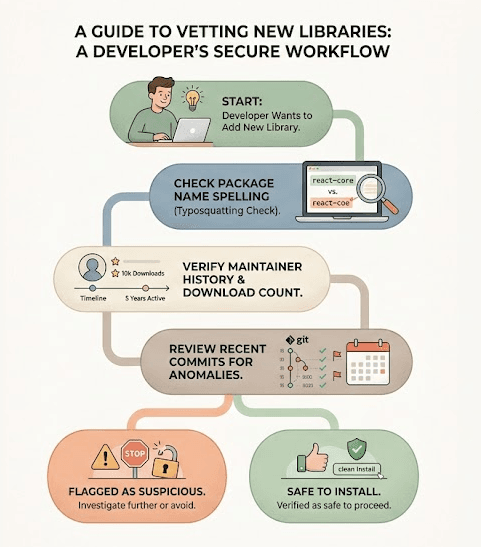
A Pragmatic Guide to Vetting Third-Party Libraries
You cannot stop using open source, but you can stop using it blindly. Here is how vibe coders and engineers can safely navigate NPM and PyPI in 2026 without destroying their velocity.
- Lock Down Your Dependencies: Never use floating version numbers (like ^1.0.0) in your package.json or requirements.txt. Always pin your dependencies to an exact, verified version (e.g., 1.0.4). Use lockfiles (package-lock.json or Pipfile.lock) to ensure your build system only downloads the specific cryptographic hashes you have explicitly approved.
- Scope Your Private Packages: To defeat dependency confusion, explicitly map your private packages to your internal registry. In NPM, use scoped packages (e.g., @yourorg/package-name) and configure your .npmrc file to strictly route requests for that scope to your private server, never the public internet.
- Audit Before You Install: Before adding a new library, take 60 seconds to do a sanity check. Look at the download count. Does a highly essential package only have 400 downloads? That's a red flag. Check the maintainer's history and look at the repository's recent issues. If a package was suddenly updated after three years of inactivity, proceed with extreme caution.
- Use Automated SCA Tools: Integrate Software Composition Analysis (SCA) tools directly into your DevSecOps pipeline. These tools automatically scan your manifest files against databases of known malicious packages and outdated libraries with known vulnerabilities.
Defending the Assembly Line with Axeploit
Vetting your libraries and locking down your supply chain is critical, but it only secures the building blocks. What happens when a sophisticated attack slips through the cracks, or a brand-new vulnerability is discovered in a previously safe package after it's already compiled into your application?
This is where passive defense ends and active testing begins. Our automated scanner actively tests your live, running application. Instead of waiting for a breach, Axeploit safely attacks your app from the outside, exactly how a malicious hacker would.
If a compromised dependency manages to open a hidden backdoor, leak an API route, or introduce a logic flaw, Axeploit’s dynamic scanner will catch it, flag it, and show you exactly how to fix it before you go live.
The era of vibe coding is about building incredible things at unprecedented speeds. You don't need to slow down; you just need the right tools to illuminate the blind spots in your software supply chain.


