When a team moves from VS Code to Cursor, the extensions follow by muscle memory. Developers search for the same IDs, click install, and get back to work. Almost nobody checks which versions actually land, or who published them. That is a mistake, because Cursor cannot use Microsoft's extension marketplace at all, and the same extension ID on the registry it does use can resolve to a different publisher and different code than the build you vetted.
The marketplace swap nobody announced
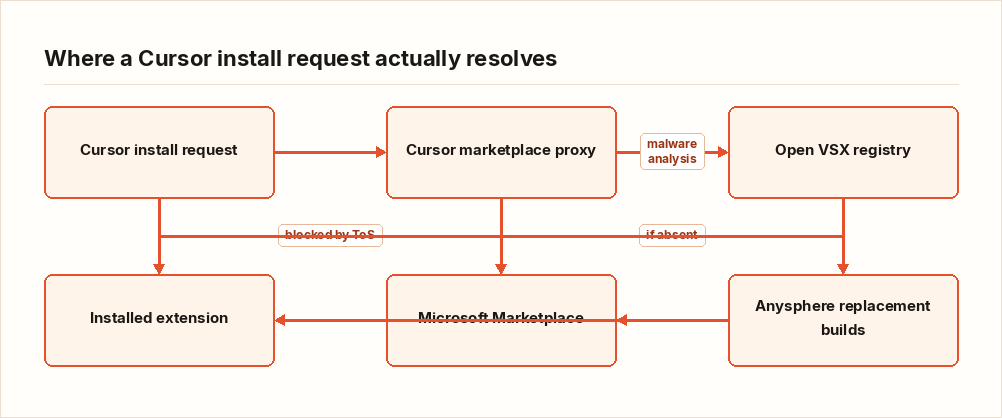
Microsoft's Visual Studio Code Marketplace terms of service restrict its use to Microsoft's own VS Code product. Forks like Cursor, Gitpod, Theia, and VSCodium are locked out by contract, not by technology, so they point at Open VSX, an open-source registry originally seeded by the Eclipse Foundation. Cursor routes all extension search and downloads through its own marketplace proxy at marketplace.cursorapi.com, which applies automated malware and supply-chain analysis before extensions are offered for install.
Here is the part that should stop a migration in its tracks: Cursor's own documentation warns that the same publisher.extension name can point to a different publisher or different code on Open VSX than on the Microsoft Marketplace, and advises treating extension IDs like dependencies. For some popular extensions that never made it to Open VSX, Cursor ships first-party "Anysphere" replacement builds instead. So during a routine migration, an extension your developers trust can silently become a different artifact, built by a different party, pulled from a different pipeline. Nobody clicked anything unusual. The editor did it for them.
Version drift is the failure mode nobody tracks
Even when the publisher matches, the version often does not. Open VSX copies are published and maintained separately from the Microsoft listings, and nothing guarantees parity. There is no lockfile for IDE extensions, no pinning mechanism, no integrity check against a manifest. On top of that, extensions auto-update by default in most editors, so an install-time review says nothing about the version running next month. The vetted artifact and the running artifact diverge from day one.
This is the same blind spot we see with coding agents pulling packages faster than anyone tracks, which we covered in Your Coding Agent Installed 23 Packages in a Minute. Your SBOM Saw Zero. The IDE extension set is a dependency manifest that nobody wrote down.
Drift has already been exploited
This is not a theoretical supply chain concern. The campaigns have already found the seam.
- In July 2025, a malicious "Solidity Language" extension published to Open VSX shipped an extension.js that launched a PowerShell script on install, leading to exfiltration and cryptocurrency theft. It racked up more than 50,000 downloads before removal, and one crypto-industry Cursor user lost roughly $500,000, per Kaspersky research cited in Safeguard's writeup. Microsoft reportedly killed the same or a similar submission on its marketplace within seconds. The Open VSX copy lingered. Whatever analysis the pipeline applied was not enough.
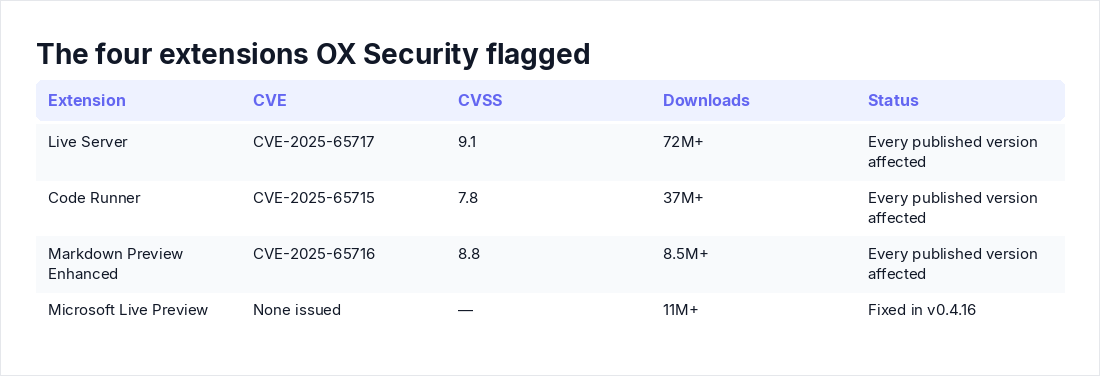
- OX Security found vulnerabilities in four popular VS Code extensions, later confirmed on Cursor and Windsurf, with roughly 128 million combined downloads. Three got CVEs and every published version of those three is affected: CVE-2025-65717 in Live Server (CVSS 9.1, 72M+ downloads, remote file exfiltration), CVE-2025-65715 in Code Runner (CVSS 7.8, 37M+ downloads, remote code execution), and CVE-2025-65716 in Markdown Preview Enhanced (CVSS 8.8, 8.5M+ downloads). Microsoft Live Preview (11M+ downloads) was fixed in v0.4.16 with no CVE issued. OX disclosed the three CVE'd bugs in July and August 2025 and reports that none of the maintainers responded through any channel. If your editor serves an older build of any of these, there is no patched version waiting for you on the other side of an update.
- Cursor ships with Workspace Trust disabled by default. As Oasis Security's analysis put it via The Hacker News: "A malicious .vscode/tasks.json turns a casual 'open folder' into silent code execution in the user's context." A related auto-execution flaw was responsibly disclosed in December and, per Dark Reading reporting cited by Shield53, remained unpatched as of Shield53's July 14, 2026 analysis.
The broader pattern is registry-scale: malicious packages now arrive in coordinated waves, not one at a time, as we saw in Your Detections Assume a Single Attacker. The Hugging Face Swarm Had 700. Extensions run with the full privileges of the editor process: every open file, environment variables, integrated terminals, credentials cached in IDE storage. A compromised one does not need to escalate anything.
Cursor's controls are real, and they ship off
The predictable pushback: "Cursor's proxy does malware and supply-chain analysis, and there are enterprise controls. Solved?" No, and Cursor's documentation is more honest about this than most of the coverage.
Malware scanning answers a different question than the one this article is about. A scanner can pass an extension that is clean but six months stale, or a legitimately-published build from a publisher you never vetted. Version drift and publisher substitution walk straight through malware analysis. Cursor's docs say as much: publisher verification confirms identity only, and enterprises should still use allowlists and install cooldowns for anything that touches production code and credentials. The controls themselves are client-side and complement, not replace, marketplace-layer analysis.
Now the defaults. The Marketplace Install Cooldown, which defers installs and updates until a version has been published for a minimum number of hours, defaults to 0. Disabled. That means a malicious update pushed to Open VSX can reach every developer in your org the moment auto-update fires, with zero soak time for anyone to catch it. Enterprise allowlisting (AllowedExtensions, via the team dashboard or MDM) and optional Open VSX signature verification both exist, but neither is on unless you turn it on.
My position: an allowlist is the single highest-value control here, and a cooldown of less than 72 hours for extensions with access to credentials is negligence dressed as convenience.
Audit the installed set this week
You can measure the drift yourself in an afternoon. Do it before you argue about policy.
- Export what the team ran on VS Code:
code --list-extensions --show-versions. That is your baseline manifest. - Pull what Cursor actually installed:
cursor --list-extensions --show-versions. Cross-check against the on-disk directory, since folder names embed versions:
# macOS / Linux
ls ~/.cursor/extensions

# Windows (PowerShell)
Get-ChildItem "$env:USERPROFILE\.cursor\extensions"- For each ID, query Open VSX and compare publisher and version against the Microsoft Marketplace listing:
curl -s "https://open-vsx.org/api/<publisher>/<name>" \
| jq '{version, publisher: .publishedBy.loginName}'- Flag and investigate anything matching these rules: publisher differs between registries, installed version trails the Microsoft listing by more than one minor release, publisher shows as Anysphere where you expected the original vendor, or the extension is installed but absent from Open VSX entirely (find out which VSIX or substitution path delivered it).
- Diff the installed set against the known-bad list above. Any version of Live Server, Code Runner, or Markdown Preview Enhanced is an affected version.
The output of step 4 becomes your allowlist. You verified it, so now it means something.
The migration checklist
- Freeze the VS Code extension manifest before migration and diff Cursor's installed set against it after. Every mismatch gets a named owner.
- Enable AllowedExtensions team-wide, default-deny for anything new. Configure it in the dashboard or push it by MDM so individual installs cannot widen the set.
- Set a team-enforced Marketplace Install Cooldown of at least 72 hours. Team settings override per-user ones, which is the point.
- Turn on Open VSX signature verification, while remembering it proves origin, not intent.
- Decide explicitly whether you accept Anysphere replacement builds. They may be fine. The decision should be yours, not the proxy's.
- For the small set of extensions that touch production credentials, consider disabling auto-update and reviewing bumps manually. Accept the patch lag there in exchange for eyes on every change.
- Re-run the inventory on every Cursor update and quarterly at minimum.
- When one of your extensions shows up in a campaign, treat it like any package alert. The triage order in The First Hour of an npm Supply-Chain Alert: Three Questions, One Right Order maps over cleanly.
Gaps like this live in the space between annual tests: the editor changed, the registry changed, and no control fired because nothing technically broke. If the gap here is coverage between annual tests, Axeploit's pentest workflow is the product page that matches this problem, continuous validation of the attack surface your developers actually run.
Key takeaways
- Cursor cannot use Microsoft's marketplace. Identical extension IDs on Open VSX can mean a different publisher and different code, and Cursor's own docs say to treat IDs like dependencies.
- There is no lockfile or pinning, and extensions auto-update, so install-time vetting expires immediately. Version drift is the default state, not an edge case.
- The enterprise controls exist but arrive off: the install cooldown defaults to 0, and publisher verification proves identity only.
- The exploits are real and recent: 50,000+ downloads of a malicious Open VSX extension, and three CVE'd extensions where every published version is affected.
- Export, diff, cross-check publishers, then write your allowlist from what you actually verified. It takes an afternoon.