Container Breakouts 101: How Hackers Escape Docker and Kubernetes
As a DevOps or platform engineer, your mandate is usually clear: ship faster, scale efficiently. Containers and Kubernetes are your tools of choice. But while you're mastering YAML and optimizing CI/CD pipelines, a silent battle is raging. The same isolation that makes containers useful can be brittle if not configured correctly. In the early days, container security was an afterthought; by 2026, it is the primary frontline of cloud-native security.
At Axeploit, our research shows that most major breaches in containerized environments do not stem from complex zero-day vulnerabilities in the kernel. They stem from simple, preventable misconfigurations.
This is Container Breakouts 101. We’re going to step away from the infrastructure management for a moment and look at your cluster through the eyes of an attacker.
Understanding the Concept: What is a Container Breakout?
First, let’s simplify. Think of a standard container as a guest in a secure hotel. You have your own room (the container namespaces), your own resources (cgroups), and you shouldn’t be able to enter anyone else's room, let alone the manager's office or the hotel’s main wiring closet.
A container breakout (sometimes called a Docker escape) occurs when a guest figures out how to leave their room and pick the lock to the manager’s office, effectively gaining control over the entire hotel building (the underlying host OS).
From this position of power, usually achieved as the root user on the host node, an attacker can steal data from “all” other containers on that node, access the internal network, deploy malware, or establish a foothold that is incredibly difficult to detect. It is the holy grail of cloud-native exploitation.
Before we dive into specifics, let's look at the logical progression an attacker follows during a breakout attempt.
Identifying the Open Doors: Critical Misconfigurations
In 2026, the two most devastating "open doors" are still configurations designed for convenience rather than security.
1. The Perils of Privileged Containers
You’ve probably seen it in a troubleshooting guide: just add `privileged: true` to the deployment. It’s the easy button that solves permission issues instantly. But what does it actually do?
A privileged container is effectively a container with all security boundaries removed. In technical terms, it breaks the primary isolation mechanism of user namespaces. It has nearly all the capabilities of the host's root user.
How the Hacker Exploits It: When an attacker lands in a privileged container, they are delighted. They can directly see and interact with all devices on the host (`/dev`), modify the host’s kernel parameters (`/proc`, `/sys`), and, most dangerously, easily mount the host’s entire root filesystem. They use simple tools like `nsenter` to seamlessly transition their shell from the container context directly into the host context as root.
2. The Mounting Nightmare: Exposing the Docker Socket
This is perhaps the most lethal configuration mistake, and it still plagues modern deployments.
The Docker socket (`/var/run/docker.sock`) is the Unix socket that the Docker daemon uses to listen to API requests. Whoever controls this socket controls Docker on that host. Developers sometimes mount this socket “inside” a container so that the container can manage other containers (e.g., for CI/CD tooling, monitoring agents, or image building).
How the Hacker Exploits It: If an attacker compromises a container where the Docker socket is mounted, they have already won. They don't need fancy kernel exploits. They can simply communicate directly with the daemon.
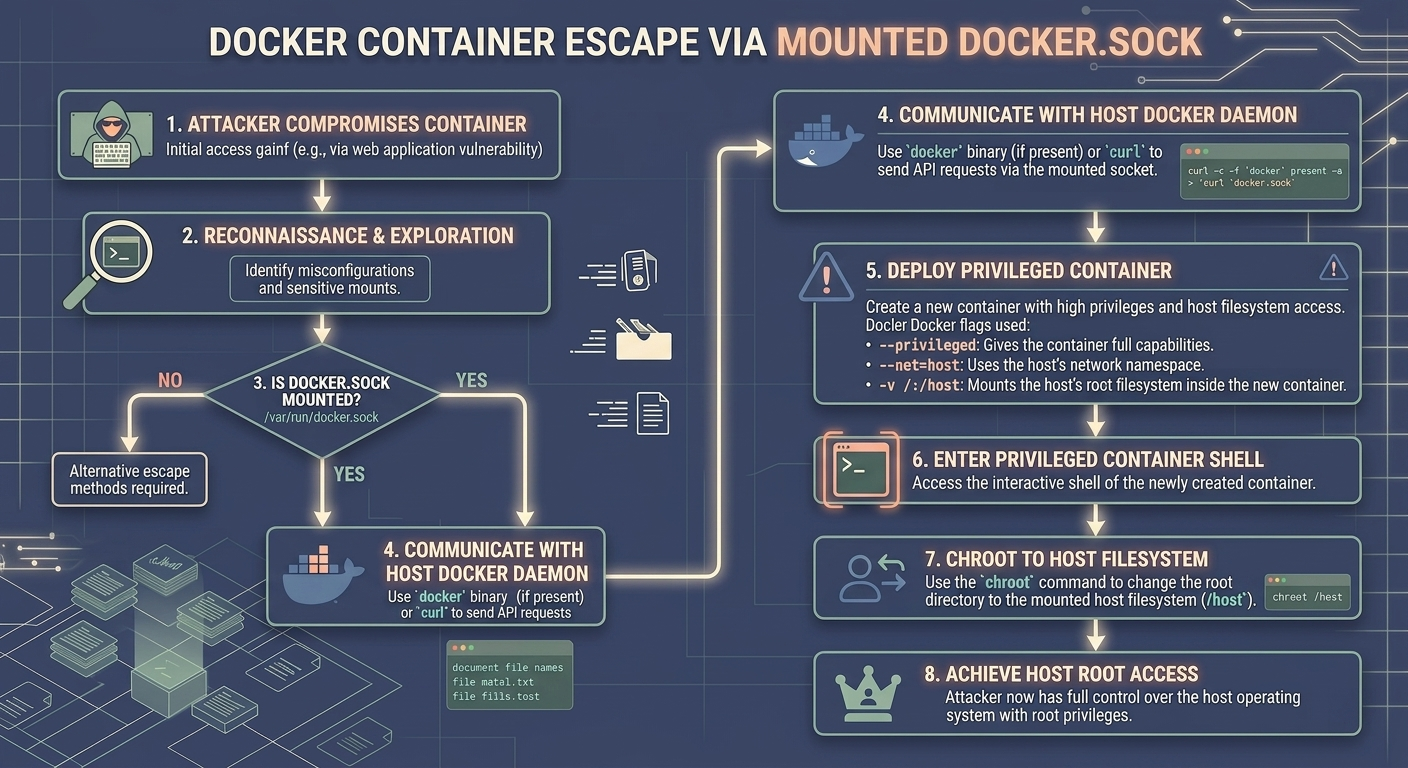
This detailed flowchart illustrates exactly how the attack vector unfolds:
1. Initial Access: The application running “inside” the container is compromised (e.g., via a web app vulnerability).
2. Reconnaissance: The attacker finds the mounted socket file (`/var/run/docker.sock`).
3. Command the Daemon: They use a simple tool (even `curl` will work if the `docker` binary isn't present) to send an API request to the host’s daemon. The request tells the host: *"Run a new, highly-privileged container for me."*
4. Escape: The new container is spawned with `--privileged=true` and `-v /:/host` (mounting the host’s root file system). The attacker enters this new, ultimate back door and ‘chroot’s into `/host‘. They now have full root access on the host node.
From Pod to Host: Kubernetes-Specific Vulnerabilities
While the above principles apply equally to Kubernetes, K8s introduces unique Kubernetes vulnerabilities and abstraction layers that attackers can leverage.
Exploiting Over-Privileged Service Accounts
In Kubernetes, every pod is typically assigned a Service Account, which includes a token the pod uses to authenticate with the Kubernetes API server. This token is mounted at `/var/run/secrets/kubernetes.io/serviceaccount/token`.
DevOps engineers often make the mistake of assigning powerful cluster-wide roles to a pod’s service account for convenience.
How the Hacker Exploits It: If an attacker breaches the pod, they steal the Service Account token. Using ‘kubectl’ (or direct API calls), they then impersonate the pod to the API server. If the token has "get secrets" or "create pods" permissions cluster-wide, they can immediately elevate their privilege. Their goal is often to create a malicious pod on a specific node that mounts the host filesystem, allowing them to complete the breakout as seen in the previous sections.
Lock it Down: Practical Container Security for DevOps Engineers
You build the infrastructure; we must ensure it’s defensible. Here are actionable steps for your platform engineering teams:
1. The Mandatory Principle: Least Privilege
Your default stance must be zero trust within the cluster.
- Never run containers as root. This is fundamental. If the application is compromised, the attacker only has limited user permissions inside the container. Use the `USER` instruction in your Dockerfile.
- Absolutely ban `privileged: true` in production. The use cases for this are exceedingly rare and should be heavily scrutinized by security teams.
2. Secure Your Socket and Mounts
- Do not mount `docker.sock: If you need to build images within K8s, use alternative tools designed for cloud-native security, such as Kaniko or Buildah, which do not require a host daemon.
- Read-Only Root Filesystem: Where possible, configure containers to run with a read-only root filesystem (`readOnlyRootFilesystem: true` in your SecurityContext). This prevents attackers from downloading tools or modifying configuration files.
3. Use Pod Security Standards (PSS)
Kubernetes PSS provides built-in admission controllers that define three security levels: Privileged, Baseline, and Restricted. You should enforce the Restricted standard cluster-wide. This automatically blocks the use of privileged containers, host networking, and host paths.
PSS makes the manual effort of writing complex security policies much simpler, ensuring your configuration aligns with standard cloud-native security best practices.
4. Vulnerability Scanning
Maintain a clean software supply chain. Every image must be scanned for known CVEs “before” deployment and continually scanned in the registry. While breaking out via configuration is the preferred method, advanced threats still target software vulnerabilities in the container runtime itself. At Axeploit, we constantly track these emerging trends to protect our clients.
Wrapping Up: The Continuous Security Cycle
Container breakout attacks are a reality of modern infrastructure. The complexity of orchestrators like Kubernetes means that security cannot be a one-time setup; it must be an integrated part of the deployment lifecycle. By understanding the mind of the attacker and locking down common misconfigurations like privileged containers and open sockets, you shift the odds back in your favor.
At Axeploit, our elite security teams help organizations identify these hidden pathways before attackers do. We simulate these attacks to ensure your walls are as high as your scale. Don't wait for the break-in; ensure your isolation holds.