Two HTTP headers were the only thing between an unauthenticated attacker and remote code execution in CircleCI's MCP server. The attacker sets both of them. Send Host: localhost with no Origin header and you walk through the allowlist, call the run-pipeline tool with a configuration you wrote, and your commands execute inside the organization's CI under its API token. The researchers at Remedio, who found the bug, gave it an expected CVSS 3.1 score of 10.0, Critical.
The original disclosure and the GitHub advisories explain the bug itself well enough. What nobody has published is the defender's view. There are three advisories for this one package, the conditions and fixes differ per issue, the standalone server is deprecated, and most of your real exposure comes from configuration choices the advisory text cannot check for you. This article is that missing piece.
Three advisories, one pattern
The CircleCI MCP server (the mcp-server-circleci package) has three published GitHub Security Advisories:
- GHSA-xv5j-cwgj-22r4: the remote transport serves unauthenticated non-browser clients. This is the header bypass described above.
- GHSA-m9x7-h9px-p447: unauthenticated command injection in the
run_evaluation_teststool, also leading to RCE. - GHSA-8xjg-jpfh-5257: a third issue in the same package, published alongside the others.
None of the materials we reviewed listed CVE identifiers, so track these by GHSA ID. And read all three before you close the ticket. The command injection advisory got a fraction of the attention the header bypass did, which makes it the one most likely to still be sitting unpatched in someone's environment.
The pattern across the set is consistent. The server was built with the trust assumptions of a local developer tool: it runs next to your AI assistant, it talks to localhost, why would it need real authentication? Then teams started running it as a shared, network-reachable service holding an organization-wide CircleCI API token, which is a supported use case, and those assumptions became the vulnerability.
Host and Origin checks are not authentication
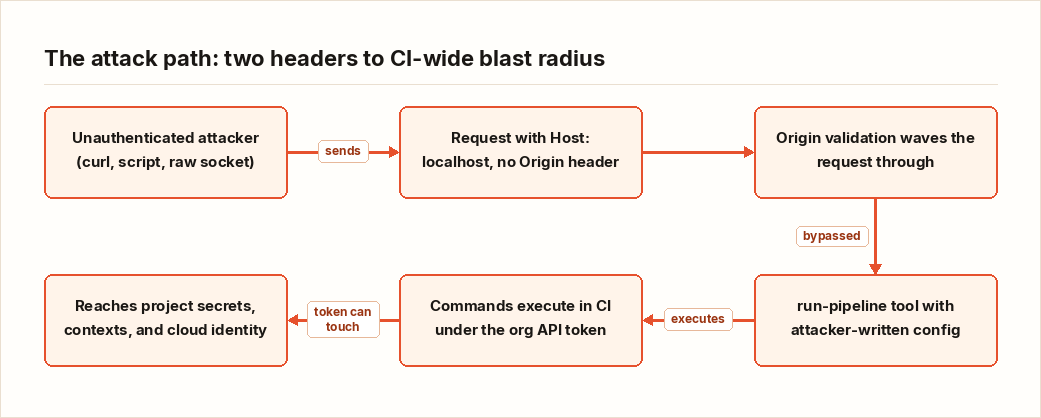
This is the lesson worth keeping, because you will meet this pattern again in other AI tooling. The server's origin validation (src/lib/auth/originValidation.ts) checks the Host header against an allowed set and explicitly waves requests through when the Origin header is absent. localhost sits on the allowed list.
That design exists to blunt browser-based attacks, where a malicious page tries to make the victim's browser talk to a local service. Inside a browser, the page cannot forge Host or Origin, so the check has teeth. But nothing forces an attacker to use a browser. With curl, or a Python script, or a raw socket, the client picks every header on the wire. The researchers described the result as inspecting a lock the attacker already has the key to.
The defaults made it worse. Out of the box the server listened on every interface, and the request-token requirement could be turned off. A service designed like a local tool, shipped with the posture of a public one.
Am I affected? Three checks that take ten minutes
Whether you are exposed depends on how the server is deployed, so go look. Three checks, in order of impact.
1. Where is it listening?
# On the host running the MCP server
ss -tlnp | grep -i node
# Read the Local Address column:
#   127.0.0.1:<port>  = loopback only (good)
#   0.0.0.0:<port> or *:<port> = every interface (reachable from the network)
If it runs in Docker, check the published ports in docker ps for 0.0.0.0:...->... mappings. In Kubernetes, look for Services of type NodePort or LoadBalancer in front of it, and for stray kubectl port-forward sessions. Do not skip developer machines. A shared dev box or a container with a published port turns "local" into "network-reachable" fast.
2. Is a token required?
docker inspect <container> | grep -i REQUIRE_REQUEST_TOKEN
# or directly on the host:
tr '\0' '\n' < /proc/$(pgrep -f mcp-server-circleci | head -1)/environ | grep -i REQUIRE_REQUEST_TOKEN
Unset or false means requests need no token. Paired with a 0.0.0.0 bind, that is the advisory's worst case, and it was the default shape of the thing.
3. Does the allowlist actually reject you?
Against your own deployment only:
curl -i -H "Host: localhost" http://<server-ip>:<port>/On a vulnerable version this is the exact request shape that passes both checks. If you get a response from the MCP endpoint rather than a rejection, the allowlist is decorative.
Finally, compare your installed version against the patched versions listed in each GHSA. All three, not only the famous one.
If it was reachable, hunt before you patch
Patching first feels productive and it destroys evidence. If you found a network-reachable instance, spend an hour on detection before you touch anything.
- Proxy and firewall logs: requests to the MCP port where the
Hostheader sayslocalhostbut the source IP is not loopback. Almost nothing legitimate produces that pattern. - CircleCI pipeline history: pipelines nobody on the team triggered, configs containing steps you do not recognize, runs at odd hours. The attack path goes through the run-pipeline tool, so the execution record lives in CircleCI, not on your host.
- Token activity: the server carries the organization's API token, so its activity is the attacker's activity. Review whatever audit trail CircleCI gives you for that token's use.
If you find something, or if your logging is too thin to rule it out, rotate. Start with the CircleCI API token, then everything that token could reach: secrets in project environment variables and contexts, and any cloud identity your CI assumes. The blast radius of this bug is not the box running the MCP server. It is whatever your CI can touch, which in most shops is quite a lot.
Fixing it, given the deprecation
Two facts complicate remediation: the standalone server is deprecated, and the three advisories carry different fixed versions and conditions.
Short term, upgrade to the patched versions called out in the advisories. If you cannot upgrade this week, bind the server to 127.0.0.1 and enable the request-token requirement (REQUIRE_REQUEST_TOKEN=true). That removes the unauthenticated network path. Afterwards, verify with the ss command from earlier. Trust the socket, not the config file.
Medium term, plan the migration. CircleCI's repository notes the deprecation, so follow their current guidance on the supported path rather than investing further in the standalone package. Whatever you migrate to, run it against the checklist below before you hand it an org-level token. A different deployment model changes who operates the service. It does not change what the service can do with your credentials.
"We only run MCP servers locally"
I hear this a lot, and there is a fair version of it. A single-user stdio setup, where the MCP server is a subprocess of your assistant with no network listener at all, genuinely is not exposed to this class of bug.
But check before you relax. The default configuration binds to every interface, so "local only" is a decision you make explicitly, not the out-of-box behavior. Shared team mode, one instance serving a whole team and their agents, is a designed use case of this server, not an abuse of it. And the thing AI agents are built to do, call tools over HTTP with whatever headers they choose, is precisely the client behavior this allowlist cannot see. In practice, most teams that start with a local stdio setup end up standing up a shared instance within weeks, because shared tooling is the point.
Hardening checklist for any MCP server
Treat every MCP server as an internet-facing service, because sooner or later it will be one.
- Authenticate at the transport, not the headers. If the access control is a
Host/Origincheck, you have no access control. Require a real credential before any tool is listed or invoked. - Bind to loopback by default. Deviate only when you can name the client that needs remote access, and then put the service behind something that terminates TLS and authenticates callers.
- Scope the tokens it holds like production credentials, because they are. An org-wide CI token sitting in a tool server is a standing invitation. Prefer the narrowest token that still works.
- Log every tool call with caller identity. Your entire detection story for AI tooling rests on this log existing.
- Inventory what is actually running. Ask every team which MCP servers they run, where, and with which tokens attached. The answers will surprise you.
- Track GHSA advisories for AI tooling dependencies the same way you track them for anything else in the supply chain.
Key takeaways
- The CircleCI MCP RCE was not exotic: an allowlist trusting attacker-controlled headers, a default bind on all interfaces, and an optional token check. Check your own exposure in that order.
- There are three advisories (GHSA-xv5j-cwgj-22r4, GHSA-m9x7-h9px-p447, GHSA-8xjg-jpfh-5257). Patch against all three; the
run_evaluation_testscommand injection got far less coverage than the header bypass. - If an instance was network-reachable, hunt first and patch second, then rotate the org API token and everything it could reach.
- The standalone server is deprecated. Patch now, migrate deliberately.
- Any MCP server holding credentials is an internet-facing service whether you intended it or not. Threat-model it that way.