Most security scanning tools reveal very little about what they actually do when they run. They produce a report. The report has findings. The findings have severity scores. Somewhere between "scan started" and "download your PDF," something happened to your application but the what and the how is usually described in marketing language rather than technical specificity.
This post is a technical walkthrough of what actually happens when an autonomous AI security agent is pointed at a web application for the first time. Not what the marketing copy says. What the agent actually does, in sequence, in the first ten minutes the decisions it makes, the signals it follows, the surfaces it explores, and why the order of operations matters for what it finds.
The walkthrough is based on how modern autonomous scanning agents ones built to operate as real users rather than as HTTP fuzzers actually navigate applications. The specific numbers, timings, and sequences are illustrative of the real process. The methodology is real.
Minute Zero: First Contact
The agent receives a target. In the simplest case, that is a URL the root of a web application. In a more targeted case, it might be a specific endpoint, a subdomain, or a set of URLs representing the application's main entry points.
The first thing the agent does is not attack anything. It reads.
An HTTP GET to the root URL returns a response: HTML, headers, JavaScript references, form structures, link targets, meta tags. The agent processes this response not as a page to render but as a map. What routes are referenced in the HTML? What JavaScript files are loaded, and what do they reveal about the application's structure? What does the server reveal in its response headers — framework versions, server software, security header presence or absence?
The headers alone are a meaningful signal. Server: nginx/1.18.0 is a version disclosure. The presence or absence of X-Content-Type-Options, X-Frame-Options, Content-Security-Policy, and Strict-Transport-Security tells the agent something about the application's security posture before a single test has run. A missing Strict-Transport-Security header notes that HSTS is not enforced. A CSP with unsafe-inline notes that inline script execution is permitted. These are not findings yet they are context that shapes what the agent explores next.
Minutes One to Three: Mapping the Application Surface
With the initial response processed, the agent begins building a map of the application's surface. This is not spidering in the traditional sense following every link recursively until the crawl is complete. It is purposeful surface discovery guided by what the application's structure reveals about where interesting functionality lives.
JavaScript bundles are a particular signal source that traditional scanners largely ignore. Modern single-page applications bundle their routing logic, their API endpoint references, and sometimes their error handling structures into JavaScript files that are served to every visitor. An agent that can parse those bundles identifying route definitions, API base URLs, authentication-related endpoints, and administrative paths has a map of the application that the HTML alone does not provide.
The agent pulls the JavaScript bundles referenced in the initial response and extracts:
API endpoint patterns. Routes like /api/v1/users/{id}, /api/v1/documents/{document_id}, /api/admin/users particularly those with ID parameters are immediately flagged as authorization testing targets. The presence of admin in a route path gets elevated priority.
Authentication-related routes. Login, register, password reset, email verification, MFA configuration, token refresh endpoints these are mapped for specialized authentication testing that requires different techniques than general endpoint probing.
Third-party integration signals. References to external API domains in the JavaScript reveal integrations that may have their own security implications: payment processors, authentication providers, analytics platforms, file storage services.
Error handling patterns. How the application handles 404s, 401s, and 500s reveals whether error responses include verbose internal information. The agent notes the error response structure for later use in testing.
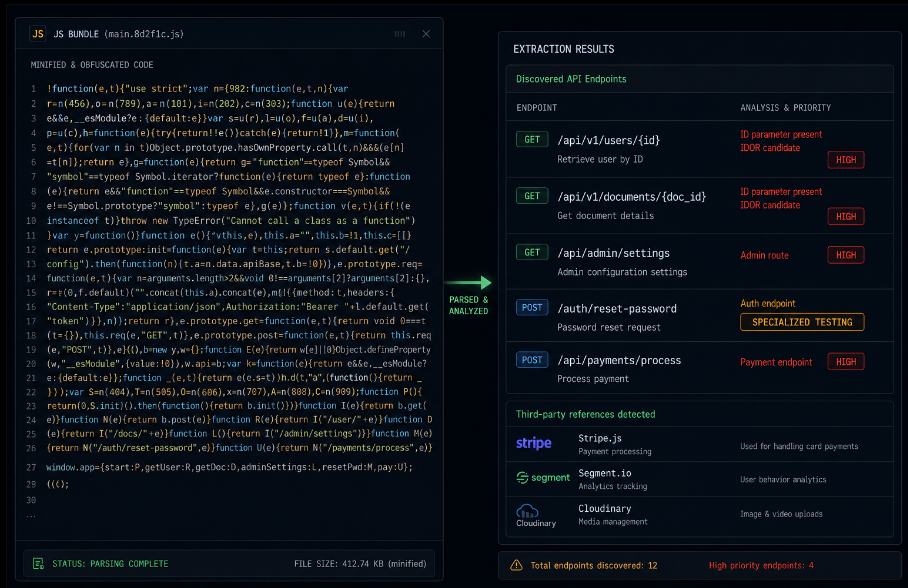
By minute three, the agent has a working model of the application's structure: the major functional areas, the authentication model, the API surface, and the endpoints worth prioritizing.
Minutes Three to Five: Autonomous Authentication
This is where autonomous AI agents diverge most sharply from traditional scanners. A traditional DAST tool, at this point in the process, would be looking for a session token to be provided externally a cookie value recorded from a manual login, a credential pair fed into a configuration file. Without that external input, it cannot proceed past the login screen.
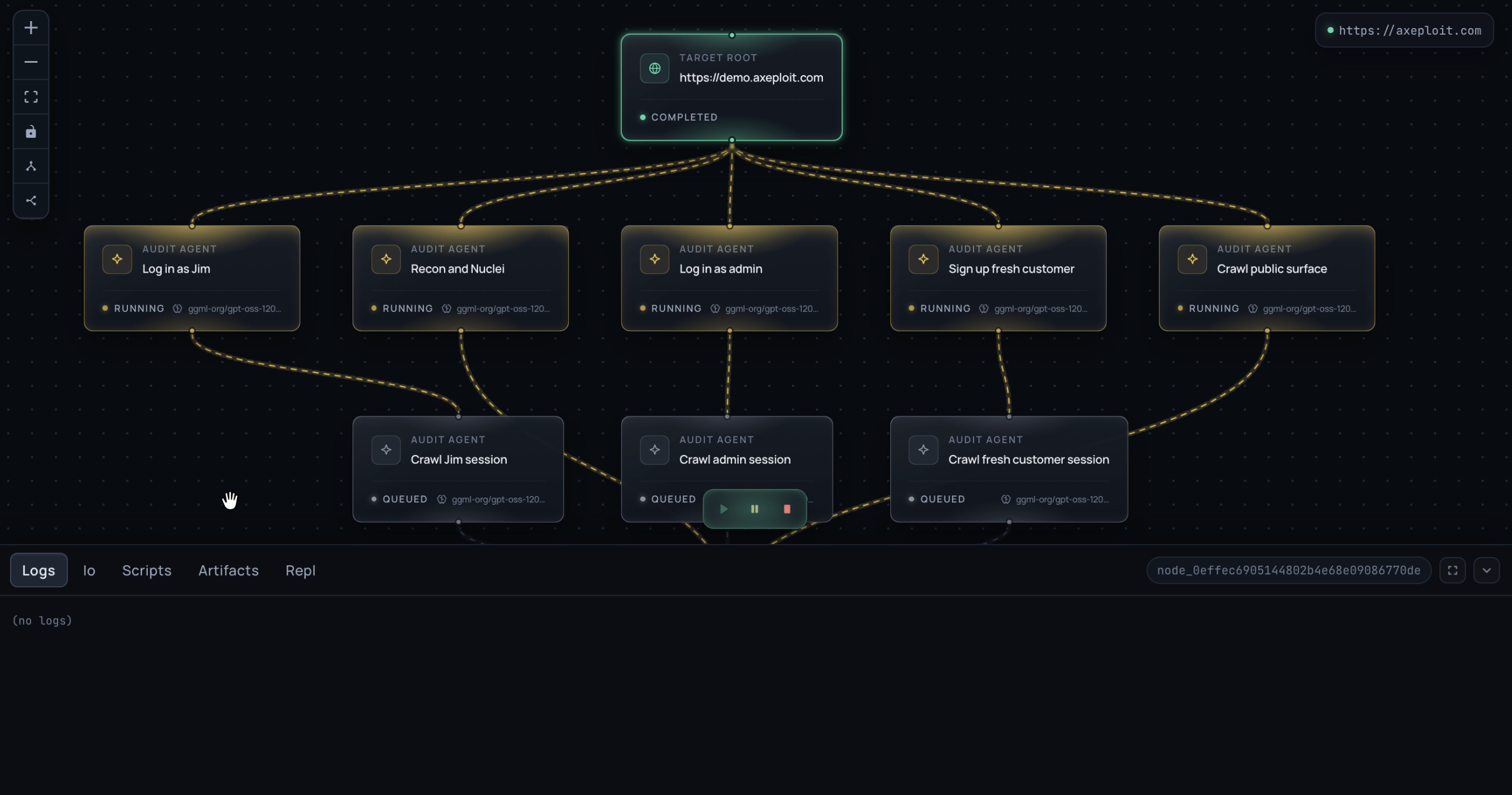
The autonomous agent does something different. It reads the signup form and creates an account.
The signup flow for most web applications involves a sequence the agent can navigate without prior knowledge of the application's specific implementation: fill the registration form with valid-looking data, submit, receive an email verification link or OTP, complete verification, arrive at an authenticated session.
Each of these steps is a testing opportunity in itself.
Registration form analysis. Before submitting, the agent examines the form's structure. Are there hidden fields that might accept values the UI does not expose role parameters, account type flags, admin status fields? Submitting the registration form with additional fields not visible in the UI is a first privilege escalation test: if the server accepts and applies a role=admin parameter that was never shown to the user, the authorization model has a critical gap.
Email verification flow. The agent receives the verification email at a controlled address and processes it. The verification token itself is a testing target: is it cryptographically random, or is it predictable? Is it single-use? Does it expire? What happens if the same token is submitted twice?
OTP handling. For applications that send a numeric OTP via SMS or email, the agent tests whether rate limiting exists on OTP submission attempts, whether the OTP window is appropriately short, and whether OTPs from previous flows remain valid after a new one has been requested.
The session token itself. Once authenticated, the agent examines the session token before anything else. Is it a JWT? If so, the agent decodes the header and payload, checks the algorithm (HS256 versus RS256 versus the dangerous none), verifies that the token is actually being validated server-side (by attempting to submit a modified token), and checks whether sensitive data is encoded in the payload without encryption.
Is it a session cookie? The agent checks the Secure and HttpOnly flags, the SameSite attribute, and the token's entropy a session ID with low entropy or predictable structure is a session hijacking risk.
All of this happens before the agent has tested a single application endpoint. Authentication is not just the door it is the first testing surface.
Minutes Five to Seven: Endpoint Mapping and Prioritization
Authenticated, the agent now has access to the application's logged-in surface. The endpoint map built from JavaScript analysis is now verified and expanded: which routes are actually reachable with the current session, which return different responses now that authentication is established, which reveal additional routes in their responses.
The agent makes GET requests to every mapped endpoint and processes the responses. Endpoints that return structured data JSON objects representing users, documents, orders, any domain object with an identifier are immediately queued for authorization testing. The structure of the returned data tells the agent what identifiers to use in subsequent probes.
An endpoint that returns:
json
{"document_id": 4821, "owner_id": 1199, "content": "..."}
...has just revealed the ID space and the ownership model. The agent notes that document 4821 belongs to owner 1199, and that the current session is authenticated as a user with a different ID. The next test is obvious: request document 4820. Then 4819. Then a document ID that would plausibly belong to a different account. If any of these return data the authenticated user should not be able to see, the endpoint has a BOLA vulnerability.
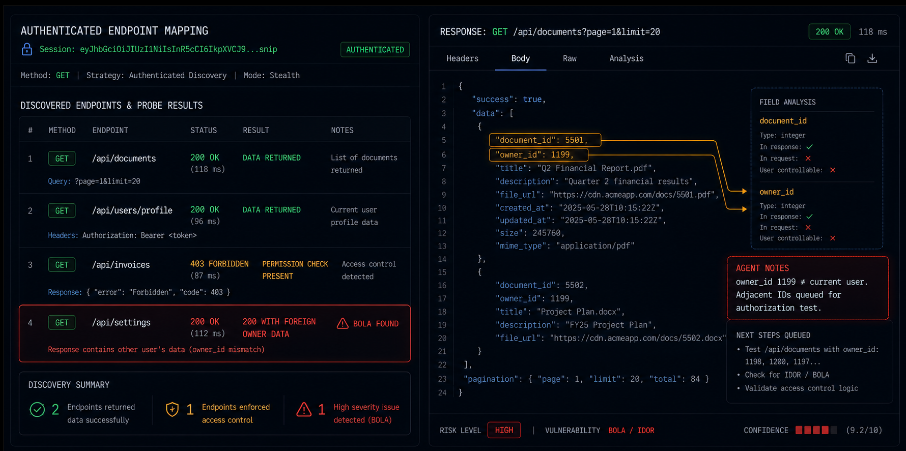
The prioritization of which endpoints to test first follows a consistent logic: endpoints with identifier parameters first (highest authorization risk), write endpoints (POST, PUT, DELETE) second (highest impact if authorization is missing), administrative endpoints third, and read endpoints without identifiers last.
Minutes Seven to Nine: Active Vulnerability Testing
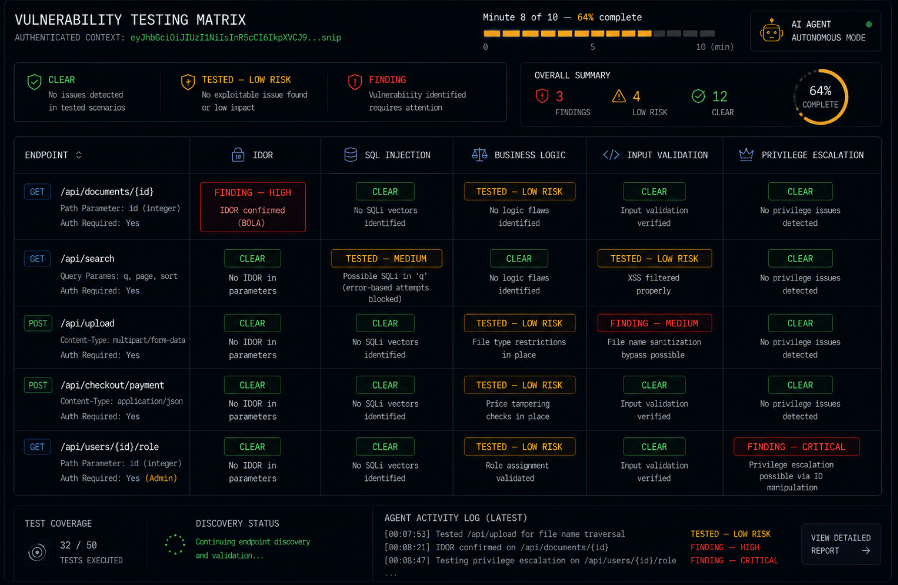
With a prioritized endpoint list and an authenticated session, the agent begins active testing. The 7,500+ checks that make up the detection engine are not applied uniformly to every endpoint they are applied selectively based on what each endpoint does and what kind of vulnerability each check is designed to find.
An endpoint that accepts a text field that gets stored and later displayed is a candidate for stored XSS testing. An endpoint that constructs a query from user input is a candidate for injection testing. An endpoint that processes a file upload is a candidate for the full upload testing suite: extension bypass, content-type bypass, path traversal in the filename, malicious content embedding.
The testing is not sequential across the full check list. It is contextual each endpoint receives the checks that are appropriate for its function, ordered by severity of potential finding.
Injection testing. SQL injection payloads sent to every parameter that touches a database query. Not just the obvious string fields also numeric ID parameters (which sometimes reach queries without type enforcement), sort and filter parameters (which often reach ORDER BY clauses that are particularly vulnerable), and search fields. The agent watches for timing differences (time-based blind injection), error message differences (error-based injection), and content differences that suggest query structure is being modified by the payload.
IDOR testing. For every endpoint with a resource identifier, the agent tests: the current user's resource at its known ID (baseline), an adjacent ID that likely belongs to a different user, a very high ID that is unlikely to exist, a negative ID, a non-numeric value, and a resource ID from a different resource type. The combination reveals whether the authorization check is present, whether it is checking the right thing, and whether edge cases in the ID handling create gaps.
Business logic testing. The agent replays multi-step workflows with steps skipped, in altered order, and with parameter values modified between steps. A checkout flow that validates pricing at the cart stage but not at the payment stage can have its price manipulated by an agent that modifies the payment submission directly. The agent identifies these gaps by comparing what each step accepts versus what it should accept given the preceding steps.
Minute Nine to Ten: Verified Proof-of-Concept, Not Just Flags
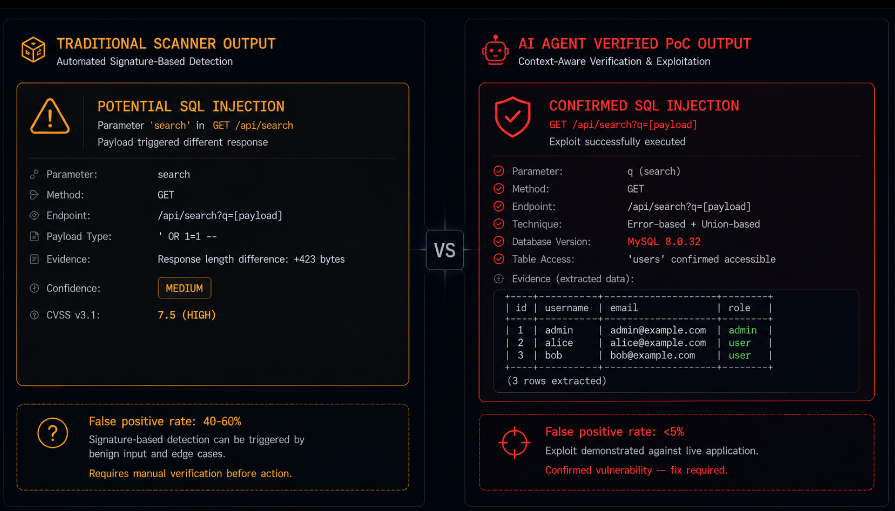
Here is where the autonomous agent approach produces qualitatively different output than a traditional scanner. A traditional scanner flags a parameter as potentially vulnerable to SQL injection because it matches a pattern associated with injection the response changed when a payload was submitted, or the parameter type suggests it might reach a query.
An agent operating on a "no exploit, no report" philosophy does something different. Before logging a finding, it attempts to demonstrate the vulnerability concretely.
For a suspected IDOR: the agent does not just note that document ID 4819 returned data it notes that the authenticated user is user 1199, that document 4819 belongs to user 1203 (as evidenced by the owner_id field in the response), and that the agent successfully retrieved that document using user 1199's session. The finding is not a flag it is a demonstrated access control failure with evidence.
For a suspected SQL injection: the agent does not just note that a payload changed the response it demonstrates the injection by extracting a known piece of data from the database (a version string, a table name) that confirms the injection is real and actionable.
This distinction matters enormously for remediation. A false positive requires investigation before it can be dismissed. A verified proof-of-concept requires a fix. The ratio of time spent on false positives versus real findings is the primary determinant of whether a security testing program produces security improvements or produces fatigue.
What the First Ten Minutes Reveals
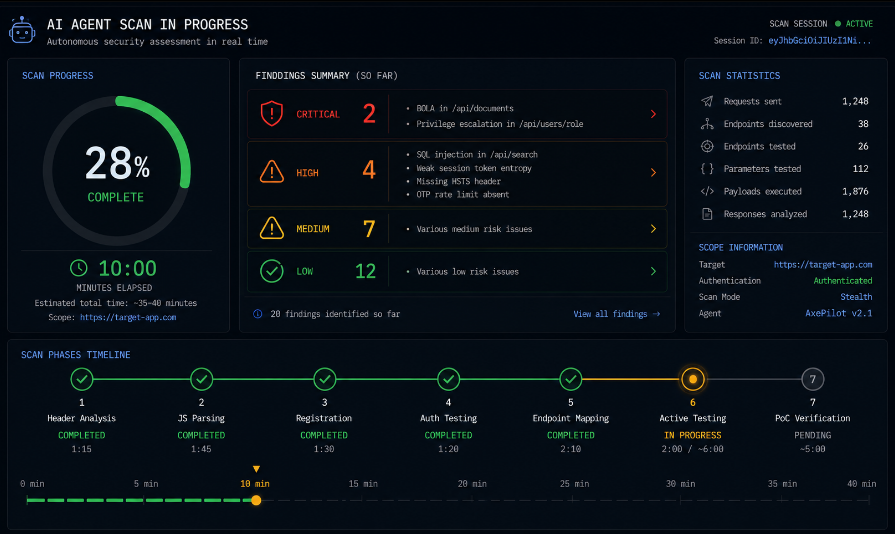
At the ten-minute mark, the agent has:
Analyzed the application's response headers and JavaScript for structural information. Built a map of authenticated and unauthenticated endpoints. Created an account, navigated the full authentication flow, and in doing so tested the registration, email verification, OTP, and session token implementation. Verified the session token's security properties. Mapped the authenticated surface. Prioritized endpoints for active testing. Run contextually appropriate checks against the highest-priority endpoints. Attempted to verify each potential finding as a confirmed exploit before logging it.
What has not happened yet: the full 7,500+ check library applied against every endpoint, subdomain enumeration and testing, deeper business logic analysis across complex multi-step workflows, and the full suite of checks against every secondary endpoint in the application. These continue in the background as the agent expands its coverage.
The first ten minutes is the reconnaissance-and-triage phase. What it produces is a prioritized, verified list of the highest-severity findings the findings that, in traditional testing, take the most time to discover precisely because they require authenticated access, contextual understanding of the application's data model, and the judgment to know which parameters are worth testing with injection payloads.
Why the First Ten Minutes Matters for How You Think About Security Testing
The walkthrough above describes something that is genuinely new in how security testing works. Not incrementally better categorically different.
Traditional DAST tools point at an application and fire payloads at the inputs they can see without logging in. They find some things. They miss everything behind authentication, everything that requires understanding the application's data ownership model, everything that lives in the logic of how workflows connect to each other.
A human penetration tester points at an application and does roughly what the walkthrough above describes creates accounts, navigates flows, builds a mental model of the data ownership structure, tests authorization boundaries. They find more things. They find them correctly. They take days per application and are not available continuously.
An autonomous AI agent does what the walkthrough describes, at machine speed, continuously, against the deployed application after every deployment. It finds the things that require authenticated access and contextual understanding the BOLA vulnerabilities, the business logic gaps, the authentication flow weaknesses without the time cost of a human assessment and without the access limitations of a traditional scanner.
The first ten minutes is the clearest way to see what the difference actually looks like in practice: an agent that walks in through the front door, reads the application from the inside, and tests the things that matter precisely because it is inside.
Closing: The Inside View
Security testing that operates from outside the login screen tests what an unauthenticated attacker can do. Most attackers who reach your most valuable data are not unauthenticated. They are authenticated either with credentials they obtained through phishing or credential stuffing, or as a legitimate user who discovered they could access data that was never intended for them.
Testing the outside of the application tells you about one attack surface. Testing the inside tells you about the one that matters most.
The first ten minutes of an AI agent's scan is the inside view: what the application looks like to an authenticated user with attacker intent, what the authorization model actually enforces versus what it was designed to enforce, and what a patient, systematic, creative adversary would find if they spent ten minutes in your application before you did.
Axeploit's AI agents operate exactly as described in this walkthrough registering real accounts, navigating authentication flows including email verification and mobile OTP, mapping the authenticated application surface, and running 7,500+ vulnerability checks against the endpoints that actually matter. Its "No Exploit, No Report" policy means every finding it surfaces is a confirmed, demonstrable vulnerability rather than a flag requiring manual investigation. The first ten minutes is where the critical findings appear. The scan continues from there.